


Garbled characters appear when reading text files in java


I recently encountered a problem. When Java reads text files (such as csv files, txt files, etc.), it becomes garbled when encountering Chinese characters. Read the code as follows:
List<String> lines=new ArrayList<String>();
BufferedReader br = new BufferedReader(new FileReader(fileName));
String line = null;
while ((line = br.readLine()) != null) {
      lines.add(line);
}
br.close();
Recommended related video tutorials: java online learning
Principle:
Java The I/O class processing is as shown in the figure:
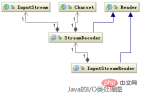
Reader class is the parent class of reading characters in Java I/O, and InputStream class is the parent class of reading characters in Java I/O. The parent class of bytes, the InputStreamReader class is the bridge that associates bytes to characters. It is responsible for processing the conversion of reading bytes into characters during the I/O process, and the specific decoding implementation of bytes into characters It is implemented by StreamDecoder, and the Charset encoding format must be specified by the user during the decoding process of StreamDecoder.
It is worth noting that if you do not specify Charset, the default character set in the local environment will be used. For example, GBK encoding will be used in the Chinese environment.
Summary: When Java reads the data stream, you must specify the encoding method of the data stream, otherwise the default character set in the local environment will be used.
After the above analysis, the modified code is as follows:
List<String> lines=new ArrayList<String>();
BufferedReader br=new BufferedReader(new InputStreamReader(new FileInputStream(fileName),"UTF-8"));
String line = null;
while ((line = br.readLine()) != null) {
      lines.add(line);
}
br.close();
If you want to know more related tutorials, you can visit: java introductory learning
The above is the detailed content of Garbled characters appear when reading text files in java. For more information, please follow other related articles on the PHP Chinese website!

Hot AI Tools

Undresser.AI Undress
AI-powered app for creating realistic nude photos

AI Clothes Remover
Online AI tool for removing clothes from photos.

Undress AI Tool
Undress images for free

Clothoff.io
AI clothes remover

AI Hentai Generator
Generate AI Hentai for free.

Hot Article
Hot Tools

SublimeText3 Mac version
God-level code editing software (SublimeText3)

PhpStorm Mac version
The latest (2018.2.1) professional PHP integrated development tool

WebStorm Mac version
Useful JavaScript development tools

Atom editor mac version download
The most popular open source editor

Dreamweaver Mac version
Visual web development tools

