



Visual Studio Code (hereinafter referred to as vscode) is a very powerful editor that is relatively lightweight. vscode supports three environments: windows, OS
vscode interface
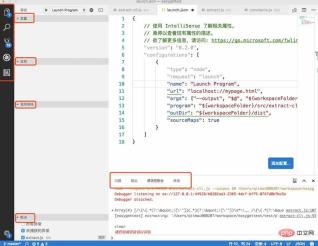
The upper left corner is the project directory, search, version management git related (the lower left corner is the current branch), Debugging, other extension plug-ins, and others are all marked in Chinese without explanation. They are all necessary for us. If you don’t have these suggestions, call them out. These are some things that are very necessary for debugging. You can go to the view in the menu bar. Call out
debugging preconditions one by one: launch.json configuration
Click the fourth button from the left in the picture, which is debugging, and then click the red box in the picture You can open launch.json
    "configurations": [
        {
            "type": "node",
            "request": "launch",
            "name": "Launch Program",
            "program": "${workspaceFolder}/src/extract-cli.js",
            "args": ["--output", "output.pot", "${workspaceFolder}/test/product_group.vm"],
            "outDir": "${workspaceFolder}/dist",
            "sourceMaps": true
        }
    ]
Type and request do not need to be changed, the default is fine. When request is launch, you can directly start debugging with F5. According to the official website explanation, request is attach and it is associated with an already running program, but You can ignore it here, we can just use the debugger that comes with vscode for debugging.
The program parameter specifies the js entry file to be run, where ${workspaceFolder} is the currently opened project directory. The .vscode directory will be automatically generated in this directory, and launch.json is also in this directory
args is also quite important. For example, in this example, I execute the command gettext-extract --output output.pot input.vm. Then the function of args is actually to pass in the parameters after the command. There must be a space between each space. Separate, written as a sub-element of args
sourceMaps This parameter is of little use for writing es5 code, but it is very necessary for writing es6, TypeScript, etc. When the value of this parameter is true, compilation will be used The map generated by the process corresponds to the source code and the compiled code, so that we can happily debug at the source code interruption point.
outDir is used to mark the generated directory of the compiled code. Help vscode search
Let’s discuss the correspondence between before and after compilation
I use babel to compile. After trying, if the program parameter points directly to the compiled file, vscode miraculously can find the source code file by itself, which is the easiest way for our debugging. If the program points to the file you wrote, then you need to provide an outDir parameter. Just configure it to the compilation and generation directory. . Others: Visual inspection does not require sourceMaps and compilation into .js.map. If you encounter problems while debugging, please try setting sourceMaps to true and let the compilation tool generate the map file
Debugging code
Just click on the left side of the code you are debugging. As long as it is red, it means that the breakpoint here is feasible, as shown in the picture
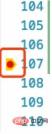
directly Press F5 to start debugging. Several single-step skips, single-step debugging, etc. similar to chrome will appear on the interface. The usage method is similar to chrome, but the shortcut keys are slightly different.
Then click left Click the debugging button introduced above, and you will see the variables running to a certain step, as well as the call stack, as shown in the figure

Others
Introducing the knowledge related to babel and command line entry used in this article
Open package.json, you will find a bin configuration, such a configuration will be displayed when npm install Add these two commands to node_modules/.bin, and then you can use it as a command line.
  "bin": {
    "gettext-compile": "./dist/compile-cli.js",
    "gettext-extract": "./dist/extract-cli.js"
  }
babel can add --source-maps true when executing the command to generate a map file. If you encounter the above This is only used when it comes to problems, and it is estimated that other compilation tools will also have it; in addition, after we modify the source file, we want to restart debugging immediately for verification. It is troublesome to execute the command by ourselves every time, so Babel itself supports-- The watch parameter can monitor file changes, so that we can implement simple automation. Babel or other command line commands are very long and difficult to remember, so we can write them in package.json. The following is about babel. To compile and write in it, you can execute npm run prepublish
  "scripts": {
    "prepublish": "babel  --watch --presets es2015 --plugins transform-object-assign --source-maps true src --out-dir dist/"
  }
Related recommendations: "vscode usage tutorial"
The above is the detailed content of How to use vscode debug. For more information, please follow other related articles on the PHP Chinese website!

 How to format json with vscodeApr 16, 2025 am 07:54 AM
The ways to format JSON in VS Code are: 1. Use shortcut keys (Windows/Linux: Ctrl Shift I; macOS: Cmd Shift I); 2. Go through the menu ("Edit" > "Format Document"); 3. Install JSON formatter extensions (such as Prettier); 4. Format manually (use shortcut keys to indent/extract blocks or add braces and semicolons); 5. Use external tools (such as JSONLint and JSON Formatter).
 How to compile vscodeApr 16, 2025 am 07:51 AM
Compiling code in VSCode is divided into 5 steps: Install the C extension; create the "main.cpp" file in the project folder; configure the compiler (such as MinGW); compile the code with the shortcut key ("Ctrl Shift B") or the "Build" button; run the compiled program with the shortcut key ("F5") or the "Run" button.
 How to install vscodeApr 16, 2025 am 07:48 AM
To install Visual Studio Code, please follow the following steps: Visit the official website https://code.visualstudio.com/; download the installer according to the operating system; run the installer; accept the license agreement and select the installation path; VSCode will start automatically after the installation is completed.
 How to enlarge fonts with vscodeApr 16, 2025 am 07:45 AM
The methods to enlarge fonts in Visual Studio Code are: open the settings panel (Ctrl, or Cmd,). Search and adjust "Font Size". Choose "Font Family" with the right size. Install or select a theme that provides the right size. Use keyboard shortcuts (Ctrl or Cmd) to enlarge the font.
 How to connect to a remote server with vscodeApr 16, 2025 am 07:42 AM
How to connect to a remote server through VSCode? Install Remote - SSH Extended Configuration SSH Create a Connection in VSCode Enter connection information: Host, Username, Port, SSH Key Double-click the saved connection in Remote Explorer
 How to run vue with vscodeApr 16, 2025 am 07:39 AM
Running a Vue project in VSCode requires the following steps: 1. Install the Vue CLI; 2. Create a Vue project; 3. Switch to the project directory; 4. Install project dependencies; 5. Run the development server; 6. Open the browser to visit http://localhost:8080.
 How to compare two files with vscodeApr 16, 2025 am 07:36 AM
How to compare files in VSCode: 1. Open two files, 2. Enable the Differences view (View menu), 3. View the Differences (Add green, delete red, modify purple), 4. Use the arrow keys to navigate, 5. Accept or reject changes. Additional features include merging changes, copying changes, viewing details, and editing differences.
 How to run js code with vscodeApr 16, 2025 am 07:33 AM
How to run JS code in VSCode? Create .js files and write code; install Node.js and npm; install Debugger for Chrome; open the debug console; select Chrome; add debug configuration; set debug scripts; run code; debug code (optional).


Hot AI Tools

Undresser.AI Undress
AI-powered app for creating realistic nude photos

AI Clothes Remover
Online AI tool for removing clothes from photos.

Undress AI Tool
Undress images for free

Clothoff.io
AI clothes remover

AI Hentai Generator
Generate AI Hentai for free.

Hot Article
Hot Tools

VSCode Windows 64-bit Download
A free and powerful IDE editor launched by Microsoft

DVWA
Damn Vulnerable Web App (DVWA) is a PHP/MySQL web application that is very vulnerable. Its main goals are to be an aid for security professionals to test their skills and tools in a legal environment, to help web developers better understand the process of securing web applications, and to help teachers/students teach/learn in a classroom environment Web application security. The goal of DVWA is to practice some of the most common web vulnerabilities through a simple and straightforward interface, with varying degrees of difficulty. Please note that this software

SublimeText3 Linux new version
SublimeText3 Linux latest version

Dreamweaver CS6
Visual web development tools

MantisBT
Mantis is an easy-to-deploy web-based defect tracking tool designed to aid in product defect tracking. It requires PHP, MySQL and a web server. Check out our demo and hosting services.

