




How to write html in notepad?
Double-click to open notepad and click New, as shown below.
Recommended: "notepad usage tutorial"
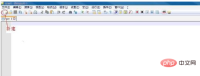
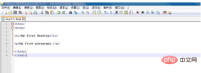
Enter or copy the first HTML program, as shown below.
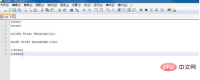
Click the Save button to save the text we just entered, as shown below.
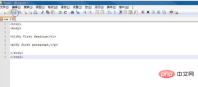
The file name is start-1, and the file type is hypertext markup language, that is, html, as shown below. Click OK.
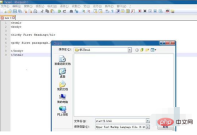
After saving, we see that the label turns light blue, which makes it easier for us to write web pages, as shown below.
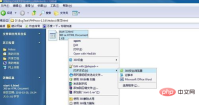
Open the start-1 file we saved, right-click, open with ----360 browser, as shown below.
The result is as shown below.

The above is the detailed content of How to write html in notepad. For more information, please follow other related articles on the PHP Chinese website!

 Downloading and Setting Up Notepad : The Installation ProcessApr 16, 2025 am 12:13 AM
Notepad is a free open source code editor that supports multiple programming languages. 1. Visit Notepad official website to download the latest version. 2. Double-click the installation file, complete the installation and select whether to create a desktop shortcut and set it as the default editor. 3. Start Notepad, adjust the font size, color theme, etc. through the "Settings" menu, and explore the "Plugin Manager" to install plug-ins.
 Notepad : The Geographical SourceApr 15, 2025 am 12:06 AM
Notepad uses Git for source code management and enables global collaboration through GitHub. 1.Git's distributed features allow developers from different geographical locations to work together. 2.Notepad's development team uses flexible working hours and asynchronous communication to deal with time zone differences. 3. Use basic and advanced Git features such as branching, merge requests and code review to improve collaboration efficiency and code quality.
 Notepad : The Value of a Free Text EditorApr 14, 2025 am 12:06 AM
Notepad is a free and powerful text editor for Windows platforms. Its advantages include: 1. Supports syntax highlighting and code folding in multiple programming languages; 2. Enhanced functions of plug-in systems and flexible configuration options; 3. Optimized performance of multi-threading technology and memory management; 4. Improved work efficiency; 5. Excellent performance when processing large files.
 Notepad : Its Origins and DevelopmentApr 13, 2025 am 12:05 AM
Notepad wascreatedbyDonHoin2003toaddresstheneedforamoreefficienttexteditor.1)DonHo,aTaiwaneseprogrammer,releasedthefirstversionin2003.2)Itsopen-sourcenaturehasallowedforcollaborativedevelopmentandcontinuousimprovement.3)Notepad offersextensibilityt
 Easy Installation: How to Get Notepad Up and RunningApr 12, 2025 am 12:01 AM
Notepad is a free source code editor that supports syntax highlighting and code folding in multiple programming languages. Installation steps: 1. Visit the official website to download the latest version; 2. Double-click the installation package and follow the prompts to install; 3. Start Notepad from the Start menu. Usage tips: 1. Select the corresponding language for syntax highlighting; 2. Install plug-ins such as "Compare" for file comparison; 3. Adjust the encoding format to solve display problems; 4. Turn off automatic completion and clean up plug-ins to optimize performance; 5. Enable automatic backup function to protect the code.
 Notepad : Donations and FundingApr 11, 2025 pm 12:13 PM
Notepad remains free and open source through user donations. 1) Donations are made through PayPal or bank transfer, and the user voluntarily decides the amount. 2) Funds are used for server fees, development tools and developer bonuses, and transparency is guaranteed through periodic reports. 3) Donations not only support Notepad, but also support the development of the entire open source community.
 Notepad Line Numbers: Display Line NumbersApr 10, 2025 am 09:42 AM
The steps to display line numbers in Notepad are: 1. Settings -> Preferences -> Editor -> Check "Show Line Number". Line numbering is crucial for programmers because it helps quickly locate and reference specific locations in code and improves productivity.
 Notepad vs. Notepad : Which Text Editor is Right for You?Apr 09, 2025 am 12:09 AM
Choose Notepad because it is more powerful and suitable for programming and advanced text editing. 1. Notepad is suitable for simple text editing, lightweight and fast. 2.Notepad supports multiple programming languages, provides syntax highlighting and plug-in extensions, suitable for complex programming tasks.


Hot AI Tools

Undresser.AI Undress
AI-powered app for creating realistic nude photos

AI Clothes Remover
Online AI tool for removing clothes from photos.

Undress AI Tool
Undress images for free

Clothoff.io
AI clothes remover

AI Hentai Generator
Generate AI Hentai for free.

Hot Article
Hot Tools

mPDF
mPDF is a PHP library that can generate PDF files from UTF-8 encoded HTML. The original author, Ian Back, wrote mPDF to output PDF files "on the fly" from his website and handle different languages. It is slower than original scripts like HTML2FPDF and produces larger files when using Unicode fonts, but supports CSS styles etc. and has a lot of enhancements. Supports almost all languages, including RTL (Arabic and Hebrew) and CJK (Chinese, Japanese and Korean). Supports nested block-level elements (such as P, DIV),

SAP NetWeaver Server Adapter for Eclipse
Integrate Eclipse with SAP NetWeaver application server.

WebStorm Mac version
Useful JavaScript development tools

MinGW - Minimalist GNU for Windows
This project is in the process of being migrated to osdn.net/projects/mingw, you can continue to follow us there. MinGW: A native Windows port of the GNU Compiler Collection (GCC), freely distributable import libraries and header files for building native Windows applications; includes extensions to the MSVC runtime to support C99 functionality. All MinGW software can run on 64-bit Windows platforms.

VSCode Windows 64-bit Download
A free and powerful IDE editor launched by Microsoft

