




1. Find the fn key and the insert and numlk keys.
Look carefully at the keyboard of our computer and find the fn key and the insert and numlk keys. These 3 If a key is pressed randomly, confusion will occur when typing.

2. Key operation
After finding these three keys, we first hold down the fn key, and then hold down the "insert" key or numlk This key will do the trick.

3. Test
Then open our text input box and try typing anywhere. You will find that the typing is normal.
4. Find the Control Panel
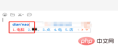
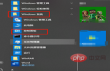
But sometimes we may not be able to solve the problem of confusing keyboard typing by following the above method. At the beginning of the desktop, find "Windows System", expand it and find "Control Panel".
5. Find devices and printers
After entering the control panel, find "Devices and Printers" in the many menus, double-click to open and enter the device and printer Printer interface.

6. Click "Device Manager"
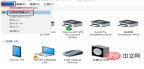
After entering the device and printer interface, find "File" at the top, click it, and find " Device Manager" and click on it.
7. Update the driver
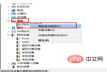
After entering the device manager, find "Keyboard", then expand it, find "Standard Keyboard", and then right-click Click and select "Update Driver" in the pop-up menu.
The above is the detailed content of Keyboard keys are messed up. For more information, please follow other related articles on the PHP Chinese website!

Hot AI Tools

Undresser.AI Undress
AI-powered app for creating realistic nude photos

AI Clothes Remover
Online AI tool for removing clothes from photos.

Undress AI Tool
Undress images for free

Clothoff.io
AI clothes remover

AI Hentai Generator
Generate AI Hentai for free.

Hot Article
Hot Tools

SAP NetWeaver Server Adapter for Eclipse
Integrate Eclipse with SAP NetWeaver application server.

Dreamweaver CS6
Visual web development tools

Zend Studio 13.0.1
Powerful PHP integrated development environment

EditPlus Chinese cracked version
Small size, syntax highlighting, does not support code prompt function

MinGW - Minimalist GNU for Windows
This project is in the process of being migrated to osdn.net/projects/mingw, you can continue to follow us there. MinGW: A native Windows port of the GNU Compiler Collection (GCC), freely distributable import libraries and header files for building native Windows applications; includes extensions to the MSVC runtime to support C99 functionality. All MinGW software can run on 64-bit Windows platforms.

