



Webpack is a front-end resource loading/packaging tool. It will perform static analysis based on module dependencies, and then generate corresponding static resources for these modules according to specified rules.
This chapter is based on Webpack3.0 and passed the test.
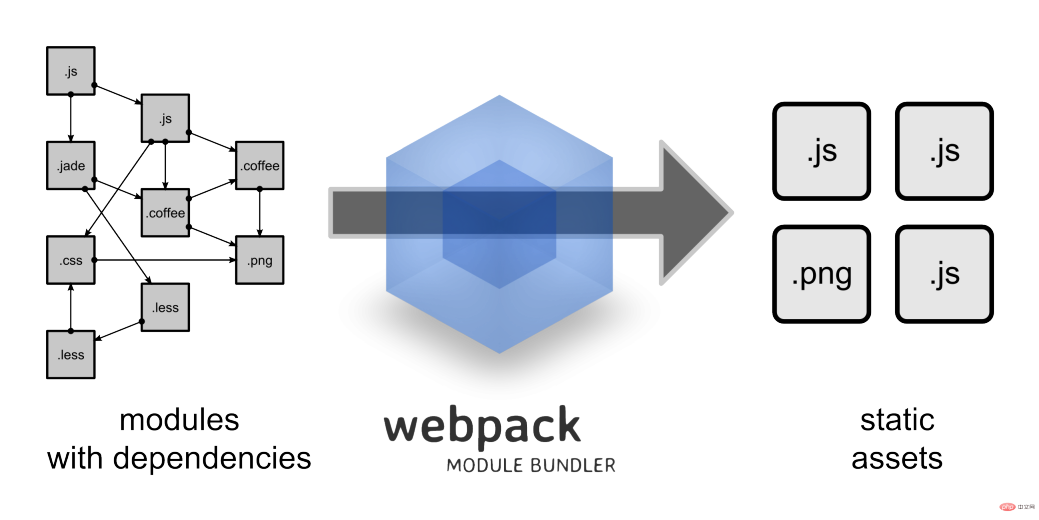
We can see from the picture that Webpack can convert a variety of static resources js, css, and less into a static file, reducing page requests.
Next we will briefly introduce the installation and use of Webpack.
Install Webpack
Before installing Webpack, your local environment needs to support node.js.
Due to the slow installation speed of npm, this tutorial uses Taobao's image and its command cnpm. For installation and usage instructions, please refer to: Using Taobao NPM image.
Use cnpm to install webpack:
cnpm install webpack -g
Create project
Next we create a directory app:
mkdir app
Add the runoob1.js file in the app directory, the code is as follows:
document.write("It works.");Add the index.html file in the app directory, the code is as follows:
<html>
    <head>
        <meta charset="utf-8">
    </head>
    <body>
        <script type="text/javascript" src="bundle.js" charset="utf-8"></script>
    </body>
</html>
Next we use the webpack command to Packaging:
webpack runoob1.js bundle.js
Executing the above command will compile the runoob1.js file and generate the bundle.js file. After success, the output information is as follows:
Hash: a41c6217554e666594cb
Version: webpack 1.12.13
Time: 50ms
    Asset     Size  Chunks             Chunk Names
bundle.js  1.42 kB       0  [emitted]  main
   [0] ./runoob1.js 29 bytes {0} [built]
Open index.html in the browser and output The results are as follows:

Create a second JS file
Next we create another js file runoob2.js, the code is as follows:
module.exports = "It works from runoob2.js.";
Update the runoob1.js file, the code is as follows:
document.write(require("./runoob2.js"));Next we use the webpack command to package:
webpack runoob1.js bundle.js

Hash: dcf55acff639ebfe1677
Version: webpack 1.12.13
Time: 52ms
    Asset     Size  Chunks             Chunk Names
bundle.js  1.55 kB       0  [emitted]  main
   [0] ./runoob1.js 41 bytes {0} [built]
   [1] ./runoob2.js 46 bytes {0} [built]
In browsing The output result is as follows:

webpack performs static analysis based on the dependencies of the module, and these files (modules) will be included in the bundle.js file. Webpack assigns each module a unique id and indexes and accesses the module through this id. When the page starts, the code in runoob1.js will be executed first, and other modules will be executed when require is run.
LOADER
Webpack itself can only process JavaScript modules. If you want to process other types of files, you need to use loader for conversion. .
So if we need to add a css file to the application, we need to use css-loader and style-loader. They do two different things. The css-loader will traverse the CSS file and then find the url() Expressions are then processed and the style-loader inserts the original CSS code into a style tag on the page.
Next we use the following commands to install css-loader and style-loader (global installation requires parameter -g).
cnpm install css-loader style-loader
After executing the above command, the node_modules directory will be generated in the current directory, which is the installation directory of css-loader and style-loader.
Next create a style.css file, the code is as follows:
body {
    background: yellow;
}
Modify the runoob1.js file, the code is as follows:
require("!style-loader!css-loader!./style.css");
document.write(require("./runoob2.js"));
Next we use the webpack command to package:
webpack runoob1.js bundle.js

Hash: a9ef45165f81c89a4363
Version: webpack 1.12.13
Time: 619ms
    Asset     Size  Chunks             Chunk Names
bundle.js  11.8 kB       0  [emitted]  main
   [0] ./runoob1.js 76 bytes {0} [built]
   [5] ./runoob2.js 46 bytes {0} [built]
    + 4 hidden modules
When accessed in the browser, the output result is as follows:

require CSS files must be written with the loader prefix!style-loader!css- loader!, of course we can automatically bind the required loader according to the module type (extension). Change require("!style-loader!css-loader!./style.css") in runoob1.js to require("./style.css"):
runoob1.js File
require("./style.css");
document.write(require("./runoob2.js"));
Then execute:
webpack runoob1.js bundle.js --module-bind 'css=style-loader!css-loader'
Access in the browser, the output result is as follows:

Obviously, this The two ways of using loader have the same effect.
Configuration file
We can put some compilation options in the configuration file for unified management:
Create the webpack.config.js file, the code is as follows:
module.exports = {
    entry: "./runoob1.js",
    output: {
        path: __dirname,
        filename: "bundle.js"
    },
    module: {
        loaders: [
            { test: /\.css$/, loader: "style-loader!css-loader" }
        ]
    }
};
Next we only need to execute the webpack command to generate the bundle.js file:
webpack

Hash: 4fdefac099a5f36ff74b
Version: webpack 1.12.13
Time: 576ms
    Asset     Size  Chunks             Chunk Names
bundle.js  11.8 kB       0  [emitted]  main
   [0] ./runoob1.js 65 bytes {0} [built]
   [5] ./runoob2.js 46 bytes {0} [built]
    + 4 hidden modules
webpack command After execution, the webpack.config.js file in the current directory will be loaded by default.
Plug-ins
Plug-ins are specified in the plugins option of webpack's configuration information and are used to complete some tasks that cannot be completed by the loader.
Webpack comes with some plug-ins, and you can install some plug-ins through cnpm.
使用内置插件需要通过以下命令来安装:
cnpm install webpack --save-dev
比如我们可以安装内置的 BannerPlugin 插件,用于在文件头部输出一些注释信息。
修改 webpack.config.js,代码如下:
var webpack=require('webpack');

module.exports = {
    entry: "./runoob1.js",
    output: {
        path: __dirname,
        filename: "bundle.js"
    },
    module: {
        loaders: [
            { test: /\.css$/, loader: "style-loader!css-loader" }
        ]
    },
    plugins:[
    new webpack.BannerPlugin('菜鸟教程 webpack 实例')
    ]
};
然后运行:
webpack
打开 bundle.js,可以看到文件头部出现了我们指定的注释信息。
开发环境
当项目逐渐变大,webpack 的编译时间会变长,可以通过参数让编译的输出内容带有进度和颜色。
webpack --progress --colors
如果不想每次修改模块后都重新编译,那么可以启动监听模式。开启监听模式后,没有变化的模块会在编译后缓存到内存中,而不会每次都被重新编译,所以监听模式的整体速度是很快的。
webpack --progress --colors --watch
当然,我们可以使用 webpack-dev-server 开发服务,这样我们就能通过 localhost:8080 启动一个 express 静态资源 web 服务器,并且会以监听模式自动运行 webpack,在浏览器打开 http://localhost:8080/ 或 http://localhost:8080/webpack-dev-server/ 可以浏览项目中的页面和编译后的资源输出,并且通过一个 socket.io 服务实时监听它们的变化并自动刷新页面。
# 安装
cnpm install webpack-dev-server -g

# 运行
webpack-dev-server --progress --colors
在浏览器打开 http://localhost:8080/ 输出结果如下:

相关教程推荐:webpack 中文文档
The above is the detailed content of Webpack Getting Started Tutorial. For more information, please follow other related articles on the PHP Chinese website!

 Python vs. JavaScript: The Learning Curve and Ease of UseApr 16, 2025 am 12:12 AM
Python is more suitable for beginners, with a smooth learning curve and concise syntax; JavaScript is suitable for front-end development, with a steep learning curve and flexible syntax. 1. Python syntax is intuitive and suitable for data science and back-end development. 2. JavaScript is flexible and widely used in front-end and server-side programming.
 Python vs. JavaScript: Community, Libraries, and ResourcesApr 15, 2025 am 12:16 AM
Python and JavaScript have their own advantages and disadvantages in terms of community, libraries and resources. 1) The Python community is friendly and suitable for beginners, but the front-end development resources are not as rich as JavaScript. 2) Python is powerful in data science and machine learning libraries, while JavaScript is better in front-end development libraries and frameworks. 3) Both have rich learning resources, but Python is suitable for starting with official documents, while JavaScript is better with MDNWebDocs. The choice should be based on project needs and personal interests.
 From C/C to JavaScript: How It All WorksApr 14, 2025 am 12:05 AM
The shift from C/C to JavaScript requires adapting to dynamic typing, garbage collection and asynchronous programming. 1) C/C is a statically typed language that requires manual memory management, while JavaScript is dynamically typed and garbage collection is automatically processed. 2) C/C needs to be compiled into machine code, while JavaScript is an interpreted language. 3) JavaScript introduces concepts such as closures, prototype chains and Promise, which enhances flexibility and asynchronous programming capabilities.
 JavaScript Engines: Comparing ImplementationsApr 13, 2025 am 12:05 AM
Different JavaScript engines have different effects when parsing and executing JavaScript code, because the implementation principles and optimization strategies of each engine differ. 1. Lexical analysis: convert source code into lexical unit. 2. Grammar analysis: Generate an abstract syntax tree. 3. Optimization and compilation: Generate machine code through the JIT compiler. 4. Execute: Run the machine code. V8 engine optimizes through instant compilation and hidden class, SpiderMonkey uses a type inference system, resulting in different performance performance on the same code.
 Beyond the Browser: JavaScript in the Real WorldApr 12, 2025 am 12:06 AM
JavaScript's applications in the real world include server-side programming, mobile application development and Internet of Things control: 1. Server-side programming is realized through Node.js, suitable for high concurrent request processing. 2. Mobile application development is carried out through ReactNative and supports cross-platform deployment. 3. Used for IoT device control through Johnny-Five library, suitable for hardware interaction.
 Building a Multi-Tenant SaaS Application with Next.js (Backend Integration)Apr 11, 2025 am 08:23 AM
I built a functional multi-tenant SaaS application (an EdTech app) with your everyday tech tool and you can do the same. First, what’s a multi-tenant SaaS application? Multi-tenant SaaS applications let you serve multiple customers from a sing
 How to Build a Multi-Tenant SaaS Application with Next.js (Frontend Integration)Apr 11, 2025 am 08:22 AM
This article demonstrates frontend integration with a backend secured by Permit, building a functional EdTech SaaS application using Next.js. The frontend fetches user permissions to control UI visibility and ensures API requests adhere to role-base
 JavaScript: Exploring the Versatility of a Web LanguageApr 11, 2025 am 12:01 AM
JavaScript is the core language of modern web development and is widely used for its diversity and flexibility. 1) Front-end development: build dynamic web pages and single-page applications through DOM operations and modern frameworks (such as React, Vue.js, Angular). 2) Server-side development: Node.js uses a non-blocking I/O model to handle high concurrency and real-time applications. 3) Mobile and desktop application development: cross-platform development is realized through ReactNative and Electron to improve development efficiency.


Hot AI Tools

Undresser.AI Undress
AI-powered app for creating realistic nude photos

AI Clothes Remover
Online AI tool for removing clothes from photos.

Undress AI Tool
Undress images for free

Clothoff.io
AI clothes remover

AI Hentai Generator
Generate AI Hentai for free.

Hot Article
Hot Tools

VSCode Windows 64-bit Download
A free and powerful IDE editor launched by Microsoft

DVWA
Damn Vulnerable Web App (DVWA) is a PHP/MySQL web application that is very vulnerable. Its main goals are to be an aid for security professionals to test their skills and tools in a legal environment, to help web developers better understand the process of securing web applications, and to help teachers/students teach/learn in a classroom environment Web application security. The goal of DVWA is to practice some of the most common web vulnerabilities through a simple and straightforward interface, with varying degrees of difficulty. Please note that this software

SublimeText3 Linux new version
SublimeText3 Linux latest version

Dreamweaver CS6
Visual web development tools

MantisBT
Mantis is an easy-to-deploy web-based defect tracking tool designed to aid in product defect tracking. It requires PHP, MySQL and a web server. Check out our demo and hosting services.

