




win7 to win10
First download the win10 image to a drive letter other than C drive, such as D drive

Use compression software to decompress the win10 image to a drive letter other than C drive, such as D drive,

Double-click the system installer
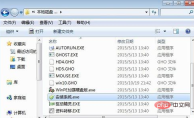
Select the C drive and confirm

Click Yes to restart the computer, uninstall the win7 system, and start installing the win10 system. This The system is being restored

Restart the computer to start the complete installation of the win10 system and the appropriate drivers for the computer win10 system

After restarting, enter the win10 system. The replacement of win10 system from win7 system is completed.

Notes
Be sure to back up important files on the computer's C drive and desktop to prevent It will be deleted during system installation.
The above is the detailed content of win7 to win10. For more information, please follow other related articles on the PHP Chinese website!

Hot AI Tools

Undress AI Tool
Undress images for free

Undresser.AI Undress
AI-powered app for creating realistic nude photos

AI Clothes Remover
Online AI tool for removing clothes from photos.

Clothoff.io
AI clothes remover

Video Face Swap
Swap faces in any video effortlessly with our completely free AI face swap tool!

Hot Article
Hot Tools

SublimeText3 English version
Recommended: Win version, supports code prompts!

Dreamweaver CS6
Visual web development tools

SublimeText3 Mac version
God-level code editing software (SublimeText3)

MantisBT
Mantis is an easy-to-deploy web-based defect tracking tool designed to aid in product defect tracking. It requires PHP, MySQL and a web server. Check out our demo and hosting services.

Notepad++7.3.1
Easy-to-use and free code editor

