


What should I do if navicat reports error 1251 when connecting to mysql?


Navicat connection mysql error 1251 solution
1. Newly installed mysql8, use the cracked version of navicat It keeps reporting an error when connecting, as shown in the figure:

2. Searching the Internet for the reason found that the encryption rule in versions before mysql8 was mysql_native_password, but after mysql8, the encryption rule is caching_sha2_password.
Related recommendations: "Navicat for mysql graphic tutorial"
There are two ways to solve the problem, one is to upgrade the navicat driver; the other is to change the mysql user The login password encryption rule is restored to mysql_native_password. Since I am using a cracked version of navicat, I can only use the second method to solve it.
3. First run cmd as administrator, and then use the command to enter mysql.
#Then enter the root password you set when you installed mysql to enter. The interface after entering is as follows:

Note: If you enter mysql -u root -p, cmd prompts that mysql is not an internal or external command, nor is it an operable program or Batch file, it means that you did not add the path of mysql to the environment variable PATH after installing mysql before. This method is suggested at the end of the article;
4. Then change the encryption method in mysql first. The instructions are as follows:
ALTER USER 'root'@'localhost' IDENTIFIED BY 'password' PASSWORD EXPIRE NEVER;
5. Then change the password. Since the encryption rules have changed, you need to re- Set the password;
ALTER USER 'root'@'localhost' IDENTIFIED WITH mysql_native_password BY '新密码';
6. Finally, refresh the database;
FLUSH PRIVILEGES;
Finally, write down how to add the path to mysql in the environment variable PATH;
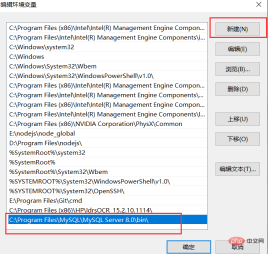
1. win r-->services.msc-->Right-click the mysql service-->Properties-->Find the executable path and copy it;
2. Right-click "My Computer"- ->Properties-->Advanced System Settings-->Environment Variables-->System Variables-->PATH-->Edit-->New-->"Executable Path" above, as the picture shows:
The above is the detailed content of What should I do if navicat reports error 1251 when connecting to mysql?. For more information, please follow other related articles on the PHP Chinese website!

 Navicat: Pricing Details for Different Database SystemsApr 16, 2025 am 12:10 AM
Navicat provides flexible pricing solutions based on different database systems, and users can choose the appropriate version according to their needs. 1.NavicatforMySQL has standard version ($199), enterprise version ($499) and education version ($99). 2.NavicatPremium supports multiple databases, standard version $499 and enterprise version $999, suitable for medium and large enterprises.
 Evaluating the Value of Navicat: Is It Worth the Cost?Apr 15, 2025 am 12:05 AM
Is Navicat worth the money? It depends on your needs and budget. If you often deal with complex database tasks and have a good budget, Navicat is worth the investment; but if you only manage the database occasionally or have a limited budget, there may be a more suitable option.
 Navicat's Cost: Factors to ConsiderApr 14, 2025 am 12:16 AM
The cost of Navicat is mainly affected by version selection, subscription mode, database support, and additional features. 1. The personal version is suitable for a single developer or small project and is at a low price. 2. Team Edition and Enterprise Edition provide more features, at a higher price, suitable for team collaboration and large enterprises. 3. The subscription model provides continuous updates and support, but the long-term cost may be higher than the perpetual license.
 Is Navicat Free? Exploring Trials and Pricing PlansApr 13, 2025 am 12:09 AM
Navicat is not free, but offers a 14-day trial version and requires a license to be purchased after the trial period expires. Navicat has a variety of pricing plans: 1. The personal version is suitable for individual developers and small teams; 2. The enterprise version is suitable for large enterprises; 3. The education version is specially designed for educational institutions.
 Choosing the Best Database Manager: Options Beyond NavicatApr 12, 2025 am 12:01 AM
DBeaver and DataGrip are database management tools that go beyond Navicat. 1.DBeaver is free and open source, suitable for small projects, and supports multiple databases. 2.DataGrip is powerful and suitable for complex large-scale projects, providing advanced code completion and SQL reconstruction.
 Using Navicat: Enhancing Database ProductivityApr 10, 2025 am 09:27 AM
Navicat improves database productivity with its intuitive interface and powerful features. 1) Basic usages include connecting to databases, managing tables and executing queries. 2) Advanced functions such as data synchronization and transmission simplify operations through a graphical interface. 3) Common errors can be solved by checking connections and using syntax checking functions. 4) It is recommended to use batch operations and regular backups for performance optimization.
 How to use the replacement function of navicatApr 09, 2025 am 09:15 AM
Navicat's replacement feature allows you to find and replace text in database objects. You can use this feature by right-clicking on the object and selecting Replace, enter the text you want to find and replace in the pop-up dialog box and configure options such as Find/Replace Range, Case Sensitivity, and Regular Expressions. By selecting the Replace button, you can find and replace text and configure options as needed to avoid unexpected changes.
 What to do if the activation of navicat failsApr 09, 2025 am 09:12 AM
Solutions to Navicat activation failure: 1. Check the correctness of the activation code; 2. Ensure the network connection is normal; 3. Temporarily disable the antivirus software; 4. Reset the activation status; 5. Contact technical support.


Hot AI Tools

Undresser.AI Undress
AI-powered app for creating realistic nude photos

AI Clothes Remover
Online AI tool for removing clothes from photos.

Undress AI Tool
Undress images for free

Clothoff.io
AI clothes remover

AI Hentai Generator
Generate AI Hentai for free.

Hot Article
Hot Tools

SAP NetWeaver Server Adapter for Eclipse
Integrate Eclipse with SAP NetWeaver application server.

mPDF
mPDF is a PHP library that can generate PDF files from UTF-8 encoded HTML. The original author, Ian Back, wrote mPDF to output PDF files "on the fly" from his website and handle different languages. It is slower than original scripts like HTML2FPDF and produces larger files when using Unicode fonts, but supports CSS styles etc. and has a lot of enhancements. Supports almost all languages, including RTL (Arabic and Hebrew) and CJK (Chinese, Japanese and Korean). Supports nested block-level elements (such as P, DIV),

Dreamweaver Mac version
Visual web development tools

ZendStudio 13.5.1 Mac
Powerful PHP integrated development environment

MinGW - Minimalist GNU for Windows
This project is in the process of being migrated to osdn.net/projects/mingw, you can continue to follow us there. MinGW: A native Windows port of the GNU Compiler Collection (GCC), freely distributable import libraries and header files for building native Windows applications; includes extensions to the MSVC runtime to support C99 functionality. All MinGW software can run on 64-bit Windows platforms.

