




Recommended tutorial: word tutorial
Editing more than one page in a Word document When the table is long, if you do not add the title row of the table on each page, then when you view the column data of the table on the second page, you will not be clear about the meaning of each column of data, so it is necessary to set the title row to be displayed repeatedly. The following will introduce how to set it up.
1. Create a Word document and insert a long table that exceeds one page.

2. When the header row is not used to repeat, when browsing to the second page, it is not clear the meaning of each column of data, giving readers Forms cause inconvenience.

3. Go back to the top of the table on the first page and set the title row of the table.

4. Select the title row of the table and click "Table Tools" - "Layout" - "Duplicate Title Row".

5. Or select the title row of the table, right-click the mouse, and click "Table Properties".

6. In the opened window, switch to the "Rows" tab and check "Repeat as title row at the top of each page" ” and click “OK”.
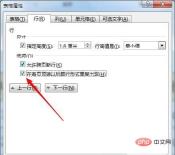
7. Using the above two methods, you can make the selected title row appear repeatedly on every page where the table is located. In this way, no matter which page of the table you are browsing, you can see the title of each column.

The above is the detailed content of How to set table title row to display on every page. For more information, please follow other related articles on the PHP Chinese website!

Hot AI Tools

Undresser.AI Undress
AI-powered app for creating realistic nude photos

AI Clothes Remover
Online AI tool for removing clothes from photos.

Undress AI Tool
Undress images for free

Clothoff.io
AI clothes remover

AI Hentai Generator
Generate AI Hentai for free.

Hot Article
Hot Tools

Dreamweaver Mac version
Visual web development tools

SublimeText3 English version
Recommended: Win version, supports code prompts!

Notepad++7.3.1
Easy-to-use and free code editor

Atom editor mac version download
The most popular open source editor

SAP NetWeaver Server Adapter for Eclipse
Integrate Eclipse with SAP NetWeaver application server.

