



The content of this article is about the detailed steps for Laravel to use JWT to implement API user authorization. It has certain reference value. Friends in need can refer to it. I hope it will be helpful to you.
Part 1 Installing JWT
The first step. Use Composer to install tymon/jwt-auth:
`composer require tymon/jwt -auth 1.0.0-rc.3
Step 2. Add the service provider (Laravel 5.4 and below, no need to add 5.5 and above),
Add the following line Go to the providers array of the config/app.php file:
<?php // 文件:app.php 'providers' => [ // other code Tymon\JWTAuth\Providers\LaravelServiceProvider::class, ]
Step 3. Publish the configuration file,
Run the following command to publish the jwt-auth configuration file:
php artisan vendor:publish --provider="Tymon\JWTAuth\Providers\LaravelServiceProvider"
Step 4. Generate the key,
This command will add a new line to your .env file JWT_SECRET=secret.
php artisan jwt:secret
The second part starts the configuration
The fifth step. Configure Auth guard, `
In config/auth .php file, you need to update guards/driver to jwt,
This can only be used when using Laravel 5.2 and above.
<?php 'defaults' => [ 'guard' => 'api', 'passwords' => 'users', ], // other code 'guards' => [ 'api' => [ 'driver' => 'jwt', 'provider' => 'users', ], ],
Step 6. Change the User Model,
Implement the TymonJWTAuthContractsJWTSubject interface on the User Model,
Implement the two methods getJWTIdentifier() and getJWTCustomClaims().
<?php namespace App;

use Tymon\JWTAuth\Contracts\JWTSubject;

class User extends Authenticatable implements JWTSubject
{
    // other code

    // Rest omitted for brevity

    /**
     * Get the identifier that will be stored in the subject claim of the JWT.
     *
     * @return mixed
     */
    public function getJWTIdentifier()
    {
        return $this->getKey();
    }

    /**
     * Return a key value array, containing any custom claims to be added to the JWT.
     *
     * @return array
     */
    public function getJWTCustomClaims()
    {
        return [];
    }
}
Part 3 Quickly create DEMO test
Step 7. Add some basic authentication routes:
<?php Route::group([
'middleware' => 'api',
'prefix' => 'auth'
], function ($router) {
Route::post('login', 'AuthController@login');
Route::post('register', 'AuthController@register');
Route::post('logout', 'AuthController@logout');
Route::post('refresh', 'AuthController@refresh');
Route::post('me', 'AuthController@me');
}); Step 8. Create AuthController controller=> php artisan make:controller AuthController:<?php namespace App\Http\Controllers;
use App\User;
use Illuminate\Http\Request;
use Illuminate\Support\Facades\Validator;
class AuthController extends Controller
{
/**
* Create a new AuthController instance.
*
* @return void
*/
public function __construct()
{
$this->middleware('auth:api', ['except' => ['login', 'register']]);
}
/**
* 用户使用邮箱密码获取JWT Token.
*
* @return \Illuminate\Http\JsonResponse
*/
public function login()
{
$credentials = request(['email', 'password']);
if (! $token = auth()->attempt($credentials)) {
return response()->json(['error' => 'Unauthorized'], 401);
}
return $this->respondWithToken($token);
}
/**
* 注册新用户
*/
public function register(Request $request)
{
// 数据校验
// 数据验证
$validator = Validator::make($request->all(), [
'name' => 'required',
'email' => 'required|email',
'password' => 'required',
'c_password' => 'required|same:password'
]);
if ($validator->fails()) {
return response()->json(['error'=>$validator->errors()], 401);
}
// 读取参数并保存数据
$input = $request->all();
$input['password'] = bcrypt($input['password']);
$user = User::create($input);
// 创建Token并返回
return $user;
}
/**
* 获取经过身份验证的用户.
*
* @return \Illuminate\Http\JsonResponse
*/
public function me()
{
return response()->json(auth()->user());
}
/**
* 刷新Token.
*
* @return \Illuminate\Http\JsonResponse
*/
public function refresh()
{
return $this->respondWithToken(auth()->refresh());
}
/**
* Get the token array structure.
*
* @param string $token
*
* @return \Illuminate\Http\JsonResponse
*/
protected function respondWithToken($token)
{
return response()->json([
'access_token' => $token,
'token_type' => 'bearer',
'expires_in' => auth()->factory()->getTTL() * 60
]);
}
}
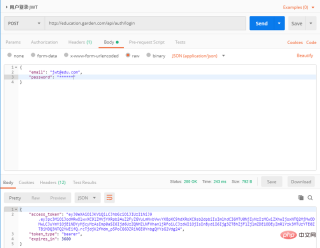
Step 9. Use Postman to test the API:


To test API data acquisition, you need to add Token in the headers; format
key=Authorization, value=Bearer space token

Token refresh:
The above is the detailed content of Detailed steps for Laravel to implement API user authorization using JWT. For more information, please follow other related articles on the PHP Chinese website!

 Laravel (PHP) vs. Python: Different Use Cases and ApplicationsApr 18, 2025 am 12:16 AM
Selecting Laravel or Python depends on the project requirements: 1) If you need to quickly develop web applications and use ORM and authentication systems, choose Laravel; 2) If it involves data analysis, machine learning or scientific computing, choose Python.
 Laravel and Python: Finding the Right ToolApr 18, 2025 am 12:14 AM
Laravel is suitable for building web applications quickly, and Python is suitable for projects that require flexibility and versatility. 1) Laravel provides rich features such as ORM and routing, suitable for the PHP ecosystem. 2) Python is known for its concise syntax and a powerful library ecosystem, and is suitable for fields such as web development and data science.
 Laravel and PHP: Creating Dynamic WebsitesApr 18, 2025 am 12:12 AM
Use Laravel and PHP to create dynamic websites efficiently and fun. 1) Laravel follows the MVC architecture, and the Blade template engine simplifies HTML writing. 2) The routing system and request processing mechanism make URL definition and user input processing simple. 3) EloquentORM simplifies database operations. 4) The use of database migration, CRUD operations and Blade templates are demonstrated through the blog system example. 5) Laravel provides powerful user authentication and authorization functions. 6) Debugging skills include using logging systems and Artisan tools. 7) Performance optimization suggestions include lazy loading and caching.
 Laravel and the Full Stack: Front and Back TogetherApr 18, 2025 am 12:07 AM
Laravel realizes full-stack development through the Blade template engine, EloquentORM, Artisan tools and LaravelMix: 1. Blade simplifies front-end development; 2. Eloquent simplifies database operations; 3. Artisan improves development efficiency; 4. LaravelMix manages front-end resources.
 Laravel: A Framework for Modern Web DevelopmentApr 18, 2025 am 12:05 AM
Laravel is a modern PHP-based framework that follows the MVC architecture model, provides rich tools and functions, and simplifies the web development process. 1) It contains EloquentORM for database interaction, 2) Artisan command line interface for fast code generation, 3) Blade template engine for efficient view development, 4) Powerful routing system for defining URL structure, 5) Authentication system for user management, 6) Event listening and broadcast for real-time functions, 7) Cache and queue systems for performance optimization, making it easier and more efficient to build and maintain modern web applications.
 Laravel (PHP) vs. Python: Weighing the Pros and ConsApr 17, 2025 am 12:18 AM
Laravel is suitable for building web applications quickly, while Python is suitable for a wider range of application scenarios. 1.Laravel provides EloquentORM, Blade template engine and Artisan tools to simplify web development. 2. Python is known for its dynamic types, rich standard library and third-party ecosystem, and is suitable for Web development, data science and other fields.
 Laravel vs. Python: Comparing Frameworks and LibrariesApr 17, 2025 am 12:16 AM
Laravel and Python each have their own advantages: Laravel is suitable for quickly building feature-rich web applications, and Python performs well in the fields of data science and general programming. 1.Laravel provides EloquentORM and Blade template engines, suitable for building modern web applications. 2. Python has a rich standard library and third-party library, and Django and Flask frameworks meet different development needs.
 Laravel's Purpose: Building Robust and Elegant Web ApplicationsApr 17, 2025 am 12:13 AM
Laravel is worth choosing because it can make the code structure clear and the development process more artistic. 1) Laravel is based on PHP, follows the MVC architecture, and simplifies web development. 2) Its core functions such as EloquentORM, Artisan tools and Blade templates enhance the elegance and robustness of development. 3) Through routing, controllers, models and views, developers can efficiently build applications. 4) Advanced functions such as queue and event monitoring further improve application performance.


Hot AI Tools

Undresser.AI Undress
AI-powered app for creating realistic nude photos

AI Clothes Remover
Online AI tool for removing clothes from photos.

Undress AI Tool
Undress images for free

Clothoff.io
AI clothes remover

AI Hentai Generator
Generate AI Hentai for free.

Hot Article
Hot Tools

Atom editor mac version download
The most popular open source editor

SecLists
SecLists is the ultimate security tester's companion. It is a collection of various types of lists that are frequently used during security assessments, all in one place. SecLists helps make security testing more efficient and productive by conveniently providing all the lists a security tester might need. List types include usernames, passwords, URLs, fuzzing payloads, sensitive data patterns, web shells, and more. The tester can simply pull this repository onto a new test machine and he will have access to every type of list he needs.

PhpStorm Mac version
The latest (2018.2.1) professional PHP integrated development tool

SAP NetWeaver Server Adapter for Eclipse
Integrate Eclipse with SAP NetWeaver application server.

Dreamweaver CS6
Visual web development tools

