



What is float? Why use float? This article will introduce to you what float is, let you understand the role of float on layout, and how to clear float. It has certain reference value. Friends in need can refer to it. I hope it will be helpful to you.
First of all, let’s understand what float is?
float is a positioning attribute of css. To understand its purpose and origin, we can look at typographic design. In a print layout, you can set images to the page so that the text wraps around them as desired. This is often aptly called "text wrapping." Here's an example:
#In a page layout program, the box holding the text can be told to follow text wrapping, or to ignore it. Ignoring text wrapping will allow the words to flow above the image as if it wasn't even there. This is the difference between whether the image is part of the page flow (or not). Web design is very similar.
In web design, page elements to which the CSS float property is applied behave like images with text surrounding them in a print layout. Floated elements are still part of the flow of the web page. This is significantly different from using absolutely positioned page elements. Absolutely positioned page elements will be removed from the web page flow, just like text boxes in print layouts are told to ignore page wraps. Absolutely positioned page elements do not affect the position of other elements, nor do other elements affect them, regardless of whether they touch each other.
Using CSS to set float on an element will happen as follows:
.demo {
  float: right;
}
The float attribute has four valid values, which are:
left: Set the element to the left Float;
right: Set the element to float to the right;
none: Default value, set the element not to float;
inherit: Specify that the value of the float attribute should be inherited from the parent element .
Why use float?
Floating also helps with layout in smaller areas. Take this small area of a web page, for example. If we use float for our little avatar image, when that image changes size, the text in the box will reflow to fit:
using relative positioning on the container and The same layout can also be achieved with absolute positioning on the avatar. This way the text will not be affected by the avatar and cannot reflow when the size changes.
Why do we need to clear floats?
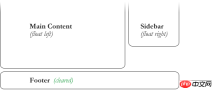
float (float) allows the element to be removed from the normal flow, and other elements will be displayed next to it, so if we want to prevent subsequent elements from moving up (as shown below, prevent the footer from moving up) move), which requires clearing it. We need to clear the footer's float to make sure it is below the two floated columns. To solve this problem, you need to use the clear attribute.
.footer {
  clear: both;
}
The clear attribute has five valid values, which are:
left: clear the floating ones on the left element.
right: Clear elements floating on the right.
both: Clear elements that are floating on both the left and right sides.
none: Default value, allowing floating elements to appear on both sides. Usually a value that is unnecessary unless the clear value is removed from the cascade.
inherit: The setting specifies that the value of the clear attribute should be inherited from the parent element.
Summary: The above is all the content of this article on float-related issues. I hope it will be helpful to everyone's study.
The above is the detailed content of What is float? Detailed explanation of float attribute. For more information, please follow other related articles on the PHP Chinese website!

 Two Images and an API: Everything We Need for Recoloring ProductsApr 15, 2025 am 11:27 AM
I recently found a solution to dynamically update the color of any product image. So with just one of a product, we can colorize it in different ways to show
 Weekly Platform News: Impact of Third-Party Code, Passive Mixed Content, Countries with the Slowest ConnectionsApr 15, 2025 am 11:19 AM
In this week's roundup, Lighthouse sheds light on third-party scripts, insecure resources will get blocked on secure sites, and many country connection speeds
 Options for Hosting Your Own Non-JavaScript-Based AnalyticsApr 15, 2025 am 11:09 AM
There are loads of analytics platforms to help you track visitor and usage data on your sites. Perhaps most notably Google Analytics, which is widely used
 It's All In the Head: Managing the Document Head of a React Powered Site With React HelmetApr 15, 2025 am 11:01 AM
The document head might not be the most glamorous part of a website, but what goes into it is arguably just as important to the success of your website as its
 What is super() in JavaScript?Apr 15, 2025 am 10:59 AM
What's happening when you see some JavaScript that calls super()?.In a child class, you use super() to call its parent’s constructor and super. to access its
 Comparing the Different Types of Native JavaScript PopupsApr 15, 2025 am 10:48 AM
JavaScript has a variety of built-in popup APIs that display special UI for user interaction. Famously:
 Why Are Accessible Websites so Hard to Build?Apr 15, 2025 am 10:45 AM
I was chatting with some front-end folks the other day about why so many companies struggle at making accessible websites. Why are accessible websites so hard
 The `hidden` Attribute is Visibly WeakApr 15, 2025 am 10:43 AM
There is an HTML attribute that does exactly what you think it should do:


Hot AI Tools

Undresser.AI Undress
AI-powered app for creating realistic nude photos

AI Clothes Remover
Online AI tool for removing clothes from photos.

Undress AI Tool
Undress images for free

Clothoff.io
AI clothes remover

AI Hentai Generator
Generate AI Hentai for free.

Hot Article
Hot Tools

MantisBT
Mantis is an easy-to-deploy web-based defect tracking tool designed to aid in product defect tracking. It requires PHP, MySQL and a web server. Check out our demo and hosting services.

ZendStudio 13.5.1 Mac
Powerful PHP integrated development environment

Dreamweaver CS6
Visual web development tools

SublimeText3 English version
Recommended: Win version, supports code prompts!

SublimeText3 Linux new version
SublimeText3 Linux latest version

