


 Web Front-endCSS TutorialHow to set paragraph spacing in css? The margin property sets paragraph spacing (code example)
How to set paragraph spacing in css? The margin property sets paragraph spacing (code example)

Paragraph spacing is an important factor in web design that improves the article reading experience. But web page layout is not as simple as Word. As web designers, for the sake of a good reading experience for readers, we must reserve a certain amount of space for each subtitle and paragraph of the article, and use CSS to effectively set the paragraph spacing. This chapter will introduce to you how the css margin property sets the paragraph spacing. It has certain reference value. Friends in need can refer to it. I hope it will be helpful to you.
So how to use the css margin property to set the paragraph spacing of text?
css margin can set the spacing distance style between the upper and lower paragraphs. We know margin It is to set the distance between the upper, lower, left, and right objects and the objects. The paragraphs here can also use this css style to achieve spacing.
Below we use a simple code example to explain in detail how to set the css margin property and adjust the spacing between text paragraphs!
<!DOCTYPE html>
<html>
	<head>
		<meta http-equiv="Content-Type" content="text/html; charset=utf-8" />
		<title>margin设置段落间距</title>
		<style>
			.cx{
				margin: 20px 0;
			}
			/* css注释: 设置margin为对象上下间距10px */
		</style>
	</head>

	<body>
		<p>第一段,没有设置间距。我是一段测试代码!我是一段测试代码!我是一段测试代码!我是一段测试代码!我是一段测试代码!我是一段测试代码!我是一段测试代码!我是一段测试代码!我是一段测试代码!</p>
		<p>第二段,没有设置间距。我是一段测试代码!我是一段测试代码!我是一段测试代码!我是一段测试代码!我是一段测试代码!我是一段测试代码!我是一段测试代码!我是一段测试代码!我是一段测试代码!</p>
		<p class="cx">第三段,设置了间距。我是一段测试代码!我是一段测试代码!我是一段测试代码!我是一段测试代码!我是一段测试代码!我是一段测试代码!我是一段测试代码!我是一段测试代码!我是一段测试代码!</p>
	</body>
</html>
Rendering:
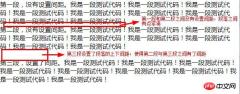
In fact, the margin attribute is a shorthand attribute that can set all the margins of the element. You can use the margin attribute to set the margins of the paragraph at the same time. Upper and lower spacing. We can also set the margins one by one, and set the top or bottom spacing of a paragraph. The method is as follows:
margin-top: Set the top margin of the element.
margin-bottom: Set the bottom margin of the element.
Below we will explain the implementation method in detail through simple code examples!
<!DOCTYPE html>
<html>
	<head>
		<meta http-equiv="Content-Type" content="text/html; charset=utf-8" />
		<title>margin设置段落间距</title>
		<style>
			*{margin: 0px;padding: 0px;}
			.a1{
				margin-top: 20px;
			}
			.a2{
				margin-bottom: 20px;
			}
		</style>
	</head>

	<body>
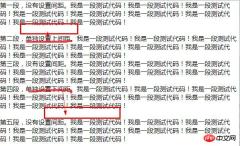
		<p>第一段,没有设置间距。我是一段测试代码!我是一段测试代码!我是一段测试代码!我是一段测试代码!我是一段测试代码!我是一段测试代码!我是一段测试代码!我是一段测试代码!我是一段测试代码!</p>
		<p class="a1">第二段,单独设置上间距。我是一段测试代码!我是一段测试代码!我是一段测试代码!我是一段测试代码!我是一段测试代码!我是一段测试代码!我是一段测试代码!我是一段测试代码!我是一段测试代码!</p>
		<p>第三段,没有设置间距。我是一段测试代码!我是一段测试代码!我是一段测试代码!我是一段测试代码!我是一段测试代码!我是一段测试代码!我是一段测试代码!我是一段测试代码!我是一段测试代码!</p>
<p class="a2">第四段,单独设置下间距。我是一段测试代码!我是一段测试代码!我是一段测试代码!我是一段测试代码!我是一段测试代码!我是一段测试代码!我是一段测试代码!我是一段测试代码!我是一段测试代码!</p>
<p>第五段,没有设置间距。我是一段测试代码!我是一段测试代码!我是一段测试代码!我是一段测试代码!我是一段测试代码!我是一段测试代码!我是一段测试代码!我是一段测试代码!我是一段测试代码!</p>
	</body>
</html>
Rendering:
Summary: The above is the entire content of this article, I hope it will be helpful to everyone's study. For more related tutorials, please visit CSS Video Tutorial!
Related recommendations:
php public welfare training video tutorial
How to use padding to adjust paragraph spacing in css? (Code example)
#How to set line spacing in css? Line spacing settings for css text (code example)
The above is the detailed content of How to set paragraph spacing in css? The margin property sets paragraph spacing (code example). For more information, please follow other related articles on the PHP Chinese website!

 Preloading Pages Just Before They are NeededApr 16, 2025 am 09:53 AM
The typical journey for a person browsing a website: view a page, click a link, browser loads new page. That's assuming no funny business like a Single Page
 Adaptive Photo Layout with FlexboxApr 16, 2025 am 09:51 AM
Let’s take a look at a super lightweight way to create a horizontal masonry effect for a set of arbitrarily-sized photos. Throw any set of photos at it, and
 The Many Ways to Link Up Shapes and Images with HTML and CSSApr 16, 2025 am 09:45 AM
Different website designs often call for a shape other than a square or rectangle to respond to a click event. Perhaps your site has some kind of tilted or
 Web Developer Search HistoryApr 16, 2025 am 09:41 AM
Sophie Koonin blogged "Everything I googled in a week as a professional software engineer," which was a fascinating look into the mind of a web developer and

 What happens when you open a new install of browsers for the 1st time?Apr 16, 2025 am 09:29 AM
Interesting research from Jonathan Sampson, where he watches the network requests a browser makes the very first time you launch it on a fresh install, and
 Web Development Merit BadgesApr 16, 2025 am 09:26 AM
A collection of front-end development achievements. How many can you collect?
 Clipping, Clipping, and More Clipping!Apr 16, 2025 am 09:22 AM
There are so many things you can do with clipping paths. I've been exploring them for quite some time and have come up with different techniques and use cases


Hot AI Tools

Undresser.AI Undress
AI-powered app for creating realistic nude photos

AI Clothes Remover
Online AI tool for removing clothes from photos.

Undress AI Tool
Undress images for free

Clothoff.io
AI clothes remover

AI Hentai Generator
Generate AI Hentai for free.

Hot Article
Hot Tools

SublimeText3 Chinese version
Chinese version, very easy to use

ZendStudio 13.5.1 Mac
Powerful PHP integrated development environment

Zend Studio 13.0.1
Powerful PHP integrated development environment

MinGW - Minimalist GNU for Windows
This project is in the process of being migrated to osdn.net/projects/mingw, you can continue to follow us there. MinGW: A native Windows port of the GNU Compiler Collection (GCC), freely distributable import libraries and header files for building native Windows applications; includes extensions to the MSVC runtime to support C99 functionality. All MinGW software can run on 64-bit Windows platforms.

Atom editor mac version download
The most popular open source editor

