


 Web Front-endJS TutorialHow to build an app using react? Details of the steps to build large-scale applications with React+Redux
How to build an app using react? Details of the steps to build large-scale applications with React+Redux

This article mainly introduces how to build large-scale applications with react redux. Now let's take a look at the content of the article
Background
Our team has a project that takes a long time to develop and uses a mixed development method of front and back ends. The maintenance cost is very high and it is exposed online. There are many problems. And because it is connected to more than 100 product lines of the company, it receives a large number of customer complaints and product line feedback issues every day. In November 2017, we took the product as the lead, redesigned the process from the product level, and reconstructed the front and back ends of the project. As the person in charge of the front-end, I use this article to share some of my experiences in the entire process from technology selection, development, and launch.
Thinking about technology selection
First of all, let’s take a look at the following pages of our project to summarize some of their characteristics.



# Our pages mainly require users to fill in forms. There is no need to request and render a large amount of data when the page is loaded. Moreover, a page needs to display many states (for example, the three pictures above are a component in the project). There is also the most important business requirement. Baidu has many internal product lines, and different businesses have their own unique account labels. In addition to some common processes, these accounts also go through some processes that correspond to the characteristics of the product lines.
Combining these business characteristics and previous development experience with Nodejs and React, my overall technology selection is FIS3 Nodejs React Redux React-Router. So what can these technology selections bring?
The front-end can control the routing of page jumps on the browser side, which increases the flexibility of front-end development;
The page can be customized according to business needs Select template engine rendering or isomorphic rendering in the service;
The front-end manages error code copy and page copy in a unified manner, and uses Nodejs to "hot update" them offline. It takes effect online in real time;
With Redux, it is more convenient to share data across components (multiple pages). Reduce meaningless network requests. Improve the stability and availability of project operations.
Here we will briefly talk about the selection of engineering tools. The most popular engineering tool in the industry right now is Webpack. Apart from reading the documentation, I don't have much practical application experience. I have always believed that using tools is to help developers solve some unobjectionable tasks encountered during the development process that require frequent manual operations. Regardless of Webpack, we can still manually compile the code, manually deploy, and manually refresh the page for development. Using tools only makes this series of processes coherent and reduces development costs.
In all my company-related projects, I choose FIS3. I also think it is easy to use and can meet my various engineering needs. I'm not against Webpack. I just haven't found a reason to give up the FIS3 I'm currently using and use Webpack.
The difference between the old and new framework mechanisms
Here is a brief introduction to some differences in the rendering mechanism of the rendering page after deciding on the technology selection.
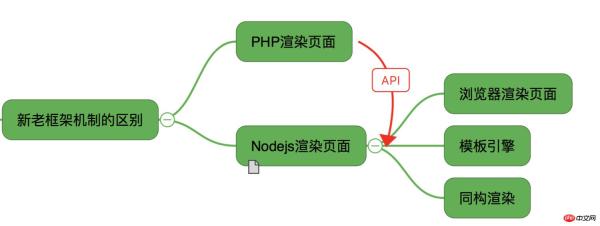
The old project used PHP Smarty's rendering mode to spit out the page to the front-end browser after the server-side rendering was completed. After using the new technical architecture, the way we render pages is more flexible. You can choose to render on the server side, leave it entirely to the browser for rendering, or render isomorphically. Because our page does not need to load a lot of data when it is on the first screen, I still let most pages be rendered on the browser side.
Another difference is that all previous requests from users will fall on the PHP server. Requests for the new framework will fall to the front-end Nodejs server. So front-end engineers are not just about writing good pages and ensuring compatibility. It will also test the technical capabilities of front-end engineers.

The convenience that React brings to the front-end
Front-end control routing rendering page
The technology selection discussed earlier has already mentioned the use of React- Router does page routing control. Moreover, React-Router provides the function of asynchronous loading of components, which provides a technical basis for the asynchronous loading of our online optimized pages.
<Route path="/v4/appeal/fillname" component={FillName} />
{* 这里对某些组件做异步加载 *}
<Route
path="/v4/appeal/selectuser"
getComponent={selectUser()}
/>function selectUser() {
return (location, cb) => { require(['../accountselect/container/AccountSelect'], function (component) {
cb(null, component);
});
};
}In addition to the front-end code for routing control through React-Router, the server may also do some configuration. Otherwise, our page will have problems when it is rolled back (the page cannot find the route). In fact, it is to control routing in what we usually call action. Because I am using Nodejs, my configuration is as follows.
router.get('/fillname', router.action('index'));
router.get('/selectuser', router.action('index'));
Event
In front-end events, I briefly used Preact because of issues with the open source protocol. The biggest difference between React and Preact is the encapsulation of some events. These make Preact much smaller than React.
When doing mobile terminal development, a problem that the front end often faces is the click event 300ms delay problem. The onClick event provided in React will also have such a problem. If we want feedback to appear immediately in other places after clicking a button, it is best to use the onTouchEnd event, or use the open source Npm package react-fastclick which is very good Solve the click event300ms delay problem.
The method used is to declare the following statement at the entrance of our code, which will change the behavior of react's onClick event by default
import initReactFastclick from 'react-fastclick';

initReactFastclick();
Design of the component
A problem you may face when using React is whether my component should be stateless or stateful. How to share my component state. When should I use Redux to manage component state. You may have such questions when you first come into contact with react.
A more extreme approach is to use Redux to manage all states of components, regardless of whether the state needs to be shared or not. This approach means that we need to write a lot of Actions. If it's one or two pages, it's okay. If it's more than a dozen pages, actually writing actions can make people crash.
So what are the best practices? Look at the picture below

When we want to write a component, first think about whether this component needs to share its own state with other components. If necessary we should design it as a stateful component, and the shared state is managed using Redux. If it is simply a stateless component or the state change of the component itself will not affect other components, the component can be designed as a stateless component (although it is called a stateless component, in fact, the state of the component itself can also be used this .state to manage).
Reuse relationship of components
One of the hot spots in React is the component development idea. As small as a button on the page can be designed as a component. Since it is a component, we should first consider how this component can be reused by other components. (If you want to see more, go to the PHP Chinese website React Reference Manual column to learn)
Give a simple example of the pop-up component that will be used in the entire project:
class AlertForm extends Component {
constructor(props) {
super(props); this.state = {
showlayout: false, // false 以tip的方式提示错误, true以弹层的方式提示错误
btnlist: false,
formbtn: false
};
}
componentWillReceiveProps(nextProps) {
}
handleHideLayout = () => {
}
handleMobile = () => {
}
handleChangeCheck = () => {
history.go(-1);
}
render() { return ( <p className="component-alertform" style={this.
state.showlayout ? {display: 'block'} : {display: 'none'}}>
</p>
);
}
}
export default AlertForm;We abstract this component that may be used on other pages separately and import where needed.
import AlertForm from '../../components/AlertForm';<AlertForm errno={errno}
stateObj={fillAppealName}
actions={actions}/>Development environment and production environment packaging optimization
One of the tasks that must be done after completing the project is optimization before going online. The main work I did before going online is as follows:

# As mentioned earlier, most users just follow some common processes. Some users with product line characteristics will go through some special processes. Therefore, you must unpack and asynchronously load components before going online. The specifics have been mentioned before. When packaging, the js of these pages need to be processed separately using packaging tools.
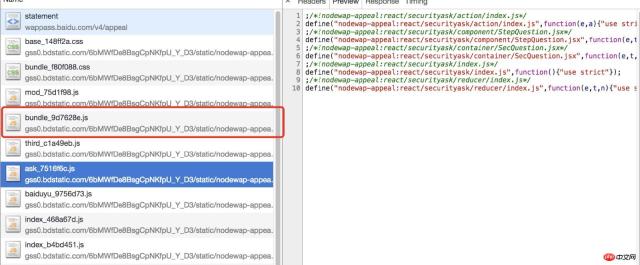
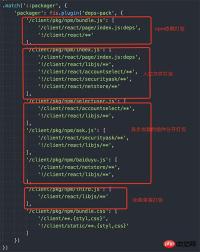
In fact, in addition to these pages that need to be loaded asynchronously, there will also be some other self-written lib libraries (small functions written by yourself). There are also, for example, the correspondence between provinces, cities and regions across the country, and the correspondence between telephone area codes. Because these functions or regional relationship maps will basically not change after they go online, they are packaged separately from the business js.
Our packaged configuration files are as follows:
Operation and maintenance
As mentioned earlier, we have talked about using Nodejs. The middle layer does routing control and server-side rendering. The picture below is the real-time status diagram of the above services captured when I wrote this article. It can be found that the memory and disk IO utilization of the entire application is still very normal, but the CPU utilization is a bit high, which is also an area that needs to be optimized in the future.
What I want to say here is that if you use Nodejs and server-side rendering, the personal quality requirements for front-end engineers will be relatively high because they need to deal with many server-side issues. I also shared an article before about dealing with security work orders. We not only have to face server-side issues, but also face issues from Internet security.

Other capabilities added
Use Nodejs in addition to server-side rendering. I also do some other work using Nodejs. 
For example, I use Nodejs to manage such a JSON file on the server side. The PHP side no longer maintains error codes and error code display copy. All front-end display copywriting needs to be placed on the Nodejs side for unified management. Moreover, I can also dynamically update these error copywriting through the system offline. Improve system availability.
This article ends here (if you want to see more, go to the React User Manual column of the PHP Chinese website to learn). If you have any questions, you can leave a message below.
The above is the detailed content of How to build an app using react? Details of the steps to build large-scale applications with React+Redux. For more information, please follow other related articles on the PHP Chinese website!

 Python vs. JavaScript: Community, Libraries, and ResourcesApr 15, 2025 am 12:16 AM
Python and JavaScript have their own advantages and disadvantages in terms of community, libraries and resources. 1) The Python community is friendly and suitable for beginners, but the front-end development resources are not as rich as JavaScript. 2) Python is powerful in data science and machine learning libraries, while JavaScript is better in front-end development libraries and frameworks. 3) Both have rich learning resources, but Python is suitable for starting with official documents, while JavaScript is better with MDNWebDocs. The choice should be based on project needs and personal interests.
 From C/C to JavaScript: How It All WorksApr 14, 2025 am 12:05 AM
The shift from C/C to JavaScript requires adapting to dynamic typing, garbage collection and asynchronous programming. 1) C/C is a statically typed language that requires manual memory management, while JavaScript is dynamically typed and garbage collection is automatically processed. 2) C/C needs to be compiled into machine code, while JavaScript is an interpreted language. 3) JavaScript introduces concepts such as closures, prototype chains and Promise, which enhances flexibility and asynchronous programming capabilities.
 JavaScript Engines: Comparing ImplementationsApr 13, 2025 am 12:05 AM
Different JavaScript engines have different effects when parsing and executing JavaScript code, because the implementation principles and optimization strategies of each engine differ. 1. Lexical analysis: convert source code into lexical unit. 2. Grammar analysis: Generate an abstract syntax tree. 3. Optimization and compilation: Generate machine code through the JIT compiler. 4. Execute: Run the machine code. V8 engine optimizes through instant compilation and hidden class, SpiderMonkey uses a type inference system, resulting in different performance performance on the same code.
 Beyond the Browser: JavaScript in the Real WorldApr 12, 2025 am 12:06 AM
JavaScript's applications in the real world include server-side programming, mobile application development and Internet of Things control: 1. Server-side programming is realized through Node.js, suitable for high concurrent request processing. 2. Mobile application development is carried out through ReactNative and supports cross-platform deployment. 3. Used for IoT device control through Johnny-Five library, suitable for hardware interaction.
 Building a Multi-Tenant SaaS Application with Next.js (Backend Integration)Apr 11, 2025 am 08:23 AM
I built a functional multi-tenant SaaS application (an EdTech app) with your everyday tech tool and you can do the same. First, what’s a multi-tenant SaaS application? Multi-tenant SaaS applications let you serve multiple customers from a sing
 How to Build a Multi-Tenant SaaS Application with Next.js (Frontend Integration)Apr 11, 2025 am 08:22 AM
This article demonstrates frontend integration with a backend secured by Permit, building a functional EdTech SaaS application using Next.js. The frontend fetches user permissions to control UI visibility and ensures API requests adhere to role-base
 JavaScript: Exploring the Versatility of a Web LanguageApr 11, 2025 am 12:01 AM
JavaScript is the core language of modern web development and is widely used for its diversity and flexibility. 1) Front-end development: build dynamic web pages and single-page applications through DOM operations and modern frameworks (such as React, Vue.js, Angular). 2) Server-side development: Node.js uses a non-blocking I/O model to handle high concurrency and real-time applications. 3) Mobile and desktop application development: cross-platform development is realized through ReactNative and Electron to improve development efficiency.
 The Evolution of JavaScript: Current Trends and Future ProspectsApr 10, 2025 am 09:33 AM
The latest trends in JavaScript include the rise of TypeScript, the popularity of modern frameworks and libraries, and the application of WebAssembly. Future prospects cover more powerful type systems, the development of server-side JavaScript, the expansion of artificial intelligence and machine learning, and the potential of IoT and edge computing.


Hot AI Tools

Undresser.AI Undress
AI-powered app for creating realistic nude photos

AI Clothes Remover
Online AI tool for removing clothes from photos.

Undress AI Tool
Undress images for free

Clothoff.io
AI clothes remover

AI Hentai Generator
Generate AI Hentai for free.

Hot Article
Hot Tools

Notepad++7.3.1
Easy-to-use and free code editor

Zend Studio 13.0.1
Powerful PHP integrated development environment

SecLists
SecLists is the ultimate security tester's companion. It is a collection of various types of lists that are frequently used during security assessments, all in one place. SecLists helps make security testing more efficient and productive by conveniently providing all the lists a security tester might need. List types include usernames, passwords, URLs, fuzzing payloads, sensitive data patterns, web shells, and more. The tester can simply pull this repository onto a new test machine and he will have access to every type of list he needs.

DVWA
Damn Vulnerable Web App (DVWA) is a PHP/MySQL web application that is very vulnerable. Its main goals are to be an aid for security professionals to test their skills and tools in a legal environment, to help web developers better understand the process of securing web applications, and to help teachers/students teach/learn in a classroom environment Web application security. The goal of DVWA is to practice some of the most common web vulnerabilities through a simple and straightforward interface, with varying degrees of difficulty. Please note that this software

SAP NetWeaver Server Adapter for Eclipse
Integrate Eclipse with SAP NetWeaver application server.

