Home > Article > Web Front-end > HTML5 option attribute: How to use the option attribute to implement a cascading drop-down list

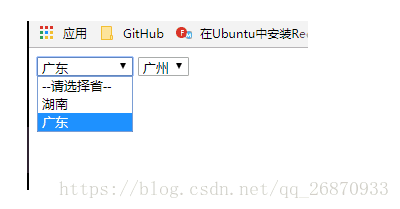
This article introduces you to the option attribute of HTML5: how to use the option attribute to implement a cascading drop-down list. It has certain reference value. Friends in need can refer to it. I hope it will be helpful to you.
<!DOCTYPE>
<html>
<head>
<title>级联下拉列表</title>
<meta charset="UTF-8">
</head>
<body onload="load()">
<p>
<select class='prov' id='prov' onchange='changeCity()'>
<option value=''>--请选择省--</option>
</select>
<select class='city' id='city'>
<option value=''>--请选择市--</option>
</select>
</p>
<script>
var province=document.getElementById("prov");
var city=document.getElementById("city");
var arr_prov=new Array(new Option("--请选择省--",''),new Option("湖南","hn"),new Option("广东","gd"));
var arr_city=new Array();
arr_city[0]=new Array(new Option("--请选择市--",''));
arr_city[1]=new Array(new Option("长沙",'cs'),new Option("娄底",'ld'),new Option("永州",'yz'));
arr_city[2]=new Array(new Option("广州",'gz'),new Option("深圳",'sz')); //动态载入所有省份
function load(){ for(var i=0;i<arr_prov.length;i++){ province.options[i]=arr_prov[i]; } } //选中省份之后,根据索引动态载入相应城市 function changeCity(){
//清空上次的选项
city.options.length=0; //获取省一级的下拉列表选中的索引
var index=province.selectedIndex;
for(var i=0;i<arr_city[index].length;i++){
city.options[i]=arr_city[index][i];
} }
</script>
</body>
</html>Recommended related articles:
html5 Custom attributes: How to get custom attribute values (with code)
How the Select object of HTML performs operations on the Option object
The above is the detailed content of HTML5 option attribute: How to use the option attribute to implement a cascading drop-down list. For more information, please follow other related articles on the PHP Chinese website!