



This article mainly introduces the relevant information on the method of using CSS position:sticky to achieve sticky layout. The content is quite good. I will share it with you now and give it as a reference.
Introduction
Generally you know the following commonly used ones:
{
position: static;
position: relative;
position: absolute;
position: fixed;
}
At https://developer.mozilla.org/zh-CN/ docs/Web/CSS/position also mentions the following three values:
/* 全局值 */
position: inherit;
position: initial;
position: unset;
I guess most of them have never used position:sticky. This attribute value is still in the experimental stage. How to describe it?
First look at position:sticky
sticky literally means sticky in English, so let’s call it sticky positioning. Let’s learn about the specific functions and practical scenarios of this experimental value.
This is a special positioning that combines the two positioning functions of position:relative and position:fixed, and is suitable for some special scenarios.
What is the combination of two positioning functions in one?
The element is first positioned according to the normal document flow, and then positioned relative to the flow root (BFC) and containing block (nearest block-level ancestor element) of the element in the flow.
Then, element positioning is relative positioning before crossing a specific threshold, and fixed positioning thereafter.
This specific threshold refers to one of top, right, bottom or left. In other words, sticky positioning can only take effect by specifying one of the four thresholds top, right, bottom or left. Otherwise the behavior is the same as relative positioning.
sticky: Object follows normal flow when normal. It is like a combination of relative and fixed. When it is on the screen, it is typed according to the normal flow. When it is scrolled out of the screen, it behaves like fixed. The performance of this attribute is the adsorption effect you see in reality.
Common scenarios: When the distance between the element and the top of the page viewport (Viewport, which is the reference for fixed positioning) is greater than 0px, the element is positioned in a relative position, and when the distance between the element and the page viewport is greater than 0px When it is less than 0px, the element behaves as fixed positioning and will be fixed at the top.
Code:
{
    position: -webkit-sticky;
    position: sticky;
    top: 0;
}
The following is the representation:
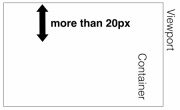
The distance from the top of the page is greater than 20px, which is expressed as position:relative;
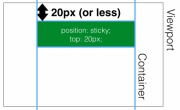
is less than 20px from the top of the page, showing position:fixed;
position:sticky to achieve fixed head navigation bar
<p class="con">
    <p class="samecon">
        <h2 id="标题一">标题一</h2>
        <p>这是一段文本</p>
        <p>这是一段文本</p>
        <p>这是一段文本</p>
    </p>
    <p class="samecon">
        <h2 id="标题二">标题二</h2>
        <p>这是一段文本</p>
        <p>这是一段文本</p>
        <p>这是一段文本</p>
    </p>
    <p class="samecon">
        <h2 id="标题三">标题三</h2>
        <p>这是一段文本</p>
        <p>这是一段文本</p>
        <p>这是一段文本</p>
    </p>
    <p class="samecon">
        <h2 id="标题四">标题四</h2>
        <p>这是一段文本</p>
        <p>这是一段文本</p>
        <p>这是一段文本</p>
    </p>
    <p class="samecon">
        <h2 id="标题五">标题五</h2>
        <p>这是一段文本</p>
        <p>这是一段文本</p>
        <p>这是一段文本</p>
    </p>
    <p class="samecon">
        <h2 id="标题五六">标题五六</h2>
        <p>这是一段文本</p>
        <p>这是一段文本</p>
        <p>这是一段文本</p>
    </p>
</p>
CSS code: .samecon h2{
position: -webkit-sticky;
position: sticky;
top: 0;
background:#ccc;
padding:10px 0;
}Similarly, It is also possible to achieve beyond fixation of the side navigation bar.
Effective rules
- Must specify one of the four thresholds
top, right, bottom or left
Enable sticky positioning. Otherwise the behavior is the same as relative positioning. - And
top
andbottomare set at the same time,toptakes effect with higher priority, ## When #leftandrightare set at the same time,lefthas higher priority. - position:sticky
The
overflowattribute of any parent node of the element must bevisible, otherwiseposition:sticky will not take effect. An explanation is needed here: - position:sticky
element is set to
overflow:hidden, then the parent The container cannot be scrolled, so theposition:stickyelement will not be scrolled and then fixed. If the positioning of any parent node of the - position:sticky
element is set to
position:relative | absolute | fixed, the element will be positioned relative to the parent element Positioning, rather than relativeviewprotpositioning. - position:sticky
is set to behave as
relativeorfixedis determined based on whether the element reaches the set threshold. of. Compatibility
- If any parent node positioning of the
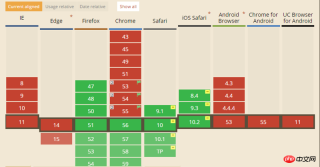 The compatibility of this attribute is not very good. It is still an experimental attribute and is not a standard recommended by W3C.
The above is the entire content of this article. I hope it will be helpful to everyone's study. For more related content, please pay attention to the PHP Chinese website!
Related recommendations:
About how to use the animation attribute in CSSHow to use CSS3 box-reflect to create Reflection effectThe above is the detailed content of CSS uses position:sticky to implement sticky layout. For more information, please follow other related articles on the PHP Chinese website!

 A Little Reminder That Pseudo Elements are Children, Kinda.Apr 19, 2025 am 11:39 AM
Here's a container with some child elements:
 Menus with 'Dynamic Hit Areas'Apr 19, 2025 am 11:37 AM
Flyout menus! The second you need to implement a menu that uses a hover event to display more menu items, you're in tricky territory. For one, they should
 Improving Video Accessibility with WebVTTApr 19, 2025 am 11:27 AM
"The power of the Web is in its universality. Access by everyone regardless of disability is an essential aspect."- Tim Berners-Lee
 Weekly Platform News: CSS ::marker pseudo-element, pre-rendering web components, adding Webmention to your siteApr 19, 2025 am 11:25 AM
In this week's roundup: datepickers are giving keyboard users headaches, a new web component compiler that helps fight FOUC, we finally get our hands on styling list item markers, and four steps to getting webmentions on your site.
 Making width and flexible items play nice togetherApr 19, 2025 am 11:23 AM
The short answer: flex-shrink and flex-basis are probably what you’re lookin’ for.

 Weekly Platform News: HTML Inspection in Search Console, Global Scope of Scripts, Babel env Adds defaults QueryApr 19, 2025 am 11:18 AM
In this week's look around the world of web platform news, Google Search Console makes it easier to view crawled markup, we learn that custom properties
 IndieWeb and WebmentionsApr 19, 2025 am 11:16 AM
The IndieWeb is a thing! They've got a conference coming up and everything. The New Yorker is even writing about it:


Hot AI Tools

Undresser.AI Undress
AI-powered app for creating realistic nude photos

AI Clothes Remover
Online AI tool for removing clothes from photos.

Undress AI Tool
Undress images for free

Clothoff.io
AI clothes remover

AI Hentai Generator
Generate AI Hentai for free.

Hot Article
Hot Tools

PhpStorm Mac version
The latest (2018.2.1) professional PHP integrated development tool

SublimeText3 Mac version
God-level code editing software (SublimeText3)

SAP NetWeaver Server Adapter for Eclipse
Integrate Eclipse with SAP NetWeaver application server.

EditPlus Chinese cracked version
Small size, syntax highlighting, does not support code prompt function

DVWA
Damn Vulnerable Web App (DVWA) is a PHP/MySQL web application that is very vulnerable. Its main goals are to be an aid for security professionals to test their skills and tools in a legal environment, to help web developers better understand the process of securing web applications, and to help teachers/students teach/learn in a classroom environment Web application security. The goal of DVWA is to practice some of the most common web vulnerabilities through a simple and straightforward interface, with varying degrees of difficulty. Please note that this software

