



This time I will show you how to use Vue2.0 to configure mint-ui, and what are the precautions for using Vue2.0 to configure mint-ui. The following is a practical case, let's take a look.
Recently, I have gradually adopted the vue.js mint-ui technology stack when developing projects. However, when I startedconfiguring the development environment yesterday, I encountered various errors, even if I followed the two companies’ The official document configuration will still report errors. I went back to configure it after get off work all night before finally configuring it, so I recorded it to prevent it from happening again later. .
Introduction to vue.js
Vue.js is a tool for creating web interactive interfaces. Its characteristics are- Concise HTML template JSON data, and then create a Vue instance, it's that simple.
- Data-driven Automatically track dependent templates
expressions and calculated properties.
- Componentization uses decoupled and reusable components to construct the interface.
- Lightweight ~24kb min gzip, no dependencies.
- Fast, precise and effective asynchronous batch DOM updates.
- Module Friendly Install via NPM or Bower and integrate seamlessly into your workflow.
mint-ui introduction
Mint UI is based on the open source of the Ele.me front-end team The features of Vue.js’s mobile component library are:- Mint UI contains rich CSS and JS components, which can meet daily mobile development needs. Through it, you can quickly build a page with a unified style and improve development efficiency.
- True loading of components on demand. You can load only the declared components and their style files, without worrying about the file size being too large.
- Taking into account the performance threshold of the mobile terminal, Mint UI uses CSS3 to handle various animations to avoid unnecessary redrawing and rearrangement of the browser, so that users can get a smooth experience. experience.
- Relying on Vue.js’ efficient componentization solution, Mint UI is lightweight. Even if all are imported, the compressed file size is only ~30kb (JS CSS) gzip.
Create Vue.js project
First create it locally according to the method given by vue official website A vue project# 全局安装 vue-cli $ npm install --global vue-cli # 创建一个基于 webpack 模板的新项目 $ vue init webpack my-project # 安装依赖,走你 $ cd my-project $ npm install $ npm run dev
Configure the Mint UI environment
Then introduce the Mint UI environment into the project according to the official website of Mint UInpm i mint-ui -SThen in the project The main.js file in introduces all components
import Vue from 'vue'
import MintUI from 'mint-ui'
import 'mint-ui/lib/style.css'
import App from './App.vue'
Vue.use(MintUI)
Okay, according to the official website, the above code completes the introduction of Mint UI.
Run the project
Finally, write a button component in APP.vue according to the content of the official website and take a look<template>
<p>
<mt-button>按钮</mt-button>
</p>
</template>
<script>
export default{
el: '#app',
methods: {
handleClick: function() {
this.$toast('Hello world!');
}
}
}
</script>
<style>
</style>Okay, the environment is set up. Let’s run the project
npm run devand then report various errors
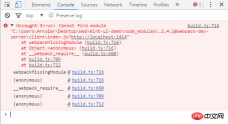
solve the errors
First You need to install the CSS interpreter in your local projectnpm i css-loader style-loader -D
{
    test: /\.css$/,
    include: [
     /src/,
     '/node_modules/mint-ui/lib/'
    ],
    use:[
     {loader:"style-loader"},
     {loader:"css-loader"},
    ]

   }
If you report an error such as es2015, you need to modify the .babelrc file to:
{
 "presets": [
  ["es2015", { "modules": false }]
 ],
 "plugins": [["component", [
  {
   "libraryName": "mint-ui",
   "style": true
  }
 ]]]
}
Finally run
After the environment is configured, we finally run it.npm run dev

How to use JS to obtain the absolute position of DOM elements
How to perform vue.js login control
The above is the detailed content of How to configure mint-ui using Vue2.0. For more information, please follow other related articles on the PHP Chinese website!

 JavaScript and the Web: Core Functionality and Use CasesApr 18, 2025 am 12:19 AM
The main uses of JavaScript in web development include client interaction, form verification and asynchronous communication. 1) Dynamic content update and user interaction through DOM operations; 2) Client verification is carried out before the user submits data to improve the user experience; 3) Refreshless communication with the server is achieved through AJAX technology.
 Understanding the JavaScript Engine: Implementation DetailsApr 17, 2025 am 12:05 AM
Understanding how JavaScript engine works internally is important to developers because it helps write more efficient code and understand performance bottlenecks and optimization strategies. 1) The engine's workflow includes three stages: parsing, compiling and execution; 2) During the execution process, the engine will perform dynamic optimization, such as inline cache and hidden classes; 3) Best practices include avoiding global variables, optimizing loops, using const and lets, and avoiding excessive use of closures.
 Python vs. JavaScript: The Learning Curve and Ease of UseApr 16, 2025 am 12:12 AM
Python is more suitable for beginners, with a smooth learning curve and concise syntax; JavaScript is suitable for front-end development, with a steep learning curve and flexible syntax. 1. Python syntax is intuitive and suitable for data science and back-end development. 2. JavaScript is flexible and widely used in front-end and server-side programming.
 Python vs. JavaScript: Community, Libraries, and ResourcesApr 15, 2025 am 12:16 AM
Python and JavaScript have their own advantages and disadvantages in terms of community, libraries and resources. 1) The Python community is friendly and suitable for beginners, but the front-end development resources are not as rich as JavaScript. 2) Python is powerful in data science and machine learning libraries, while JavaScript is better in front-end development libraries and frameworks. 3) Both have rich learning resources, but Python is suitable for starting with official documents, while JavaScript is better with MDNWebDocs. The choice should be based on project needs and personal interests.
 From C/C to JavaScript: How It All WorksApr 14, 2025 am 12:05 AM
The shift from C/C to JavaScript requires adapting to dynamic typing, garbage collection and asynchronous programming. 1) C/C is a statically typed language that requires manual memory management, while JavaScript is dynamically typed and garbage collection is automatically processed. 2) C/C needs to be compiled into machine code, while JavaScript is an interpreted language. 3) JavaScript introduces concepts such as closures, prototype chains and Promise, which enhances flexibility and asynchronous programming capabilities.
 JavaScript Engines: Comparing ImplementationsApr 13, 2025 am 12:05 AM
Different JavaScript engines have different effects when parsing and executing JavaScript code, because the implementation principles and optimization strategies of each engine differ. 1. Lexical analysis: convert source code into lexical unit. 2. Grammar analysis: Generate an abstract syntax tree. 3. Optimization and compilation: Generate machine code through the JIT compiler. 4. Execute: Run the machine code. V8 engine optimizes through instant compilation and hidden class, SpiderMonkey uses a type inference system, resulting in different performance performance on the same code.
 Beyond the Browser: JavaScript in the Real WorldApr 12, 2025 am 12:06 AM
JavaScript's applications in the real world include server-side programming, mobile application development and Internet of Things control: 1. Server-side programming is realized through Node.js, suitable for high concurrent request processing. 2. Mobile application development is carried out through ReactNative and supports cross-platform deployment. 3. Used for IoT device control through Johnny-Five library, suitable for hardware interaction.
 Building a Multi-Tenant SaaS Application with Next.js (Backend Integration)Apr 11, 2025 am 08:23 AM
I built a functional multi-tenant SaaS application (an EdTech app) with your everyday tech tool and you can do the same. First, what’s a multi-tenant SaaS application? Multi-tenant SaaS applications let you serve multiple customers from a sing


Hot AI Tools

Undresser.AI Undress
AI-powered app for creating realistic nude photos

AI Clothes Remover
Online AI tool for removing clothes from photos.

Undress AI Tool
Undress images for free

Clothoff.io
AI clothes remover

AI Hentai Generator
Generate AI Hentai for free.

Hot Article
Hot Tools

Atom editor mac version download
The most popular open source editor

SecLists
SecLists is the ultimate security tester's companion. It is a collection of various types of lists that are frequently used during security assessments, all in one place. SecLists helps make security testing more efficient and productive by conveniently providing all the lists a security tester might need. List types include usernames, passwords, URLs, fuzzing payloads, sensitive data patterns, web shells, and more. The tester can simply pull this repository onto a new test machine and he will have access to every type of list he needs.

PhpStorm Mac version
The latest (2018.2.1) professional PHP integrated development tool

SAP NetWeaver Server Adapter for Eclipse
Integrate Eclipse with SAP NetWeaver application server.

Dreamweaver CS6
Visual web development tools

