


How to use jQuery.i18n.properties to internationalize JS code

This time I will show you how to use jQuery.i18n.properties to internationalize JS code, and what are the precautions for using jQuery.i18n.properties to internationalize JS code. The following is a practical case. Let’s take a look.
When we are developing the front-end page, because the page content is too much and too complicated, sometimes there are thousands of lines on one page (of course, such a page is considered ordinary). In order to reduce the content of the page, We extract the js file of the page, put it into a specific js file, and then import it into the page. In this way, when we need to internationalize the application, we need to consider the internationalization of js. Here we introduce the use of JQuery.i18n.properties to achieve the internationalization of js. PS: jQuery.i18n.properties is a lightweight jQuery internationalization plug-in. Similar to resource files in Java, jQuery.i18n.properties uses .properties files to internationalize Using resource files to achieve internationalization is a popular way. For example, Android applications can use resource files named after language and country encoding to achieve internationalization. The resource files in the jQuery.i18n.properties plug-in are suffixed with ".properties" and contain region-related key-value pairs. We know that Java programs can also use resource files with the .properties suffix to achieve internationalization, so this method is particularly useful when we want to share resource files between Java programs and front-end JavaScript programs. The jQuery.i18n.properties plug-in first loads the default resource file (for example: strings.properties), and then loads the resource file for a specific locale (for example: strings_zh.properties), which ensures that when a translation for a certain language is not provided , the default value is always valid. Developers can use keys in resource files as JavaScript variables (or functions) or Maps. So how to use jQuery.i18n.properties to achieve js internationalization? Step one: Create the properties resource file. The naming rule for property resource files is: string_browser language shortcode.properties, for example, Simplified Chinese: string_zh-CN.properties. It should be noted here that it is a dash instead of an underline. As shown in the figure, I created three Resource filesjs_en-US.properties (US English), js_ja.properties (Japanese), js_zh-CN.properties (Simplified Chinese).

<script>
$(document).ready(function(){
//国际化加载属性文件
jQuery.i18n.properties({
name:'js',
path:'<%=path%>/js/i18n/',
mode:'map',
callback: function() {// 加载成功后设置显示内容
//alert(jQuery.i18n.prop("theme_manage.js_activity"));
}
});
});
</script>The value after name is the string in front of the language shortcode in the resource file you defined , because my resource file is js_xxx.properties, so this value is js
The value after path is the relative path of your resource file. That is, relative to the path under the project structure WebContent, the value after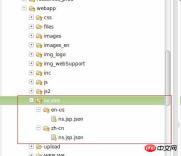
callback function.
How to load different resource files according to different locale environments? In fact, the implementation principle of jQuery.i18n.properties is thatfinds the corresponding resource file based on the value after name, plus the browser's language shortcode, and .properties. This process is automatic and only requires the above configuration.
The key-value pairs in properties are as follows: (Chinese characters in the properties file will be automatically converted into corresponding ASCII values. Of course, this can be set or changed through plug-ins. I haven’t done it yet. Anyway, these Chinese characters It is copied from the page, ignore it), the one before the equal sign is the key, and the one after the equal sign is the value (note that the key in different resource files must be consistent and customized).

The content in the resource file has been loaded.
Step 4: Find the corresponding value in the js file based on the key.

The red part is the way to get the value. The string in quotation marks corresponds to the key value in the resource file above.
Things to note:
This method can be implemented in Google and Firefox browsers without any problem. But there will be problems in IE browser. The problem is that the locale obtained every time when using IE browser is the system language, not the browser language.
I have been struggling with this problem for a long time. There are some methods on the Internet to obtain the language of the browser, but it does not work in IE. In the end, my solution is: use jQuery.i18n.properties to load Before the resource file, first obtain the language of the browser in the request header information, and then set it.
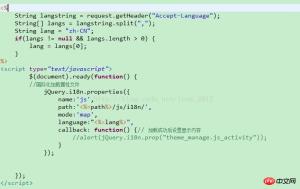
The internationalization ends here.
This is my first blog. I used to read other people’s blogs. Later, I found that the problem I encountered was solved. However, after a while, I found that I had forgotten it. I encountered it many times. I had the same problem, but later I forgot how to solve it, so I looked for information online again. This is the direct reason why I decided to write a blog. However, it does feel good to write a blog, as you can record your learning process. I hope everyone can try this too.
I believe you have mastered the method after reading the case in this article. For more exciting information, please pay attention to other related articles on the php Chinese website!
Recommended reading:
Detailed explanation of steps to optimize vue project
Usage of JS callback function (with code)
The above is the detailed content of How to use jQuery.i18n.properties to internationalize JS code. For more information, please follow other related articles on the PHP Chinese website!

 Python vs. JavaScript: The Learning Curve and Ease of UseApr 16, 2025 am 12:12 AM
Python is more suitable for beginners, with a smooth learning curve and concise syntax; JavaScript is suitable for front-end development, with a steep learning curve and flexible syntax. 1. Python syntax is intuitive and suitable for data science and back-end development. 2. JavaScript is flexible and widely used in front-end and server-side programming.
 Python vs. JavaScript: Community, Libraries, and ResourcesApr 15, 2025 am 12:16 AM
Python and JavaScript have their own advantages and disadvantages in terms of community, libraries and resources. 1) The Python community is friendly and suitable for beginners, but the front-end development resources are not as rich as JavaScript. 2) Python is powerful in data science and machine learning libraries, while JavaScript is better in front-end development libraries and frameworks. 3) Both have rich learning resources, but Python is suitable for starting with official documents, while JavaScript is better with MDNWebDocs. The choice should be based on project needs and personal interests.
 From C/C to JavaScript: How It All WorksApr 14, 2025 am 12:05 AM
The shift from C/C to JavaScript requires adapting to dynamic typing, garbage collection and asynchronous programming. 1) C/C is a statically typed language that requires manual memory management, while JavaScript is dynamically typed and garbage collection is automatically processed. 2) C/C needs to be compiled into machine code, while JavaScript is an interpreted language. 3) JavaScript introduces concepts such as closures, prototype chains and Promise, which enhances flexibility and asynchronous programming capabilities.
 JavaScript Engines: Comparing ImplementationsApr 13, 2025 am 12:05 AM
Different JavaScript engines have different effects when parsing and executing JavaScript code, because the implementation principles and optimization strategies of each engine differ. 1. Lexical analysis: convert source code into lexical unit. 2. Grammar analysis: Generate an abstract syntax tree. 3. Optimization and compilation: Generate machine code through the JIT compiler. 4. Execute: Run the machine code. V8 engine optimizes through instant compilation and hidden class, SpiderMonkey uses a type inference system, resulting in different performance performance on the same code.
 Beyond the Browser: JavaScript in the Real WorldApr 12, 2025 am 12:06 AM
JavaScript's applications in the real world include server-side programming, mobile application development and Internet of Things control: 1. Server-side programming is realized through Node.js, suitable for high concurrent request processing. 2. Mobile application development is carried out through ReactNative and supports cross-platform deployment. 3. Used for IoT device control through Johnny-Five library, suitable for hardware interaction.
 Building a Multi-Tenant SaaS Application with Next.js (Backend Integration)Apr 11, 2025 am 08:23 AM
I built a functional multi-tenant SaaS application (an EdTech app) with your everyday tech tool and you can do the same. First, what’s a multi-tenant SaaS application? Multi-tenant SaaS applications let you serve multiple customers from a sing
 How to Build a Multi-Tenant SaaS Application with Next.js (Frontend Integration)Apr 11, 2025 am 08:22 AM
This article demonstrates frontend integration with a backend secured by Permit, building a functional EdTech SaaS application using Next.js. The frontend fetches user permissions to control UI visibility and ensures API requests adhere to role-base
 JavaScript: Exploring the Versatility of a Web LanguageApr 11, 2025 am 12:01 AM
JavaScript is the core language of modern web development and is widely used for its diversity and flexibility. 1) Front-end development: build dynamic web pages and single-page applications through DOM operations and modern frameworks (such as React, Vue.js, Angular). 2) Server-side development: Node.js uses a non-blocking I/O model to handle high concurrency and real-time applications. 3) Mobile and desktop application development: cross-platform development is realized through ReactNative and Electron to improve development efficiency.


Hot AI Tools

Undresser.AI Undress
AI-powered app for creating realistic nude photos

AI Clothes Remover
Online AI tool for removing clothes from photos.

Undress AI Tool
Undress images for free

Clothoff.io
AI clothes remover

AI Hentai Generator
Generate AI Hentai for free.

Hot Article
Hot Tools

ZendStudio 13.5.1 Mac
Powerful PHP integrated development environment

PhpStorm Mac version
The latest (2018.2.1) professional PHP integrated development tool

SecLists
SecLists is the ultimate security tester's companion. It is a collection of various types of lists that are frequently used during security assessments, all in one place. SecLists helps make security testing more efficient and productive by conveniently providing all the lists a security tester might need. List types include usernames, passwords, URLs, fuzzing payloads, sensitive data patterns, web shells, and more. The tester can simply pull this repository onto a new test machine and he will have access to every type of list he needs.

DVWA
Damn Vulnerable Web App (DVWA) is a PHP/MySQL web application that is very vulnerable. Its main goals are to be an aid for security professionals to test their skills and tools in a legal environment, to help web developers better understand the process of securing web applications, and to help teachers/students teach/learn in a classroom environment Web application security. The goal of DVWA is to practice some of the most common web vulnerabilities through a simple and straightforward interface, with varying degrees of difficulty. Please note that this software

VSCode Windows 64-bit Download
A free and powerful IDE editor launched by Microsoft

