



Below I will share with you an example of axios post submitting formdata. It has a good reference value and I hope it will be helpful to everyone.
The vue framework recommends using axios to send ajax requests. I also wrote a blog before to explain how to use axios in vue components. But before, I only used get requests for fun. Now I use the post method when setting up my blog. It turns out that the backend (node.js) cannot get the parameters passed from the frontend at all. After some exploration, I finally found the problem.
Four coding methods for post submission data
1.application/x-www-form-urlencoded
This should be the most common post encoding method. Generally, form submissions are submitted in this way by default. Most server languages have good support for this method. In PHP, you can use $_POST["key"] to get the value of key. In node, we can use querystring middleware to separate parameters
app.post("/server",function(req,res){
 req.on("data",function(data){
 let key=querystring.parse(decodeURIComponent(data)).key;
 console.log("querystring:"+key)
 });
});
2.multipart/form-data
This is also a relatively common post data format. When we use a form to upload files, we must use the form form The enctype attribute or the contentType parameter of ajax is equal to multipart/form-data. The data sent to the background when using this encoding format looks like this

Different fields start with --boundary, followed by content description information, and finally the specific content of the field . If a file is transferred, the file name and file type information must also be included
3.application/json
axios default submission uses this Format. If this encoding method is used, the serialized json string will be passed to the background. We can compare application/json with the data sent by application/x-www-form-urlencoded
First application/json:

Then application/x-www-form-urlencoded:

It can be clearly seen that the data uploaded to the background by application/x-www-form-urlencoded is in the form of key-value organized, and application/json is directly a json string. If the background still uses the method of dealing with application/x-www-form-urlencoded when processing application/json, problems will occur.
For example, the background node.js still uses the previous method of dealing with application/x-www-form-urlencoded, then the data obtained after querystring.parse(decodeURIComponent(data)) is like this

At this time, querystring.parse(decodeURIComponent(data)).key can only get undefined
4.text/xml
The remaining encoding format is text/xml, which I have not used much.
Solution
Now that we know that the axios post method uses the application/json format to encode data by default, there are two solutions. One is to change the method of receiving parameters in the background, and the other is to modify the encoding format of the axios post method to application/x-www-form-urlencoded, so no background modification is required.
Let’s look at the first solution first
In the vue component, the code for axios to send a post request is as follows
this.$axios({
 method:"post",
 url:"/api/haveUser",
 data:{
 name:this.name,
 password:this.password
 }
}).then((res)=>{
 console.log(res.data);
})
At this time, the information in the console Network Headers is like this

Receiving data in the background requires relying on the body-parser middleware , we installed it in advance, and then referenced body-parser in the background code
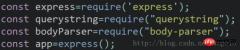
In this screenshot, the code that works is just const bodyParser=require("body-parser ");
Next use body-parser in routing
app.post("/api/haveUser",bodyParser.json(),function(req,res){
 console.log(req.body);
 let haveUser=require("../api/server/user.js");
 haveUser(req.body.name,req.body.password,res);
});
At this time, after the frontend sends a post request, in the background console Req.body

will be printed out. At this time, the corresponding value can be obtained through req.body.name or req.body.password.
This method is relatively simple and does not require too many modifications at the front desk. It is recommended to use this method.
The second solution, the specific operations are as follows
Front end
this.$axios({
 method:"post",
 url:"/api/haveUser",
 headers:{
 'Content-type': 'application/x-www-form-urlencoded'
 },
 data:{
 name:this.name,
 password:this.password
 },
 transformRequest: [function (data) {
 let ret = ''
 for (let it in data) {
  ret += encodeURIComponent(it) + '=' + encodeURIComponent(data[it]) + '&'
 }
 return ret
 }],
}).then((res)=>{
 console.log(res.data);
})
其中发挥关键作用的是headers与transformRequest。其中 headers 是设置即将被发送的自定义请求头。 transformRequest 允许在向服务器发送前,修改请求数据。这样操作之后,后台querystring.parse(decodeURIComponent(data))获取到的就是类似于{ name: 'w', password: 'w' }的对象。
后台代码如下
app.post("/api/haveUser",function(req,res){
 let haveUser=require("../api/server/user.js");
 req.on("data",function(data){
  let name=querystring.parse(decodeURIComponent(data)).name;
  let password=querystring.parse(decodeURIComponent(data)).password;
  console.log(name,password)
  haveUser(name,password,res);
 });
});
这种方法明显就要比第一种麻烦一点,但不需要后台做过多处理。所以具体操作还是得根据实际情况决定。
上面是我整理给大家的,希望今后会对大家有帮助。
相关文章:
The above is the detailed content of Example of axios post submitting formdata. For more information, please follow other related articles on the PHP Chinese website!

 Python vs. JavaScript: Community, Libraries, and ResourcesApr 15, 2025 am 12:16 AM
Python and JavaScript have their own advantages and disadvantages in terms of community, libraries and resources. 1) The Python community is friendly and suitable for beginners, but the front-end development resources are not as rich as JavaScript. 2) Python is powerful in data science and machine learning libraries, while JavaScript is better in front-end development libraries and frameworks. 3) Both have rich learning resources, but Python is suitable for starting with official documents, while JavaScript is better with MDNWebDocs. The choice should be based on project needs and personal interests.
 From C/C to JavaScript: How It All WorksApr 14, 2025 am 12:05 AM
The shift from C/C to JavaScript requires adapting to dynamic typing, garbage collection and asynchronous programming. 1) C/C is a statically typed language that requires manual memory management, while JavaScript is dynamically typed and garbage collection is automatically processed. 2) C/C needs to be compiled into machine code, while JavaScript is an interpreted language. 3) JavaScript introduces concepts such as closures, prototype chains and Promise, which enhances flexibility and asynchronous programming capabilities.
 JavaScript Engines: Comparing ImplementationsApr 13, 2025 am 12:05 AM
Different JavaScript engines have different effects when parsing and executing JavaScript code, because the implementation principles and optimization strategies of each engine differ. 1. Lexical analysis: convert source code into lexical unit. 2. Grammar analysis: Generate an abstract syntax tree. 3. Optimization and compilation: Generate machine code through the JIT compiler. 4. Execute: Run the machine code. V8 engine optimizes through instant compilation and hidden class, SpiderMonkey uses a type inference system, resulting in different performance performance on the same code.
 Beyond the Browser: JavaScript in the Real WorldApr 12, 2025 am 12:06 AM
JavaScript's applications in the real world include server-side programming, mobile application development and Internet of Things control: 1. Server-side programming is realized through Node.js, suitable for high concurrent request processing. 2. Mobile application development is carried out through ReactNative and supports cross-platform deployment. 3. Used for IoT device control through Johnny-Five library, suitable for hardware interaction.
 Building a Multi-Tenant SaaS Application with Next.js (Backend Integration)Apr 11, 2025 am 08:23 AM
I built a functional multi-tenant SaaS application (an EdTech app) with your everyday tech tool and you can do the same. First, what’s a multi-tenant SaaS application? Multi-tenant SaaS applications let you serve multiple customers from a sing
 How to Build a Multi-Tenant SaaS Application with Next.js (Frontend Integration)Apr 11, 2025 am 08:22 AM
This article demonstrates frontend integration with a backend secured by Permit, building a functional EdTech SaaS application using Next.js. The frontend fetches user permissions to control UI visibility and ensures API requests adhere to role-base
 JavaScript: Exploring the Versatility of a Web LanguageApr 11, 2025 am 12:01 AM
JavaScript is the core language of modern web development and is widely used for its diversity and flexibility. 1) Front-end development: build dynamic web pages and single-page applications through DOM operations and modern frameworks (such as React, Vue.js, Angular). 2) Server-side development: Node.js uses a non-blocking I/O model to handle high concurrency and real-time applications. 3) Mobile and desktop application development: cross-platform development is realized through ReactNative and Electron to improve development efficiency.
 The Evolution of JavaScript: Current Trends and Future ProspectsApr 10, 2025 am 09:33 AM
The latest trends in JavaScript include the rise of TypeScript, the popularity of modern frameworks and libraries, and the application of WebAssembly. Future prospects cover more powerful type systems, the development of server-side JavaScript, the expansion of artificial intelligence and machine learning, and the potential of IoT and edge computing.


Hot AI Tools

Undresser.AI Undress
AI-powered app for creating realistic nude photos

AI Clothes Remover
Online AI tool for removing clothes from photos.

Undress AI Tool
Undress images for free

Clothoff.io
AI clothes remover

AI Hentai Generator
Generate AI Hentai for free.

Hot Article
Hot Tools

SAP NetWeaver Server Adapter for Eclipse
Integrate Eclipse with SAP NetWeaver application server.

SublimeText3 Mac version
God-level code editing software (SublimeText3)

Atom editor mac version download
The most popular open source editor

Dreamweaver CS6
Visual web development tools

EditPlus Chinese cracked version
Small size, syntax highlighting, does not support code prompt function

