


 Web Front-endJS TutorialAjax implements the function of registering and selecting an avatar and then uploading it
Ajax implements the function of registering and selecting an avatar and then uploading it

This article mainly introduces the Ajax function of registering and selecting an avatar and then uploading it. It is very good and has reference value. Friends in need can refer to it
After the first contact with ajax, we made a crm For training projects, most groups have registered users, but they all ignore one feature, that is, registration on many websites allows you to upload avatars. Here I made a selection from the existing avatar array. A small CRM that uploads pictures as avatars (of course, I haven't made one that can upload and crop local photos, but I will study it as long as I have time, and I believe it won't take long).
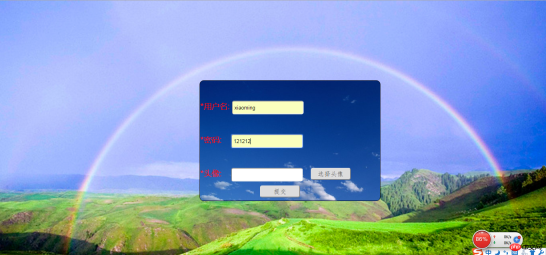
1. First write a registration page and css style. I named it regist.html, and the css file is called regist.css. I omit the specific code here. See the effect in the picture above: (The page is a bit ugly. , don’t mind)

There is also an information.html page used to display the added records. At this time, there is only the header:

2. Write the connection pool module (dbutil.js), which is the js file for establishing the link. What I built here is the users_infor table, and the database used is test.
var mysql = require('mysql');
var pool = mysql.createPool({
host : 'localhost',
user : 'root',
password : 'lovo',
database:"test",
port:3306
});
exports.pool=pool;
3. Write a module to connect to the database and process (add, delete, modify and query) user data (Userdao.js), which contains the same functions for operating the database Name it getAllUser:
var db = require("../DBUtil/dbutil.js");
//var conn = db.conn;
var mypool =db.pool;
function getAllUser(sql,arg,fun){
mypool.getConnection(function(err,conn){
conn.query(sql,arg,fun);
conn.end();
})
}
exports.getAllUser=getAllUser;
4. Write the module to operate the database, that is, add, delete, modify, and query the data table (Userservice.js ):
var dao = require("../dao/UserDao.js");
Define the registration function, which is the function that adds new records to the data table user_infor
exports.regist = function(req,res){
var arg;
if (req.method == "get" || req.method == "GET") {
arg = [req.query.username, req.query.pwd, req.query.pics];
} else {
arg = [req.body.username, req.body.pwd, req.body.pics];
}
var sql = "insert into user_infor(u_name,u_pwd,u_pics) values(?,?,?)"
dao.getAllUser(sql, arg, function (err, result) {
if (err) {
console.log(err);
} else {
if (result.affectedRows>0){
res.sendfile("./static/html/information.html")
} else {
res.sendfile("./static/html/regist.html")
}
}
})
}
Define the function that displays all the records of the information.html page, that is, the function that queries all the contents of the user_infor table
exports.listAll=function(req,res){
var sql = " select * from user_infor ";
dao.getAllUser(sql,function (err, result, fields) {
if (err){
console.log(err);
} else {
if (result.length>0){
res.json(result);console.log(result)
} else {
res.send("failed");
}
}
})
}
5. Of course, don’t forget to introduce For the two modules express and mysql, create a new folder node_module and include these two modules in it.
6. Then, write a main js file (main.js), which is the js that interacts with the user:
var http = require("http");
var express = require("express");
var userser = require("./route/UserService.js");
var url= require("url");
var app = express();
app.use(express.cookieParser());
app.use(express.session({
secret:"123456",
name:"userLogin",
cookie:{maxAge:9999999}
}))
app.set("port",8888);
app.use(express.static(__dirname+"/static"));
app.use(express.methodOverride());
app.use(express.bodyParser());
app.post("/regist",userser.regist);
app.post("/list",userser.listAll);
http.createServer(app).listen(app.get("port"),function(){
console.log("服务启动成功!监听"+app.get("port")+"端口");
})
7. The following js files are for register and information, respectively:
-------------------------- ------Function to select avatar on the register page----------------------------------------- -----------------------
function xuanze() {
var pics=document.getElementById("pics");
var picsp = document.getElementById("login_pics");
picsp.style.display = 'block';
var img=document.getElementsByTagName("img");
var picarrs=["../img/user1.jpg",
"../img/user2.jpg",
"../img/user3.jpg",
"../img/user4.jpg",
"../img/user5.jpg",
"../img/user6.jpg",
"../img/user7.jpg",
"../img/user8.jpg",
"../img/user9.jpg",
"../img/user10.jpg",
"../img/user11.jpg",
"../img/user12.jpg",
"../img/user13.jpg",
"../img/user14.jpg",
"../img/user15.jpg",
"../img/user16.jpg",
"../img/user17.jpg",
"../img/user18.jpg",
"../img/user19.jpg",
"../img/user20.jpg",
"../img/user21.jpg",
"../img/user22.jpg",
"../img/user23.jpg",
"../img/user24.jpg"];
for(var i=0;i<picarrs.length;i++){
img[i].src=picarrs[i];
}
for(var j=0;j<img src="/static/imghwm/default1.png"  data-src="https://img.php.cn/upload/article/000/118/027/06235c482359180d8c2d8ed6ba8ba34b-2.png?x-oss-process=image/resize,p_40"  class="lazy" .length;j++){
img[j].onclick=function(e){
var target= e.target|| e.srcElement;
var imgroute=target.src;//此处若弹出imgroute,可以看到完全路径是http:localhost:8888/img/users20.jpg
pics.value=".."+imgroute.substr(21);/*此处要截取后面的部分才是图片的路径,前面的http:localhost:8888要省去,不是我们需要的路径,若不截取将无法识别*/
}
}
}
--------- ---------------The information page displays all recorded functions, and all are displayed as soon as the window is loaded---------------------- --------------------------
window.onload=function(){
var xmlhttpReq;
if (window.XMLHttpRequest)
xmlhttpReq=new XMLHttpRequest();
else
xmlhttpReq=new ActiveXObject("Microsoft.XMLHTTP");
var url="http://localhost:8888/list";
//初始化信息
xmlhttpReq.open("post",url,true);
//添加请求头
xmlhttpReq.setRequestHeader("Content-type","application/x-www-form-urlencoded");
xmlhttpReq.send(null);
xmlhttpReq.onreadystatechange = function(){
if (xmlhttpReq.readyState==4 && xmlhttpReq.status==200) {
if (xmlhttpReq.responseText != "failed"){
var userinfor = document.getElementById("userinfor");
var users = eval("(" + xmlhttpReq.responseText + ")");
for (var i = 0; i < users.length; i++){
var newRow = userinfor.insertRow();
newRow.style.height = "100px";
newRow.style.backgroundColor = "skyblue";
newRow.insertCell(newRow.cells.length).innerHTML =users[i].u_name;
newRow.insertCell(newRow.cells.length).innerHTML =users[i].u_pwd;
newRow.insertCell(newRow.cells.length).innerHTML ="<img src="/static/imghwm/default1.png" data-src="https://img.php.cn/upload/article/000/118/027/06235c482359180d8c2d8ed6ba8ba34b-2.png?x-oss-process=image/resize,p_40" class="lazy" src='"+users[i].u_pics+"' alt="Ajax implements the function of registering and selecting an avatar and then uploading it" >";//此处要在这个单元格里插入img元素,将提交传过来的路径指定为此img的
src, if you don’t have this img element, the path displayed here is still the path, and no picture will appear.
newRow.insertCell(newRow.cells.length).innerHTML ="<input type='button' id='del' id='" + users[i].u_id + "' value='删除信息' onclick='shanchu(this)'/>";
}
} else if (xmlhttpReq.responseText == "failed") {
alert("添加新用户失败");
}
}
}
}
8. And the most important point is that when creating a new user_infor table in the database, specify the user_pics field to specify the path where the pictures are stored:
USE test;
DROP TABLE IF EXISTS user_infor;
CREATE TABLE user_infor(
u_id INT PRIMARY KEY AUTO_INCREMENT,
u_name CHAR(20) NOT NULL,
u_pwd CHAR(20) NOT NULL,
u_pics CHAR(100) NOT NULL
)
INSERT INTO user_infor(u_name,u_pwd,u_pics) VALUES
('xiaoming','111111','../img/user12.jpg'),
('xiaofang','222222','../img/user13.jpg'),
('xiaozhou','333333','../img/user14.jpg')
The file storage relationship of the entire project is as follows:

Open the database with SQLyog and run main.js. Open register.html in the browser, start registration and select an avatar:

Click on an avatar and return to the avatar The path to the image is generated in the text text box, as follows:

#Click submit to complete the registration. The page jumps to the information page. After several successful registrations, the page It will be displayed as follows:

The above is what I compiled for everyone. I hope it will be helpful to everyone in the future.
Related articles:
Details the differences between async:false and async:true in Ajax requests
Ajax and Mysql data interaction production message board function
Instances of ajax responding to json strings and json arrays (graphic tutorial)
The above is the detailed content of Ajax implements the function of registering and selecting an avatar and then uploading it. For more information, please follow other related articles on the PHP Chinese website!

 Python vs. JavaScript: The Learning Curve and Ease of UseApr 16, 2025 am 12:12 AM
Python is more suitable for beginners, with a smooth learning curve and concise syntax; JavaScript is suitable for front-end development, with a steep learning curve and flexible syntax. 1. Python syntax is intuitive and suitable for data science and back-end development. 2. JavaScript is flexible and widely used in front-end and server-side programming.
 Python vs. JavaScript: Community, Libraries, and ResourcesApr 15, 2025 am 12:16 AM
Python and JavaScript have their own advantages and disadvantages in terms of community, libraries and resources. 1) The Python community is friendly and suitable for beginners, but the front-end development resources are not as rich as JavaScript. 2) Python is powerful in data science and machine learning libraries, while JavaScript is better in front-end development libraries and frameworks. 3) Both have rich learning resources, but Python is suitable for starting with official documents, while JavaScript is better with MDNWebDocs. The choice should be based on project needs and personal interests.
 From C/C to JavaScript: How It All WorksApr 14, 2025 am 12:05 AM
The shift from C/C to JavaScript requires adapting to dynamic typing, garbage collection and asynchronous programming. 1) C/C is a statically typed language that requires manual memory management, while JavaScript is dynamically typed and garbage collection is automatically processed. 2) C/C needs to be compiled into machine code, while JavaScript is an interpreted language. 3) JavaScript introduces concepts such as closures, prototype chains and Promise, which enhances flexibility and asynchronous programming capabilities.
 JavaScript Engines: Comparing ImplementationsApr 13, 2025 am 12:05 AM
Different JavaScript engines have different effects when parsing and executing JavaScript code, because the implementation principles and optimization strategies of each engine differ. 1. Lexical analysis: convert source code into lexical unit. 2. Grammar analysis: Generate an abstract syntax tree. 3. Optimization and compilation: Generate machine code through the JIT compiler. 4. Execute: Run the machine code. V8 engine optimizes through instant compilation and hidden class, SpiderMonkey uses a type inference system, resulting in different performance performance on the same code.
 Beyond the Browser: JavaScript in the Real WorldApr 12, 2025 am 12:06 AM
JavaScript's applications in the real world include server-side programming, mobile application development and Internet of Things control: 1. Server-side programming is realized through Node.js, suitable for high concurrent request processing. 2. Mobile application development is carried out through ReactNative and supports cross-platform deployment. 3. Used for IoT device control through Johnny-Five library, suitable for hardware interaction.
 Building a Multi-Tenant SaaS Application with Next.js (Backend Integration)Apr 11, 2025 am 08:23 AM
I built a functional multi-tenant SaaS application (an EdTech app) with your everyday tech tool and you can do the same. First, what’s a multi-tenant SaaS application? Multi-tenant SaaS applications let you serve multiple customers from a sing
 How to Build a Multi-Tenant SaaS Application with Next.js (Frontend Integration)Apr 11, 2025 am 08:22 AM
This article demonstrates frontend integration with a backend secured by Permit, building a functional EdTech SaaS application using Next.js. The frontend fetches user permissions to control UI visibility and ensures API requests adhere to role-base
 JavaScript: Exploring the Versatility of a Web LanguageApr 11, 2025 am 12:01 AM
JavaScript is the core language of modern web development and is widely used for its diversity and flexibility. 1) Front-end development: build dynamic web pages and single-page applications through DOM operations and modern frameworks (such as React, Vue.js, Angular). 2) Server-side development: Node.js uses a non-blocking I/O model to handle high concurrency and real-time applications. 3) Mobile and desktop application development: cross-platform development is realized through ReactNative and Electron to improve development efficiency.


Hot AI Tools

Undresser.AI Undress
AI-powered app for creating realistic nude photos

AI Clothes Remover
Online AI tool for removing clothes from photos.

Undress AI Tool
Undress images for free

Clothoff.io
AI clothes remover

AI Hentai Generator
Generate AI Hentai for free.

Hot Article
Hot Tools

ZendStudio 13.5.1 Mac
Powerful PHP integrated development environment

PhpStorm Mac version
The latest (2018.2.1) professional PHP integrated development tool

SecLists
SecLists is the ultimate security tester's companion. It is a collection of various types of lists that are frequently used during security assessments, all in one place. SecLists helps make security testing more efficient and productive by conveniently providing all the lists a security tester might need. List types include usernames, passwords, URLs, fuzzing payloads, sensitive data patterns, web shells, and more. The tester can simply pull this repository onto a new test machine and he will have access to every type of list he needs.

DVWA
Damn Vulnerable Web App (DVWA) is a PHP/MySQL web application that is very vulnerable. Its main goals are to be an aid for security professionals to test their skills and tools in a legal environment, to help web developers better understand the process of securing web applications, and to help teachers/students teach/learn in a classroom environment Web application security. The goal of DVWA is to practice some of the most common web vulnerabilities through a simple and straightforward interface, with varying degrees of difficulty. Please note that this software

VSCode Windows 64-bit Download
A free and powerful IDE editor launched by Microsoft

