


 Backend DevelopmentPython TutorialDetailed explanation of Django's method of operating database based on ORM
Detailed explanation of Django's method of operating database based on ORM

This article mainly introduces Django's method of operating the database based on ORM. It summarizes and analyzes the related configuration, addition, deletion, modification and query of Django's use of ORM to operate the database in the form of examples. Friends who need it can refer to it. I hope it can help. to everyone.
1. Configure the database
vim settings #HelloWorld/HelloWorld目录下
DATABASES = {
  'default': {
    'ENGINE': 'django.db.backends.mysql', #mysql数据库中第一个库test
    'NAME': 'test',
    'USER': 'root',
    'PASSWORD': '123456',
    'HOST':'127.0.0.1',
    'PORT':'3306',
  },
  'article': {
    'ENGINE': 'django.db.backends.mysql', # mysql数据库中第二个库test2
    'NAME': 'test2',
    'USER': 'root',
    'PASSWORD': '123456',
    'HOST':'127.0.0.1',
    'PORT':'3306',
  }
}
2. Create a "web site" (app) in the project directory
django-admin.py startapp blog ##HelloWorld/目录下建立网站app,我建了两个app(blog和article)

3. Configure the new app (blog and article)
vim settings ##/HelloWorld/HelloWorld目录下
INSTALLED_APPS = [
  'django.contrib.admin',
  'django.contrib.auth',
  'django.contrib.contenttypes',
  'django.contrib.sessions',
  'django.contrib.messages',
  'django.contrib.staticfiles',
  'blog',
  'article',
]
4. Take blog as an example to create a model
vim models.py ##blog目录下
from django.db import models
# Create your models here.
class Teacher(models.Model):
  id = models.IntegerField(primary_key=True)
  name = models.CharField(max_length=50)
  class Meta:
    db_table = 'teacher'#默认库test中建立名为teacher的表。字段就是id和name
5. Synchronize the model to the database
python manage.py migrate ##Create the Django system table and run it for the first time
python manage.py makemigrations ## Generate a migration plan, and run the generated plan every time you add a table or field
python manage.py migrate ##Synchronize user-defined tables
vim models.py #In the blog directory, create a new table for testing , you can try adding or modifying or deleting a few fields
class Student(models.Model):
  id = models.IntegerField(primary_key=True)
  name = models.CharField(max_length=50)
  student_number = models.CharField(default="",max_length=50)
  class Meta:
    db_table = 'student'
6. Use of multiple databases, the blog application above corresponds to the test library in the database, and then build an application article for use test2 library. The two applications in such a project use different libraries.
I have created the article application above, and configured the corresponding database in the DATABASES item in settings.py to be test2. Note that the name article must be consistent.
cd article #Enter the article directory
vim models.py #Under the article directory
from django.db import models
class Author(models.Model):
 id = models.IntegerField(primary_key=True)
 name = models.CharField(max_length=50)
 author_ids = models.CharField(max_length=50)
 class Meta:
   db_table = 'author'
   app_label = 'article' ##对应的article这个应用,名字要一致
python manage.py makemigrations article ##Generate synchronization plan
##Execute the article application Synchronize to the database corresponding to article (configuration in settings, corresponding to test2).
python migrate article --database article ##Execution plan, you must add --database to specify the library to be synchronized
7. Step 6: Multiple applications have been configured to use their own databases, but there is a situation where one application uses multiple databases. Configure this step.
cd blog #进入blog目录下
vim models.py ##blog目录下,在文件中增加一个表,注意后边app_label
class Group(models.Model):
  id = models.IntegerField(primary_key=True)
  group_name = models.CharField(max_length=50)
  class Meta:
    db_table = 'group'
    app_label = 'article' ##必须指定这个库
python manage.py makemigrations article ##生成同步计划,虽说改的是blog python migrate article --database article ##执行计划,虽说改的是blog
8. Start operating the database test, take blog as an example:
vim view.py ##blog目录下,添加下列代码
from blog.models import Teacher
def orm_handle_db(request):
  test1 = Teacher(id=1,name='runoob',teacher_number='10') ##定义数据
  test1.save() ##保存
  return render_to_response('orm_handle_db.html')
vim urls.py ##blog目录下
from django.conf.urls import url
from blog import views
urlpatterns = [
  url(r'^hello/$', views.hello),
  url(r'^search/$', views.search),
  url(r'^post_search/$', views.post_search),
  url(r'^search_submit$', views.search_submit),
  url(r'^post_search_submit$', views.post_search_submit),
  url(r'^db_handle/$', views.db_handle),
  url(r'^orm_handle_db/$', views.orm_handle_db), ##这里配置好
]
vim orm_handle_db.html ##blog/templates目录下
Database operation
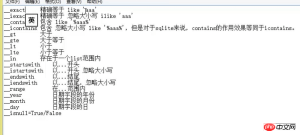
Others Operation: Add, delete, modify, search, sort and group operations can be queried by yourself. Refer to the image below
9. How to operate another database test2
vim settings.py ##HelloWorld/HelloWorld目录下,添加下面两项
DATABASES_APPS_MAPPING = {
  'blog': 'default',
  'article': 'article',
    }
DATABASE_ROUTERS = ['HelloWorld.database_app_router.DatabaseAppsRouter']
vim database_app_router.py ##配置路由 ,HelloWorld/HelloWorld/目录下。直接粘贴
from django.conf import settings
class DatabaseAppsRouter(object):
def db_for_read(self, model, **hints):
app_label = model._meta.app_label
if app_label in settings.DATABASES_APPS_MAPPING:
res = settings.DATABASES_APPS_MAPPING[app_label]
print(res)
return res
return None
def db_for_write(self, model, **hints):
app_label = model._meta.app_label
if app_label in settings.DATABASES_APPS_MAPPING:
return settings.DATABASES_APPS_MAPPING[app_label]
return None
def allow_relation(self, obj1, obj2, **hints):
db_obj1 = settings.DATABASES_APPS_MAPPING.get(obj1._mata.app_label)
db_obj2 = settings.DATABASES_APPS_MAPPING.get(obj2._mata.app_label)
if db_obj1 and db_obj2:
if db_obj1 == db_obj2:
return True
else:
return False
return None
def db_for_migrate(self, db, app_label, model_name=None, **hints):
if db in settings.DATABASES_APPS_MAPPING.values():
return settings.DATABASES_APPS_MAPPING.get(app_label) == db
elif app_label in settings.DATABASES_APPS_MAPPING:
return False
return None
After that, just operate the database as in step 8. The corresponding database will be automatically routed to find the corresponding database
vim views.py #blog目录下,添加下方代码
from blog.models import Teacher,Group##这是第8步没有的
def orm_handle_db(request):
  test1 = Teacher(id=1,name='runoob',teacher_number='10')
  test2 = Group(id=1,group_name='runoob') ##这是第8步没有的
  test1.save()
  test2.save()##这是第8步没有的
  return render_to_response('orm_handle_db.html')
10. For table link operations in a single library (1 to 1, many to 1, many-to-many). See the video if necessary. I really don’t want to use the foreign key method
11. Django does not support Kwaku’s table link operation, so you need to use a method that bypasses the ORM. See the summary document
Summary: Use ORM for simple operations, and bypass the ORM for complex operations.
The above is the detailed content of Detailed explanation of Django's method of operating database based on ORM. For more information, please follow other related articles on the PHP Chinese website!

 Learning Python: Is 2 Hours of Daily Study Sufficient?Apr 18, 2025 am 12:22 AM
Is it enough to learn Python for two hours a day? It depends on your goals and learning methods. 1) Develop a clear learning plan, 2) Select appropriate learning resources and methods, 3) Practice and review and consolidate hands-on practice and review and consolidate, and you can gradually master the basic knowledge and advanced functions of Python during this period.
 Python for Web Development: Key ApplicationsApr 18, 2025 am 12:20 AM
Key applications of Python in web development include the use of Django and Flask frameworks, API development, data analysis and visualization, machine learning and AI, and performance optimization. 1. Django and Flask framework: Django is suitable for rapid development of complex applications, and Flask is suitable for small or highly customized projects. 2. API development: Use Flask or DjangoRESTFramework to build RESTfulAPI. 3. Data analysis and visualization: Use Python to process data and display it through the web interface. 4. Machine Learning and AI: Python is used to build intelligent web applications. 5. Performance optimization: optimized through asynchronous programming, caching and code
 Python vs. C : Exploring Performance and EfficiencyApr 18, 2025 am 12:20 AM
Python is better than C in development efficiency, but C is higher in execution performance. 1. Python's concise syntax and rich libraries improve development efficiency. 2.C's compilation-type characteristics and hardware control improve execution performance. When making a choice, you need to weigh the development speed and execution efficiency based on project needs.
 Python in Action: Real-World ExamplesApr 18, 2025 am 12:18 AM
Python's real-world applications include data analytics, web development, artificial intelligence and automation. 1) In data analysis, Python uses Pandas and Matplotlib to process and visualize data. 2) In web development, Django and Flask frameworks simplify the creation of web applications. 3) In the field of artificial intelligence, TensorFlow and PyTorch are used to build and train models. 4) In terms of automation, Python scripts can be used for tasks such as copying files.
 Python's Main Uses: A Comprehensive OverviewApr 18, 2025 am 12:18 AM
Python is widely used in data science, web development and automation scripting fields. 1) In data science, Python simplifies data processing and analysis through libraries such as NumPy and Pandas. 2) In web development, the Django and Flask frameworks enable developers to quickly build applications. 3) In automated scripts, Python's simplicity and standard library make it ideal.
 The Main Purpose of Python: Flexibility and Ease of UseApr 17, 2025 am 12:14 AM
Python's flexibility is reflected in multi-paradigm support and dynamic type systems, while ease of use comes from a simple syntax and rich standard library. 1. Flexibility: Supports object-oriented, functional and procedural programming, and dynamic type systems improve development efficiency. 2. Ease of use: The grammar is close to natural language, the standard library covers a wide range of functions, and simplifies the development process.
 Python: The Power of Versatile ProgrammingApr 17, 2025 am 12:09 AM
Python is highly favored for its simplicity and power, suitable for all needs from beginners to advanced developers. Its versatility is reflected in: 1) Easy to learn and use, simple syntax; 2) Rich libraries and frameworks, such as NumPy, Pandas, etc.; 3) Cross-platform support, which can be run on a variety of operating systems; 4) Suitable for scripting and automation tasks to improve work efficiency.
 Learning Python in 2 Hours a Day: A Practical GuideApr 17, 2025 am 12:05 AM
Yes, learn Python in two hours a day. 1. Develop a reasonable study plan, 2. Select the right learning resources, 3. Consolidate the knowledge learned through practice. These steps can help you master Python in a short time.


Hot AI Tools

Undresser.AI Undress
AI-powered app for creating realistic nude photos

AI Clothes Remover
Online AI tool for removing clothes from photos.

Undress AI Tool
Undress images for free

Clothoff.io
AI clothes remover

AI Hentai Generator
Generate AI Hentai for free.

Hot Article
Hot Tools

PhpStorm Mac version
The latest (2018.2.1) professional PHP integrated development tool

SAP NetWeaver Server Adapter for Eclipse
Integrate Eclipse with SAP NetWeaver application server.

SublimeText3 English version
Recommended: Win version, supports code prompts!

Atom editor mac version download
The most popular open source editor

Dreamweaver Mac version
Visual web development tools

