



Many people have just come into contact with ajax. This article mainly summarizes and organizes some common basic knowledge of Ajax, which is very suitable for beginners. Friends in need can refer to it, and let’s learn together.
1. Introduction to Ajax, advantages and disadvantages, application scenarios and technologies
Introduction to Ajax:
Asynchronous Javascript And XML (Asynchronous JavaScript and XML)
It is not a single technology, but a combination of a series of technologies related to interactive web applications
AJAX is a method used to create rapid Dynamic web technology. AJAX enables web pages to update asynchronously by exchanging small amounts of data with the server in the background. This means that parts of a web page can be updated without reloading the entire page.
Advantages:
No page refresh, good user experience.
Asynchronous communication, faster response capability.
Reduce redundant requests and reduce server burden
Based on standardized and widely supported technology, no need to download plug-ins or applets
Disadvantages:
ajax kills the back button, which destroys the browser's back mechanism.
There are certain security issues.
The support for search engines is relatively weak.
Destroys the exception mechanism of the program.
Unable to access directly with URL
ajax application scenario
Scenario 1. Data verification
Scenario 2. Fetch data on demand
Scenario 3. Automatically update the page
AJAX contains the following five parts:
ajax is not a new technology, but a combination of several original technologies. It is composed of the following technologies.
Represented using CSS and XHTML.
Use the DOM model for interaction and dynamic display.
Data exchange and operation technology, using XML and XSLT
Use XMLHttpRequest to communicate asynchronously with the server.
Use javascript to bind and call.
Among the above technologies, except for the XmlHttpRequest object, all other technologies are based on web standards and have been widely used. Although XMLHttpRequest has not yet been Adopted by W3C, it is already a de facto standard because almost all major browsers currently support it
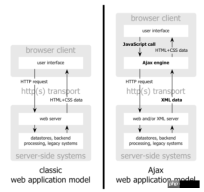
The first picture especially illustrates traditional Web applications The difference between the structure and the structure of Web applications using AJAX technology
The main difference is actually not JavaScript, not HTML/XHTML and CSS, but the use of XMLHttpRequest to asynchronously send messages to the server Request XML data

Look at the second picture again. In the traditional Web application model, the user experience is fragmented. Click ->Wait->See Go to the new page->click again->and wait. After adopting AJAX technology, most of the calculation work is completed by the server without the user noticing.

2. Steps to create ajax
The principle of Ajax is simply to send an asynchronous request to the server through the XmlHttpRequest object, obtain data from the server, and then use javascript to operate the DOM and update the page. The most critical step in this is to obtain the request data from the server. Creating ajax natively can be divided into the following four steps
1. Create an XMLHttpRequest object
The core of Ajax is the XMLHttpRequest object, which is the key to Ajax implementation. It can send asynchronous requests, accept responses, and execute callbacks. It is done through it
All modern browsers (IE7+, Firefox, Chrome, Safari and Opera) have built-in XMLHttpRequest objects.
Syntax for creating XMLHttpRequest objects:
var xhr = new XMLHttpRequest();
Older versions of Internet Explorer (IE5 and IE6) use ActiveX objects:
var xhr = new ActiveXObject("Microsoft.XMLHTTP");
To cope with all modern browsers, including IE5 and IE6, please check whether the browser supports the XMLHttpRequest object. If supported, an XMLHttpRequest object is created. If it is not supported, create an ActiveXObject:
Compatible with each browser's tool function for creating Ajax
function createRequest (){
 try {
 xhr = new XMLHttpRequest();
 }catch (tryMS){
 try {
 xhr = new ActiveXObject("Msxm12.XMLHTTP");
 } catch (otherMS) {
 try {
 xhr = new ActiveXObject("Microsoft.XMLHTTP");
 }catch (failed) {
 xhr = null;
 }
 }
 }
 return xhr;
}
2. Prepare the request
Initialize the XMLHttpRequest object and accept three parameters :
xhr.open(method,url,async);
The first parameter represents a string representing the request type, and its value can be GET or POST.
GET request:
xhr.open("GET",demo.php?name=tsrot&age=24,true);
POST request:
xhr.open("POST",demo.php,true);
The second parameter is the URL to which the request is to be sent.
The third parameter is true or false, indicating whether the request is issued in asynchronous or synchronous mode. (Default is true, false is generally not recommended)
false:同步模式发出的请求会暂停所有javascript代码的执行,知道服务器获得响应为止,如果浏览器在连接网络时或者在下载文件时出了故障,页面就会一直挂起。
true:异步模式发出的请求,请求对象收发数据的同时,浏览器可以继续加载页面,执行其他javascript代码
3、发送请求
xhr.send();
一般情况下,使用Ajax提交的参数多是些简单的字符串,可以直接使用GET方法将要提交的参数写到open方法的url参数中,此时send方法的参数为null或为空。
GET请求:
xhr.open("GET",demo.php?name=tsrot&age=24,true);
xhr.send(null);
POST请求:
如果需要像 HTML 表单那样 POST 数据,请使用 setRequestHeader()来添加 HTTP 头。然后在send()方法中规定您希望发送的数据:
xhr.open("POST",demo.php,true);
xhr.setRequestHeder("Content-Type","application/x-www-form-urlencoded;charset=UTF-8");
xhr.sen
4、处理响应
xhr.onreadystatechange = function(){
 if(xhr.readyState == 4 && xhr.status == 200){
 console.log(xhr.responseText);
 }
}
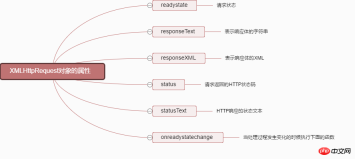
onreadystatechange :当处理过程发生变化的时候执行下面的函数
readyState :ajax处理过程
0:请求未初始化(还没有调用 open() )。
1:请求已经建立,但是还没有发送(还没有调用 send() )。
2:请求已发送,正在处理中(通常现在可以从响应中获取内容头)。
3:请求在处理中;通常响应中已有部分数据可用了,但是服务器还没有完成响应的生成。
4:响应已完成;您可以获取并使用服务器的响应了。
status属性:
200:”OK”
404: 未找到页面
responseText:获得字符串形式的响应数据
responseXML:获得 XML形式的响应数据
对象转换为JSON格式使用JSON.stringify
json转换为对象格式用JSON.parse()
返回值一般为json字符串,可以用JSON.parse(xhr.responseText)转化为JSON对象
从服务器传回的数据是json格式,这里做一个例子说明,如何利用
1、首先需要从XMLHttpRequest对象取回数据这是一个JSON串,把它转换为真正的JavaScript对象。使用JSON.parse(xhr.responseText)转化为JSON对象
2、遍历得到的数组,向DOM中添加新元素
function example(responseText){
var salep= document.getElementById("sales");
var sales = JSON.parse(responseText);
 for(var i=0;i<sales.length><p><img src="/static/imghwm/default1.png" data-src="https://img.php.cn/upload/article/000/054/025/43128062dd23542fb55c8e5d17b6f416-4.jpg?x-oss-process=image/resize,p_40" class="lazy" alt=""></p>
<p>5、完整例子</p>
<pre class="brush:php;toolbar:false">var xhr = false;
 if(XMLHttpRequest){
 xhr = new XMLHttpRequest();
 }else{
 xhr = new ActiveXObject("Microsoft.XMLHTTP");
};
if(xhr) {//如果xhr创建失败,还是原来的false
 xhr.open("GET","./data.json",true);
 xhr.send();
 xhr.onreadystatechange = function(){
 if(xhr.readyState == 4 && xhr.status == 200){
 console.log(JSON.parse(xhr.responseText).name);
 }
 }
}
data.json
{
 "name":"tsrot",
 "age":24
}
这个过程是一定要记在脑子里的
function ajax(url, success, fail){
 // 1. 创建连接
 var xhr = null;
 xhr = new XMLHttpRequest()
 // 2. 连接服务器
 xhr.open('get', url, true)
 // 3. 发送请求
 xhr.send(null);
 // 4. 接受请求
 xhr.onreadystatechange = function(){
 if(xhr.readyState == 4){
 if(xhr.status == 200){
 success(xhr.responseText);
 } else { // fail
 fail && fail(xhr.status);
 }
 }
 }
}
XMLHttpRequest 在异步请求远程数据时的工作流程
谈谈JSONP
要访问web服务器的数据除了XMLHttpRequest外还有一种方法是JSONP
如果HTML和JavaScript与数据同时在同一个机器上,就可以使用XMLHttpRequest
什么是JSONP?
JSONP(JSON with Padding)是一个非官方的协议,它允许在服务器端集成Script tags返回至客户端,通过javascript callback的形式实现跨域访问(这仅仅是JSONP简单的实现形式)
JSONP有什么用?
由于同源策略的限制,XmlHttpRequest只允许请求当前源(域名、协议、端口)的资源,为了实现跨域请求,可以通过script标签实现跨域请求,然后在服务端输出JSON数据并执行回调函数,从而解决了跨域的数据请求
如何使用JSONP?
在客户端声明回调函数之后,客户端通过script标签向服务器跨域请求数据,然后服务端返回相应的数据并动态执行回调函数
用XMLHttpRequest时,我们得到一个字符串;要用JSON.parse把字符串转化成对象,使用jsonp时,script标志会解析并执行返回的代码,等我们处理数据时,已经是一个JavaScript对象了
简单实例
<meta>
<script>
 function jsonpCallback(result) {
 alert(result.a);
 alert(result.b);
 alert(result.c);
 for(var i in result) {
 alert(i+":"+result[i]);//循环输出a:1,b:2,etc.
 }
 }
</script>
<script></script>
<!--callback参数指示生成JavaScript代码时要使用的函数jsonpcallback-->
注意浏览器的缓存问题
在末尾增加一个随机数可避免频繁请求同一个链接出现的缓存问题
`
三、 jQuery中的Ajax
jQuery中的ajax封装案例
//ajax请求后台数据
var btn = document.getElementsByTagName("input")[0];
btn.onclick = function(){

 ajax({//json格式
 type:"post",
 url:"post.php",
 data:"username=poetries&pwd=123456",
 asyn:true,
 success:function(data){
 document.write(data);
 }
 });
}
//封装ajax
function ajax(aJson){
 var ajx = null;
 var type = aJson.type || "get";
 var asyn = aJson.asyn || true;
 var url = aJson.url; // url 接收 传输位置
 var success = aJson.success;// success 接收 传输完成后的回调函数
 var data = aJson.data || '';// data 接收需要附带传输的数据

 if(window.XMLHttpRequest){//兼容处理
 ajx = new XMLHttpRequest();//一般浏览器
 }else
 {
 ajx = new ActiveXObject("Microsoft.XMLHTTP");//IE6+
 }
 if (type == "get" && data)
 {
 url +="/?"+data+"&"+Math.random();
 }

 //初始化ajax请求
 ajx.open( type , url , asyn );
 //规定传输数据的格式
 ajx.setRequestHeader('content-type','application/x-www-form-urlencoded');
 //发送ajax请求(包括post数据的传输)
 type == "get" ?ajx.send():ajx.send(aJson.data);

 //处理请求
 ajx.onreadystatechange = function(aJson){

 if(ajx.readState == 4){

 if (ajx.status == 200 && ajx.status<p>jQuery中的Ajax的一些方法</p><p>jquery对Ajax操作进行了封装,在jquery中的$.ajax()方法属于最底层的方法,第2层是load() 、$.get() 、$.post();第3层是$.getScript() 、$.getJSON() ,第2层使用频率很高</p><p>load()方法</p><p>load()方法是jquery中最简单和常用的ajax方法,能载入远程HTML代码并插入DOM中 结构为:load(url,[data],[callback])</p><p>使用url参数指定选择符可以加载页面内的某些元素 load方法中url语法:url selector 注意:url和选择器之间有一个空格<br></p><p>传递方式<br></p><p>load()方法的传递方式根据参数data来自动指定,如果没有参数传递,则采用GET方式传递,反之,采用POST<br></p><p>回调参数<br></p><p>必须在加载完成后才执行的操作,该函数有三个参数 分别代表请求返回的内容、请求状态、XMLHttpRequest对象<br>只要请求完成,回调函数就会被触发</p><pre class="brush:php;toolbar:false">$("#testTest").load("test.html",function(responseText,textStatus,XMLHttpRequest){
 //respnoseText 请求返回的内容
 //textStatus 请求状态 :sucess、error、notmodified、timeout
 //XMLHttpRequest
})
load方法参数
| 参数名称 | 类型 | 说明 |
| url | String | 请求HTML页面的URL地址 |
| data(可选) | Object | 发送至服务器的key / value数据 |
| callback(可选) | Function | 请求完成时的回调函数,无论是请求成功还是失败 |
$.get()和$.post()方法
load()方法通常用来从web服务器上获取静态的数据文件。在项目中需要传递一些参数给服务器中的页面,那么可以使用$.get()和$.post()或$.ajax()方法
注意:$.get()和$.post()方法是jquery中的全局函数
$.get()方法
$.get()方法使用GET方式来进行异步请求
结构为:$.get(url,[data],callback,type)
如果服务器返回的内容格式是xml文档,需要在服务器端设置Content-Type类型 代码如下: header("Content-Type:text/xml:charset=utf-8") //php
$.get()方法参数解析
| 参数 | 类型 | 说明 |
| url | String | 请求HTML页的地址 |
| data(可选) | Object | 发送至服务器的key/ value 数据会作为QueryString附加到请求URL中 |
| callback(可选) | Function | 载入成功的回调函数(只有当Response的返回状态是success才调用该方法) |
| type(可选) | String | 服务器返回内容的格式,包括xml、html、script、json、text和_default |
$.post() method
It has the same structure and usage as the $.get() method, with the following differences
GET request The parameters will be passed after Zhang Nai's URL, while the POST request is sent to the web server as the entity content of the Http message. In the ajax request, this difference is invisible to the user
GET method has a size limit on the transmitted data (usually no more than 2KB), while the amount of data transferred using POST method is much larger than that of GET method (theoretically not limited)
GET The data requested in this way will be cached by the browser, so others can read the data from the browser's history, such as account number and password. In some cases, the GET method will bring serious security problems, while POST can relatively avoid these problems.
The data passed by the GET and POST methods cannot be obtained on the server side. same. In PHP, use $_GET[] to get the GET method; use $_POST[] to get the POST method; both methods can use $_REQUEST[] to get it
Summary
Use load(), $.get() and $.post() methods to complete some regular Ajax programs. If you need complex Ajax programs, you need to use the $.ajax() method
$.ajax() method
$.ajax() method is the lowest level Ajax implementation of jquery. Its structure is $.ajax(options)
This method has only one parameter, but this object contains the request settings and callback functions required by the $.ajax() method. The parameters exist in key/value, and all parameters are optional
$.ajax() method common parameter analysis
| Parameter | Type | Description |
| url | String | (Default is the current page address) The address to send the request |
| type | String | The request method (POST or GET) defaults to GET |
| Number | Set request timeout (milliseconds) | |
| String | The type expected to be returned by the server. The available types are as follows |
xml: Returns an XML document, which can be processed with jquery html: Returns plain text HTML information, and the included script tag will also be executed when inserted into the DOM Script: Returns plain text javascript code. Results are not automatically cached unless the cache parameter is set. Note: When making remote requests, all POST requests will be converted to GET requests json: Return JSON data jsonp: JSONP format, when calling a function using jsonp format, for example: myurl?call back=?, jquery will automatically replace the latter one? is the correct function name to execute the callback function text: Returns a plain text string |
| Function | A function that can modify the XMLHttpRequest object before sending the request, such as adding a custom HTTP header. If false is returned in beforeSend, this Ajax request can be canceled. The XMLHttpRequest object is the only parameter |
Function(XMLHttpRequest){ This;//The options parameters passed when calling this Ajax request } |
| Function | Callback function after the request is completed (called when the request succeeds or fails) |
Parameters: XMLHttpRequest object and a string describing the successful request type Function(XMLHttpRequest,textStatus){ This;//The options parameters passed when calling this Ajax request } |
| Function | The callback function called after a successful request has two parameters |
(1) Data returned by the server and processed according to the dataType parameter (2) A string describing the status Function(data,textStatus){ //data may be xmlDoc, ``jsonObj, html, text, etc. This;//The options parameters passed when calling this Ajax request } |
| Function | Function called when the request fails | |
| Boolean | Default is true. Indicates whether to trigger the global Ajax event. If set to false, it will not be triggered. AjaxStart or AjaxStop can be used to control various Ajax events |
Examples to explain the basic knowledge of HTTP messages and ajax
Jquery ajax basic tutorial_jquery
The above is the detailed content of Summary of Ajax for Beginners. For more information, please follow other related articles on the PHP Chinese website!

 PHP: An Introduction to the Server-Side Scripting LanguageApr 16, 2025 am 12:18 AM
PHP is a server-side scripting language used for dynamic web development and server-side applications. 1.PHP is an interpreted language that does not require compilation and is suitable for rapid development. 2. PHP code is embedded in HTML, making it easy to develop web pages. 3. PHP processes server-side logic, generates HTML output, and supports user interaction and data processing. 4. PHP can interact with the database, process form submission, and execute server-side tasks.
 PHP and the Web: Exploring its Long-Term ImpactApr 16, 2025 am 12:17 AM
PHP has shaped the network over the past few decades and will continue to play an important role in web development. 1) PHP originated in 1994 and has become the first choice for developers due to its ease of use and seamless integration with MySQL. 2) Its core functions include generating dynamic content and integrating with the database, allowing the website to be updated in real time and displayed in personalized manner. 3) The wide application and ecosystem of PHP have driven its long-term impact, but it also faces version updates and security challenges. 4) Performance improvements in recent years, such as the release of PHP7, enable it to compete with modern languages. 5) In the future, PHP needs to deal with new challenges such as containerization and microservices, but its flexibility and active community make it adaptable.
 Why Use PHP? Advantages and Benefits ExplainedApr 16, 2025 am 12:16 AM
The core benefits of PHP include ease of learning, strong web development support, rich libraries and frameworks, high performance and scalability, cross-platform compatibility, and cost-effectiveness. 1) Easy to learn and use, suitable for beginners; 2) Good integration with web servers and supports multiple databases; 3) Have powerful frameworks such as Laravel; 4) High performance can be achieved through optimization; 5) Support multiple operating systems; 6) Open source to reduce development costs.
 Debunking the Myths: Is PHP Really a Dead Language?Apr 16, 2025 am 12:15 AM
PHP is not dead. 1) The PHP community actively solves performance and security issues, and PHP7.x improves performance. 2) PHP is suitable for modern web development and is widely used in large websites. 3) PHP is easy to learn and the server performs well, but the type system is not as strict as static languages. 4) PHP is still important in the fields of content management and e-commerce, and the ecosystem continues to evolve. 5) Optimize performance through OPcache and APC, and use OOP and design patterns to improve code quality.
 The PHP vs. Python Debate: Which is Better?Apr 16, 2025 am 12:03 AM
PHP and Python have their own advantages and disadvantages, and the choice depends on the project requirements. 1) PHP is suitable for web development, easy to learn, rich community resources, but the syntax is not modern enough, and performance and security need to be paid attention to. 2) Python is suitable for data science and machine learning, with concise syntax and easy to learn, but there are bottlenecks in execution speed and memory management.
 PHP's Purpose: Building Dynamic WebsitesApr 15, 2025 am 12:18 AM
PHP is used to build dynamic websites, and its core functions include: 1. Generate dynamic content and generate web pages in real time by connecting with the database; 2. Process user interaction and form submissions, verify inputs and respond to operations; 3. Manage sessions and user authentication to provide a personalized experience; 4. Optimize performance and follow best practices to improve website efficiency and security.
 PHP: Handling Databases and Server-Side LogicApr 15, 2025 am 12:15 AM
PHP uses MySQLi and PDO extensions to interact in database operations and server-side logic processing, and processes server-side logic through functions such as session management. 1) Use MySQLi or PDO to connect to the database and execute SQL queries. 2) Handle HTTP requests and user status through session management and other functions. 3) Use transactions to ensure the atomicity of database operations. 4) Prevent SQL injection, use exception handling and closing connections for debugging. 5) Optimize performance through indexing and cache, write highly readable code and perform error handling.
 How do you prevent SQL Injection in PHP? (Prepared statements, PDO)Apr 15, 2025 am 12:15 AM
Using preprocessing statements and PDO in PHP can effectively prevent SQL injection attacks. 1) Use PDO to connect to the database and set the error mode. 2) Create preprocessing statements through the prepare method and pass data using placeholders and execute methods. 3) Process query results and ensure the security and performance of the code.


Hot AI Tools

Undresser.AI Undress
AI-powered app for creating realistic nude photos

AI Clothes Remover
Online AI tool for removing clothes from photos.

Undress AI Tool
Undress images for free

Clothoff.io
AI clothes remover

AI Hentai Generator
Generate AI Hentai for free.

Hot Article
Hot Tools

WebStorm Mac version
Useful JavaScript development tools

SAP NetWeaver Server Adapter for Eclipse
Integrate Eclipse with SAP NetWeaver application server.

VSCode Windows 64-bit Download
A free and powerful IDE editor launched by Microsoft

SublimeText3 Chinese version
Chinese version, very easy to use

Atom editor mac version download
The most popular open source editor

