



When I was learning the WeChat applet and designing the homepage layout, I came across a new layout method, display:flex. This article mainly introduces the Flex layout method of the display attribute in CSS3. The editor thinks it is quite good. Now I share it with everyone and give it as a reference. I hope it can help everyone.
 .container {
   display: flex;
   flex-direction: column;
   align-items: center;
   background-color: #b3d4db;
 }
The effect after compilation is very obvious, the layout of the interface is also very reasonable, and it looks very clear. So what is this attribute used for?
Flex is the abbreviation of Flexible Box, which means "flexible layout" and is used to provide maximum flexibility for box-shaped models. After setting to Flex layout, the float, clear and vertical-align attributes of child elements will be invalid.
It can be applied to containers or inline elements. (The above description is combined with the WeChat developer tool description) In 2009, W3C proposed a new solution-Flex layout, which can implement various page layouts simply, completely, and responsively. Currently, it is supported by all browsers, which means it is now safe to use this feature.
Basic concepts
Elements that adopt Flex layout are called Flex containers (flex containers), referred to as "containers". All its child elements automatically become container members, called Flex items (flex items), referred to as "items". The container has two axes by default: the horizontal main axis and the vertical cross axis. The starting position of the main axis (the intersection with the border) is called main start, and the ending position is called main end; the starting position of the cross axis is called cross start, and the ending position is called cross end. Items are arranged along the main axis by default. The main axis space occupied by a single item is called main size, and the cross axis space occupied by a single item is called cross size.
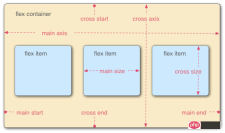
The following 6 properties are set on the container:
flex-direction The arrangement direction of the items in the container (default horizontal arrangement)
flex-wrap The wrapping method of items in the container
flex-flow The abbreviation of the above two properties
justify-content How items are aligned on the main axis
align-items How items are aligned on the cross axis
align- content Defines the alignment of multiple axes. This property has no effect if the project has only one axis.
flex-direction
.box { 2 flex-direction: row | row-reverse | column | column-reverse; 3 }
The optional value range of the attribute is row (default ) are arranged from left to right along the horizontal main axis, row-reverse is arranged from right to left along the horizontal main axis, column is arranged from top right to bottom and column-reverse along the vertical main axis.
flex-wrap
.box{ 2 flex-wrap: nowrap | wrap | wrap-reverse; 3 }
The range of optional values of the attribute is nowrap (default) no line wrapping, wrap wrapping (The first line is above) and wrap-reverse (you know~)
flex-flow
.box { 2 flex-flow: <flex-direction> || <flex-wrap>; 3 }
In the writing attribute, just connect the values of the above two methods with ||
justify-content
.box { 2 justify-content: flex-start | flex-end | center | space-between | space-around; 3 }
The alignment of the items on the main axis (which axis the main axis is depends on the setting of the attribute flex-direction)
flex-start: Arrange from left or top on the main axis
flex-end: Arrange from the right or bottom on the main axis
center: Arrange in the center on the main axis
space-between: Arrange from the left and right ends or the upper and lower ends on the main axis
space-around: Each item is equally spaced on both sides. Therefore, the space between items is twice as large as the space between items and the border.
align-items
.box { 2 align-items: flex-start | flex-end | center | baseline | stretch; 3 }
It will be clearer to explain directly with the pictures

align-content
.box { 2 align-content: flex-start | flex-end | center | space-between | space-around | stretch; 3 }

The above introduction to the container is complete The attributes in the container, let’s talk about the attributes of the items in the container:
order The order of the items. The smaller the value, the higher the ranking. The default is 0.
flex-grow The magnification ratio of the item, the default is 0, that is, if there is remaining space, it will not be enlarged.
flex-shrink The shrinkage ratio of the item, the default is 1, that is, if there is insufficient space, the item will shrink.
flex-basis The main size that the item occupies before allocating excess space. The browser uses this attribute to calculate whether there is extra space on the main axis. Its default value is auto, which is the original size of the project.
flex is the abbreviation of flex-grow, flex-shrink and flex-basis. The default value is 0 1 auto. The last two properties are optional.
align-self Allows a single item to be aligned differently from other items by overriding the align-items attribute. The default value is auto, which means inheriting the align-items attribute of the parent element. If there is no parent element, it is equivalent to stretch.
order
     .item {
       order: <integer>;
     }
flex-grow
     .item {
       flex-grow: <number>; /* default 0 */
     }
flex-shrink
     .item {
       flex-shrink: <number>; /* default 1 */
     }
flex-basis
    .item {
       flex-basis: <length> | auto; /* default auto */
    }
flex
.item {
flex: none | [ <'flex-grow'> <'flex-shrink'>? || <'flex-basis'> ]
}
align-self
     .item {
       align-self: auto | flex-start | flex-end | center | baseline | stretch;
     }
容器属性和项目属性是可以配合使用的,用法类似于CSS的行内式和嵌入式的道理一样。希望你可以在实际应用中熟练使用。
相关推荐:
The above is the detailed content of Flex layout method of display attribute in CSS3. For more information, please follow other related articles on the PHP Chinese website!

 Two Images and an API: Everything We Need for Recoloring ProductsApr 15, 2025 am 11:27 AM
I recently found a solution to dynamically update the color of any product image. So with just one of a product, we can colorize it in different ways to show
 Weekly Platform News: Impact of Third-Party Code, Passive Mixed Content, Countries with the Slowest ConnectionsApr 15, 2025 am 11:19 AM
In this week's roundup, Lighthouse sheds light on third-party scripts, insecure resources will get blocked on secure sites, and many country connection speeds
 Options for Hosting Your Own Non-JavaScript-Based AnalyticsApr 15, 2025 am 11:09 AM
There are loads of analytics platforms to help you track visitor and usage data on your sites. Perhaps most notably Google Analytics, which is widely used
 It's All In the Head: Managing the Document Head of a React Powered Site With React HelmetApr 15, 2025 am 11:01 AM
The document head might not be the most glamorous part of a website, but what goes into it is arguably just as important to the success of your website as its
 What is super() in JavaScript?Apr 15, 2025 am 10:59 AM
What's happening when you see some JavaScript that calls super()?.In a child class, you use super() to call its parent’s constructor and super. to access its
 Comparing the Different Types of Native JavaScript PopupsApr 15, 2025 am 10:48 AM
JavaScript has a variety of built-in popup APIs that display special UI for user interaction. Famously:
 Why Are Accessible Websites so Hard to Build?Apr 15, 2025 am 10:45 AM
I was chatting with some front-end folks the other day about why so many companies struggle at making accessible websites. Why are accessible websites so hard
 The `hidden` Attribute is Visibly WeakApr 15, 2025 am 10:43 AM
There is an HTML attribute that does exactly what you think it should do:


Hot AI Tools

Undresser.AI Undress
AI-powered app for creating realistic nude photos

AI Clothes Remover
Online AI tool for removing clothes from photos.

Undress AI Tool
Undress images for free

Clothoff.io
AI clothes remover

AI Hentai Generator
Generate AI Hentai for free.

Hot Article
Hot Tools

SublimeText3 Chinese version
Chinese version, very easy to use

Atom editor mac version download
The most popular open source editor

VSCode Windows 64-bit Download
A free and powerful IDE editor launched by Microsoft

Zend Studio 13.0.1
Powerful PHP integrated development environment

DVWA
Damn Vulnerable Web App (DVWA) is a PHP/MySQL web application that is very vulnerable. Its main goals are to be an aid for security professionals to test their skills and tools in a legal environment, to help web developers better understand the process of securing web applications, and to help teachers/students teach/learn in a classroom environment Web application security. The goal of DVWA is to practice some of the most common web vulnerabilities through a simple and straightforward interface, with varying degrees of difficulty. Please note that this software

