


Detailed example of Bootstrap form validation formValidation

This article mainly introduces the Bootstrap form validation formValidation to realize the form dynamic validation function. Friends who need it can refer to the Bootstrap tutorial
Dynamicly add input and dynamically Add new verification method!
init status:
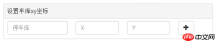
After clicking "+":
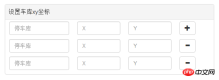
After verification:

Knowledge points:
1 First go to the official website to download: formvalidation.io/
2. Import the file. I won’t go into details about the precautions. I have already mentioned them in the remote verification article.
3 Keywords used: addField, removeField, different
4 Note that the names of the examples on the official website are different. I'm a bit lazy here. And when the project is ajaxed, the form is not used for submission, but is submitted as json by itself, so the names of x and y have the same name.
Good start:
First of all, there must be a "+" in the html, marked as addPos, and then there must be a "-" marked as "removPos,
<p id="posXY" class=" panel panel-default ">
<!-- 添加-->
                <p class="panel-heading" >设置车库xy坐标</p>
                <p class="addPos form-group">
                  <p class="col-lg-4 col-sm-4 col-xs-4" >
                    <input type="text" class="form-control text-left" name="garageNo" placeholder="停车库" style="min-width: 150px"/>
                  </p>
                  <p class="col-lg-3 col-sm-3 col-xs-3" >
                    <input type="text" class="form-control" name="posX" placeholder="X"/>
                  </p>
                  <p class="col-lg-3 col-sm-3 col-xs-3" >
                    <input type="text" class="form-control" name="posY" placeholder="Y"/>
                  </p>
                  <p class="col-lg-2 col-sm-2 col-xs-2" >
                    <button type="button" class="btn btn-default addButtonPos"><i class="glyphicon glyphicon-plus"></i></button>
                  </p>
                </p>
                <!-- 删除 -->
                <p class="removPos form-group hide" id="posTemplate">
                  <p class="col-lg-4 col-sm-4 col-xs-4" >
                    <input type="text" class="form-control text-left" name="garageNo" placeholder="停车库" style="min-width: 150px"/>
                  </p>
                  <p class="col-lg-3 col-sm-3 col-xs-3" >
                    <input type="text" class="form-control" name="posX" placeholder="X"/>
                  </p>
                  <p class="col-lg-3 col-sm-3 col-xs-3" >
                    <input type="text" class="form-control" name="posY" placeholder="Y"/>
                  </p>
                  <p class="col-lg-2 col-sm-2 col-xs-2" >
                    <button type="button" class="btn btn-default removeButtonPos"><i class="glyphicon glyphicon-minus"></i></button>
                  </p>
                </p>
</p>
Then Here is a js:
/**
   * pos添加
   * @param $that
   */
  function addButtonPosClick($that){
    var panelId = $that.parents(".topTemplate").attr("id");
    var $form=$('#'+panelId+"form")
//    defaultPanel(panelId)
    var bookIndex=typeObj[panelId]++;
    console.log(panelId,bookIndex)
    var $template = $('#'+panelId+' #posTemplate'),
      $clone =$template
        .clone()
        .removeClass('hide')
        .removeAttr('id')
        .attr('step',bookIndex)
        .insertBefore($template);
    // Update the name attributes
    $clone
      .find('[name="garageNo"]').attr({"step":bookIndex,"name":"garageNo"+bookIndex})
      .click(function(){
        clickBindGarageNo(panelId,bookIndex)
      }).end()
      .find('[name="posX"]').attr("step",bookIndex).end()
      .find('[name="posY"]').attr("step",bookIndex).end()
    // Add new fields
    // Note that we also pass the validator rules for new field as the third parameter
//    $('#defaultForm')
//    gFieldArr.push(panelId+'[' + bookIndex + '].garageNo')
    $form
      .formValidation('addField', "garageNo"+bookIndex, formObj.sameAs(false))
      .formValidation('addField', 'posX', myPosXY)
      .formValidation('addField', 'posY', myPosXY)
  }
 function myFormValidation($form){
//    var $form=$("#"+$panelId+"form")
    $form
        .formValidation({
          framework: 'bootstrap',
          locale: 'zh_CN',
          message: '值无效',
          icon: {
            valid: 'glyphicon glyphicon-ok',
            invalid: 'glyphicon glyphicon-remove',
            validating: 'glyphicon glyphicon-refresh'
          },
          fields:
          {
            myimg:{
              validators: {
                notEmpty: {
                  message: '请选择一个文件上传'
                },
                file: {
                  extension: 'jpeg,jpg,png',
                  type: 'image/jpeg,image/png',
                  maxSize: 1*1024 * 1024,
                  message: '该文件必须为jpeg,jpg,png格式和必须不超过1MB的大小'
                }
              }
            }
          }
        })
        .on('click', '.addButtonPos', function() {
          addButtonPosClick($(this))
        })
        //Remove button click handler
        .on('click', '.removeButtonPos', function() {
          var $that   = $(this)
          var panelId = $that.parents(".topTemplate").attr("id");
//           defaultPanel(panelId)
          var $row = $(this).parents('.form-group'),
              index = $row.attr('step');
//          var myname='[' +index + ']'
          var bookIndex= typeObj[panelId]--;
//          $('#defaultForm')
          $form
                   .formValidation('removeField', $row.find('[name="garageNo'+bookIndex+'"]'))
                   .formValidation('removeField', $row.find('[name="posX"]'))
                   .formValidation('removeField', $row.find('[name="posY"]'))
          // Remove element containing the fields
          $row.remove();
        })
Because my project has multiple form submissions, but the business is similar, I use these functions
For example: var form=("#" +panelId+”form”)Use panelId to distinguish multiple forms.
As mentioned above, the names of x and y are the same, but if you are careful, you will find that garageNo has a different name. . Bookindex was added later, why.
Because of business requirements. For example, the identity number of each person cannot be the same. The tablemates can be both female and 18 years old...
The keywords removeField and addField
## cannot be the same. How to do it. Please see below:var differentValid= function(diffstr){
var vv={
validators: {
different: {
field: diffstr,
message: '不能有相同的停车库'
}
}
}
return vv
}When the user enters the value of garageNo: clickBindGarageNo(panelId,idx){
$form.formValidation('addField', "garageNo"+idx, differentValid(diffArr.toString()))
var fv =$form.data('formValidation');
fv.validate();
}What is this diffArr.toString()? This is the garageNo of all entries. String of nameFor example: there are 3 entries, idx=1 and the focus is on 1. Then diffArr=["garageNo0","garageNo2",]
$form.formValidation('revalidateField', "field");There is also a detail about submission: When we don’t set a submit button, this plug-in will automatically refresh it for you. The page becomes a 404 page or other error page. But sometimes we don’t want it to refresh. What should I do? There are many tutorials on ajax submission. One is. I don’t put the submit button in the form. Then:
$btn.click(function(){
//....
retrun false;
)}
[Related recommendations]##1.
Javascript Free Video Tutorial2. Detailed examples of commonly used middleware body-parser in Nodejs
3. JavaScript form verification implementation code_javascript skills
4. Single line of JS to implement money format inspection on the mobile terminal
5. Example tutorial of vue v-model form control binding
The above is the detailed content of Detailed example of Bootstrap form validation formValidation. For more information, please follow other related articles on the PHP Chinese website!

 JavaScript in Action: Real-World Examples and ProjectsApr 19, 2025 am 12:13 AM
JavaScript's application in the real world includes front-end and back-end development. 1) Display front-end applications by building a TODO list application, involving DOM operations and event processing. 2) Build RESTfulAPI through Node.js and Express to demonstrate back-end applications.
 JavaScript and the Web: Core Functionality and Use CasesApr 18, 2025 am 12:19 AM
The main uses of JavaScript in web development include client interaction, form verification and asynchronous communication. 1) Dynamic content update and user interaction through DOM operations; 2) Client verification is carried out before the user submits data to improve the user experience; 3) Refreshless communication with the server is achieved through AJAX technology.
 Understanding the JavaScript Engine: Implementation DetailsApr 17, 2025 am 12:05 AM
Understanding how JavaScript engine works internally is important to developers because it helps write more efficient code and understand performance bottlenecks and optimization strategies. 1) The engine's workflow includes three stages: parsing, compiling and execution; 2) During the execution process, the engine will perform dynamic optimization, such as inline cache and hidden classes; 3) Best practices include avoiding global variables, optimizing loops, using const and lets, and avoiding excessive use of closures.
 Python vs. JavaScript: The Learning Curve and Ease of UseApr 16, 2025 am 12:12 AM
Python is more suitable for beginners, with a smooth learning curve and concise syntax; JavaScript is suitable for front-end development, with a steep learning curve and flexible syntax. 1. Python syntax is intuitive and suitable for data science and back-end development. 2. JavaScript is flexible and widely used in front-end and server-side programming.
 Python vs. JavaScript: Community, Libraries, and ResourcesApr 15, 2025 am 12:16 AM
Python and JavaScript have their own advantages and disadvantages in terms of community, libraries and resources. 1) The Python community is friendly and suitable for beginners, but the front-end development resources are not as rich as JavaScript. 2) Python is powerful in data science and machine learning libraries, while JavaScript is better in front-end development libraries and frameworks. 3) Both have rich learning resources, but Python is suitable for starting with official documents, while JavaScript is better with MDNWebDocs. The choice should be based on project needs and personal interests.
 From C/C to JavaScript: How It All WorksApr 14, 2025 am 12:05 AM
The shift from C/C to JavaScript requires adapting to dynamic typing, garbage collection and asynchronous programming. 1) C/C is a statically typed language that requires manual memory management, while JavaScript is dynamically typed and garbage collection is automatically processed. 2) C/C needs to be compiled into machine code, while JavaScript is an interpreted language. 3) JavaScript introduces concepts such as closures, prototype chains and Promise, which enhances flexibility and asynchronous programming capabilities.
 JavaScript Engines: Comparing ImplementationsApr 13, 2025 am 12:05 AM
Different JavaScript engines have different effects when parsing and executing JavaScript code, because the implementation principles and optimization strategies of each engine differ. 1. Lexical analysis: convert source code into lexical unit. 2. Grammar analysis: Generate an abstract syntax tree. 3. Optimization and compilation: Generate machine code through the JIT compiler. 4. Execute: Run the machine code. V8 engine optimizes through instant compilation and hidden class, SpiderMonkey uses a type inference system, resulting in different performance performance on the same code.
 Beyond the Browser: JavaScript in the Real WorldApr 12, 2025 am 12:06 AM
JavaScript's applications in the real world include server-side programming, mobile application development and Internet of Things control: 1. Server-side programming is realized through Node.js, suitable for high concurrent request processing. 2. Mobile application development is carried out through ReactNative and supports cross-platform deployment. 3. Used for IoT device control through Johnny-Five library, suitable for hardware interaction.


Hot AI Tools

Undresser.AI Undress
AI-powered app for creating realistic nude photos

AI Clothes Remover
Online AI tool for removing clothes from photos.

Undress AI Tool
Undress images for free

Clothoff.io
AI clothes remover

AI Hentai Generator
Generate AI Hentai for free.

Hot Article
Hot Tools

SublimeText3 Chinese version
Chinese version, very easy to use

MinGW - Minimalist GNU for Windows
This project is in the process of being migrated to osdn.net/projects/mingw, you can continue to follow us there. MinGW: A native Windows port of the GNU Compiler Collection (GCC), freely distributable import libraries and header files for building native Windows applications; includes extensions to the MSVC runtime to support C99 functionality. All MinGW software can run on 64-bit Windows platforms.

Dreamweaver CS6
Visual web development tools

mPDF
mPDF is a PHP library that can generate PDF files from UTF-8 encoded HTML. The original author, Ian Back, wrote mPDF to output PDF files "on the fly" from his website and handle different languages. It is slower than original scripts like HTML2FPDF and produces larger files when using Unicode fonts, but supports CSS styles etc. and has a lot of enhancements. Supports almost all languages, including RTL (Arabic and Hebrew) and CJK (Chinese, Japanese and Korean). Supports nested block-level elements (such as P, DIV),

Zend Studio 13.0.1
Powerful PHP integrated development environment

