



Preface
As a developer, if you still don’t know git or can’t use git, then you should reflect on it. Go read the introductory introduction yourself. Today I just introduce some common commands that I use git in my daily life and the commands that I think are good and can improve our office efficiency. The content may be a bit messy, but they are definitely classic commands. I jot down notes here, and I hope they can help those of you who come to appreciate me.
Region
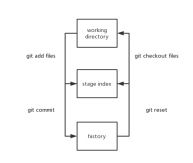
Before that, let’s introduce the three areas of git
Workspace (working directory)
Staging area (stage index)
Local history area (history)
Pass a A picture can help you understand the transformation between them concisely and easily.
clone
Let’s start with the clone command. Everyone who has used git knows it. git colneThe command pulls the remote repository to the local. But when we want to pull to the specified folder, you may directly mkdir. In fact, there is no need to do this. One command can do it git clone remote warehouse file name, that’s it Simple.
rm
We may encounter such a situation at work. Use git add . to directly add all modified files in the workspace to the staging area. , but later found that there is a file that should not be added first. At this time, we can use the following command to return the file to the workspace.
git rm --cached <file></file>
stash
There is such a situation. When you are developing, there is an online emergency bug that needs to be fixed. At this time, the function under development is If you don't want to submit it before it's completed, you can use git stash to store all the files in the workspace. At this time, you can safely cut the branch and fix the bug. After the repair is completed, execute git stash pop to take out the previously stored ones. Of course, there are also some other related commands such as: git stash listView the stored records,git stash dropDiscard the stored records.
tag
Maybe during development we need to tag git tag tagName, and push the corresponding tag to the remote warehouse. In this case, you can use the following command push.
git push --tags tagName
amend
After you commit, you find that a file was not added to the last commit, or some files were modified. . At this time, you do not want to add new commit information, you just want to add it to the last commit. At this time, you can use
git commit --amend <file></file>
to add the files in the temporary storage area, and you can also modify the commit information at this time.
reset
reset can also achieve the effect of the previous rm. You can use the following command to replace the previous git rm -- cached <file></file>Command
git reset HEAD <file></file>
But reset is more versatile. Combined with soft parameters, it can be rolled back to any commit The node operates
git reset --soft index
After executing this command, it returns to index. The work area remains unchanged and the temporary storage area returns to the current index. There is also a hard parameter.
git reset --hard index
can be said to be opposite to soft. Its effect lies in the difference between the work area and the temporary storage area. It will clear these two areas.
rebase
For rebase means redirection. If there is a difference in information between your current branch and the remote branch commit, you will be reminded. You cannot push at this time. You must first pull the remote commit information to the local one before you can submit it. In this case, you can use the rebase command. The following is currently in the develop branch
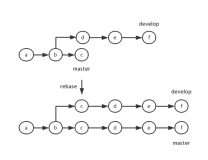
At this time, the rebase command should be executed first
git fetch
git rebase origin/master
After execution , and finally push to the remote master
git push origin master
The final situation of each branch is the effect shown in the picture above. If you find the command difficult to remember, you can also use one command to achieve the above effect.
git pull --rebase origin master
This is a simple application of rebase, and it is also a common command. The following introduces an optional parameter --onto of rebase.
--onto
Usage scenarios: During the development process, we will create different branches to develop different functions. When you create a new branch on branch AB When developing functions and submitting some commit, you find that there are wrong commit on the original A branch. If you want When rebase to master, this wrong commit cannot be attached. At this time, it’s time to --onto show off your magical powers.
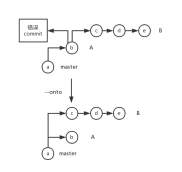
当前处在B分支,要得到上面的结果,只需执行如下命令
git rebase --onto master <b> B</b>
这个不仅可以针对不同的分支,也能作用于同一个分支上。所以针对上面的情况可以只对分支B进行操作,等价命令如下:
git rebase --onto <a> <b> B</b></a>
--interactive
当我们要修改commit信息的名称时,如果要修改的commit处在第一个时,可以使用
git commit --amend
如果不是第一个时,我们就要使用到rebase的--interactive可选参数了,可以简写为-i。
参数后面的commit hash code为需要修改的commit的前一个。执行之后就会出现如下类似的信息:
pick 137cf0a First coommit
pick 163dc38 Second commit

# Rebase f9aee6e..163dc38 onto f9aee6e (2 command(s))
#
# Commands:
# p, pick = use commit
# r, reword = use commit, but edit the commit message
# e, edit = use commit, but stop for amending
# s, squash = use commit, but meld into previous commit
# f, fixup = like "squash", but discard this commit's log message
# x, exec = run command (the rest of the line) using shell
#
# These lines can be re-ordered; they are executed from top to bottom.
#
# If you remove a line here THAT COMMIT WILL BE LOST.
#
# However, if you remove everything, the rebase will be aborted.
#
# Note that empty commits are commented out
根据提示我们可以有6个可选择的操作。相信提示已经说的很明显了,对于我们这种要修改First coommit的情况,需要使用r。
r 137cf0a First commit
pick 163dc38 Second commit
执行之后会跳到修该First coomit的界面,进行修改即可。
First commit

# Please enter the commit message for your changes. Lines starting
# with '#' will be ignored, and an empty message aborts the commit.
#
# Date:      Thu Jan 26 23:07:10 2017 +0800
#
# rebase in progress; onto f9aee6e
# You are currently editing a commit while rebasing branch 'master' on 'f9aee6e'.
#
# Changes to be committed:
#       new file:   file1
至于其他的操作项,有兴趣的可以自己去尝试一下。例如s操作就可以用来合并commit。
branch
相信branch都很熟悉,我这里要说的是他的另一种可能会用到的情况。场景是这样的:如果在你进行创建新的分支时,并不想从当前的commit信息节点进行创建分支。
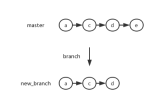
要实现如上效果只需在创建分支时在后面再添加额外的参数,该参数就是你所需调到的commit节点的hash code
git branch new_branch <commit></commit>
push
这里提一下push的--set-upstream,它的效果是设置上游分支,当我们将远程不存在的本地分支推送到远程时,如果不在推送的分支上,我们一般会使用如下命令进行推送。
git checkout push_branch
git push origin push_branch
下面是简洁的方法,使用该参数无需切换分支,可以直接使用如下命令进行推送。
git push --set-upstream origin push_branch
cherry-pick
这个命令的场景是:当你所在的分支没用,你要删除它,但其中的一个commit你还是想推送到远程master上。
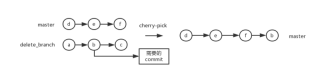
将分支切换到master,执行以下命令:
git cherry-pick <b></b>
merge
我们所熟知的是使用merge来进行分支的合并,每次使用merge时都会自动将副分支合并成一个commit进行推送到主分支上,那么如果我不想它自动推送到主分支上时(可能我还需要进行修改),这时就可以使用--squash操作
git merge --squash dev_branch
执行完以上命令后,我们就可以在暂存区看到一个还未提交的文件状态。
reflog
当我们切分支太频繁了之后,可能会忘了一些分支是从哪个分支切过来的,此时可以使用如下命令查看:
git reflog
894a16d HEAD@{0}: commit: commit another todo
6876e5b HEAD@{1}: checkout: moving from solve_world_hunger to kill_the_batman
324336a HEAD@{2}: commit: commit todo
6876e5b HEAD@{3}: checkout: moving from blowup_sun_for_ransom to solve_world_hunger
6876e5b HEAD@{4}: checkout: moving from kill_the_batman to blowup_sun_for_ransom
6876e5b HEAD@{5}: checkout: moving from cure_common_cold to kill_the_batman
6876e5b HEAD@{6}: commit (initial): initial commit
这样我们就可以看到所用的操作历史了。这样如果我们使用git reset命令不小心删除了需要的东西。可以通过此来查找到删除操作的hash code,之后就可以通过如下命令进行恢复。
git checkout <hash></hash>
目前想到的就这些了,希望能有所帮助
个人博客://m.sbmmt.com/
前言
作为一个开发者,如果现在还不知道git或者还不会使用git,那么你应该好好的反省。自己去好好看一遍的入门介绍吧。今天只是对自己在日常中使用git的一些常用命令的介绍与自己认为不错且能提高我们办公效率的命令。内容可能会有点杂乱,但绝对都是经典的命令,在此记下笔记,也希望能帮助来赏脸关顾的你们。
区域
在这之前,来介绍一下git的三个区域
工作区(working directory)
暂存区(stage index)
本地历史区(history)
通过一张图就能简洁易懂的明白它们之间的转化。
clone
Let’s start with the clone command. Anyone who has used git knows it. git colneThe command pulls the remote repository to the local. But when we want to pull to the specified folder, you may directly mkdir. In fact, there is no need to do this. One command can do it git clone remote warehouse file name, that’s it Simple.
rm
We may encounter such a situation at work. Use git add . to directly add all modified files in the workspace to the staging area. , but later found that there is a file that should not be added first. At this time, we can use the following command to return the file to the workspace.
git rm --cached <file></file>
stash
There is such a situation. When you are developing, there is an online emergency bug that needs to be fixed. At this time, the function under development is If you don't want to submit it before it's completed, you can use git stash to store all the files in the workspace. At this time, you can safely cut the branch and fix the bug. After the repair is completed, execute git stash pop to take out the previously stored ones. Of course, there are also some other related commands such as: git stash listView the stored records,git stash dropDiscard the stored records.
tag
Maybe during development we need to tag git tag tagName, and push the corresponding tag to the remote warehouse. In this case, you can use the following command push.
git push --tags tagName
amend
After you commit, you find that a file was not added to the last commit, or some files were modified. . At this time, you do not want to add new commit information, you just want to add it to the last commit. At this time, you can use
git commit --amend <file></file>
to add the files in the temporary storage area, and you can also modify the commit information at this time.
reset
reset can also achieve the effect of the previous rm. You can use the following command to replace the previous git rm -- cached <file></file>Command
git reset HEAD <file></file>
But reset is more versatile. Combined with soft parameters, it can be rolled back to any commit The node operates
git reset --soft index
After executing this command, it returns to index. The work area remains unchanged and the temporary storage area returns to the current index. There is also a hard parameter.
git reset --hard index
can be said to be opposite to soft. Its effect lies in the difference between the work area and the temporary storage area. It will clear these two areas.
rebase
For rebase means redirection. If there is a difference in information between your current branch and the remote branch commit, you will be reminded. You cannot push at this time. You must first pull the remote commit information to the local one before you can submit it. In this case, you can use the rebase command. The following is currently in the develop branch
At this time, the rebase command should be executed first
git fetch
git rebase origin/master
After execution , and finally push to the remote master
git push origin master
The final situation of each branch is the effect shown in the picture above. If you find the command difficult to remember, you can also use one command to achieve the above effect.
git pull --rebase origin master
This is a simple application of rebase, and it is also a common command. The following introduces an optional parameter --onto of rebase.
--onto
Usage scenarios: During the development process, we will create different branches to develop different functions. When you create a new branch on branch AB When developing functions and submitting some commit, you find that there are wrong commit on the original A branch. If you want When rebase to master, this wrong commit cannot be attached. At this time, it’s time to --onto show off your magical powers.
is currently in the B branch. To get the above results, just execute the following command
git rebase --onto master <b> B</b>
This can not only target different Branches can also act on the same branch. Therefore, for the above situation, we can only operate on branch B. The equivalent command is as follows:
git rebase --onto <a> <b> B</b></a>
--interactive
When we want to modify commit As the name of the information, if the commit to be modified is at the first time, you can use
git commit --amend
. If it is not the first time, we have to use rebase’s --interactive is an optional parameter and can be abbreviated as -i. The
after the <pre class="brush:php;toolbar:false">git rebase -i <commit></commit></pre> parameter is the previous commit that needs to be modified. After execution, a message similar to the following will appear:
pick 137cf0a First coommit
pick 163dc38 Second commit

# Rebase f9aee6e..163dc38 onto f9aee6e (2 command(s))
#
# Commands:
# p, pick = use commit
# r, reword = use commit, but edit the commit message
# e, edit = use commit, but stop for amending
# s, squash = use commit, but meld into previous commit
# f, fixup = like "squash", but discard this commit's log message
# x, exec = run command (the rest of the line) using shell
#
# These lines can be re-ordered; they are executed from top to bottom.
#
# If you remove a line here THAT COMMIT WILL BE LOST.
#
# However, if you remove everything, the rebase will be aborted.
#
# Note that empty commits are commented out
根据提示我们可以有6个可选择的操作。相信提示已经说的很明显了,对于我们这种要修改First coommit的情况,需要使用r。
r 137cf0a First commit
pick 163dc38 Second commit
执行之后会跳到修该First coomit的界面,进行修改即可。
First commit

# Please enter the commit message for your changes. Lines starting
# with '#' will be ignored, and an empty message aborts the commit.
#
# Date:      Thu Jan 26 23:07:10 2017 +0800
#
# rebase in progress; onto f9aee6e
# You are currently editing a commit while rebasing branch 'master' on 'f9aee6e'.
#
# Changes to be committed:
#       new file:   file1
至于其他的操作项,有兴趣的可以自己去尝试一下。例如s操作就可以用来合并commit。
branch
相信branch都很熟悉,我这里要说的是他的另一种可能会用到的情况。场景是这样的:如果在你进行创建新的分支时,并不想从当前的commit信息节点进行创建分支。
要实现如上效果只需在创建分支时在后面再添加额外的参数,该参数就是你所需调到的commit节点的hash code
git branch new_branch <commit></commit>
push
这里提一下push的--set-upstream,它的效果是设置上游分支,当我们将远程不存在的本地分支推送到远程时,如果不在推送的分支上,我们一般会使用如下命令进行推送。
git checkout push_branch
git push origin push_branch
下面是简洁的方法,使用该参数无需切换分支,可以直接使用如下命令进行推送。
git push --set-upstream origin push_branch
cherry-pick
这个命令的场景是:当你所在的分支没用,你要删除它,但其中的一个commit你还是想推送到远程master上。
将分支切换到master,执行以下命令:
git cherry-pick <b></b>
merge
我们所熟知的是使用merge来进行分支的合并,每次使用merge时都会自动将副分支合并成一个commit进行推送到主分支上,那么如果我不想它自动推送到主分支上时(可能我还需要进行修改),这时就可以使用--squash操作
git merge --squash dev_branch
执行完以上命令后,我们就可以在暂存区看到一个还未提交的文件状态。
reflog
当我们切分支太频繁了之后,可能会忘了一些分支是从哪个分支切过来的,此时可以使用如下命令查看:
git reflog
894a16d HEAD@{0}: commit: commit another todo
6876e5b HEAD@{1}: checkout: moving from solve_world_hunger to kill_the_batman
324336a HEAD@{2}: commit: commit todo
6876e5b HEAD@{3}: checkout: moving from blowup_sun_for_ransom to solve_world_hunger
6876e5b HEAD@{4}: checkout: moving from kill_the_batman to blowup_sun_for_ransom
6876e5b HEAD@{5}: checkout: moving from cure_common_cold to kill_the_batman
6876e5b HEAD@{6}: commit (initial): initial commit
这样我们就可以看到所用的操作历史了。这样如果我们使用git reset命令不小心删除了需要的东西。可以通过此来查找到删除操作的hash code,之后就可以通过如下命令进行恢复。
git checkout <hash></hash>
目前想到的就这些了,希望能有所帮助
更多git使用杂记 相关文章请关注PHP中文网!

 How does IntelliJ IDEA identify the port number of a Spring Boot project without outputting a log?Apr 19, 2025 pm 11:45 PM
Start Spring using IntelliJIDEAUltimate version...
 How to elegantly obtain entity class variable names to build database query conditions?Apr 19, 2025 pm 11:42 PM
When using MyBatis-Plus or other ORM frameworks for database operations, it is often necessary to construct query conditions based on the attribute name of the entity class. If you manually every time...
 Java BigDecimal operation: How to accurately control the accuracy of calculation results?Apr 19, 2025 pm 11:39 PM
Java...
 How to use the Redis cache solution to efficiently realize the requirements of product ranking list?Apr 19, 2025 pm 11:36 PM
How does the Redis caching solution realize the requirements of product ranking list? During the development process, we often need to deal with the requirements of rankings, such as displaying a...
 How to safely convert Java objects to arrays?Apr 19, 2025 pm 11:33 PM
Conversion of Java Objects and Arrays: In-depth discussion of the risks and correct methods of cast type conversion Many Java beginners will encounter the conversion of an object into an array...
 How do I convert names to numbers to implement sorting and maintain consistency in groups?Apr 19, 2025 pm 11:30 PM
Solutions to convert names to numbers to implement sorting In many application scenarios, users may need to sort in groups, especially in one...
 E-commerce platform SKU and SPU database design: How to take into account both user-defined attributes and attributeless products?Apr 19, 2025 pm 11:27 PM
Detailed explanation of the design of SKU and SPU tables on e-commerce platforms This article will discuss the database design issues of SKU and SPU in e-commerce platforms, especially how to deal with user-defined sales...
 How to set the default run configuration list of SpringBoot projects in Idea for team members to share?Apr 19, 2025 pm 11:24 PM
How to set the SpringBoot project default run configuration list in Idea using IntelliJ...


Hot AI Tools

Undresser.AI Undress
AI-powered app for creating realistic nude photos

AI Clothes Remover
Online AI tool for removing clothes from photos.

Undress AI Tool
Undress images for free

Clothoff.io
AI clothes remover

Video Face Swap
Swap faces in any video effortlessly with our completely free AI face swap tool!

Hot Article
Hot Tools

MantisBT
Mantis is an easy-to-deploy web-based defect tracking tool designed to aid in product defect tracking. It requires PHP, MySQL and a web server. Check out our demo and hosting services.

PhpStorm Mac version
The latest (2018.2.1) professional PHP integrated development tool

MinGW - Minimalist GNU for Windows
This project is in the process of being migrated to osdn.net/projects/mingw, you can continue to follow us there. MinGW: A native Windows port of the GNU Compiler Collection (GCC), freely distributable import libraries and header files for building native Windows applications; includes extensions to the MSVC runtime to support C99 functionality. All MinGW software can run on 64-bit Windows platforms.

mPDF
mPDF is a PHP library that can generate PDF files from UTF-8 encoded HTML. The original author, Ian Back, wrote mPDF to output PDF files "on the fly" from his website and handle different languages. It is slower than original scripts like HTML2FPDF and produces larger files when using Unicode fonts, but supports CSS styles etc. and has a lot of enhancements. Supports almost all languages, including RTL (Arabic and Hebrew) and CJK (Chinese, Japanese and Korean). Supports nested block-level elements (such as P, DIV),

ZendStudio 13.5.1 Mac
Powerful PHP integrated development environment

