


Home >WeChat Applet >WeChat Development >C# WeChat public platform development access_token acquisition, storage and update

1. What is access_token?
access_token is the globally unique ticket of the public account. The public account needs to use access_token when calling each interface. Under normal circumstances, the access_token is valid for 7200 seconds. Repeated acquisition will cause the last access_token to become invalid. Since the number of API calls to obtain access_token is very limited, it is recommended that developers store and update access_token globally. Frequent refresh of access_token will limit API calls and affect their own business.
2. Problems to be solved
1. How to obtain access_token.
2. Since the validity period of access_token is 7200 seconds, that is, 2 hours, and repeated acquisition will cause the last access_token to become invalid, the number of api calls to obtain access_token is very limited, so it is necessary to solve how to globally store and update access_token. .
3. Ideas
1. Store access_token in the database.
2. When will the access_token be updated? Update when access_token expires, so how to determine whether access_token has expired? Use the current access_token to request the WeChat interface to obtain the custom menu. If the returned errcode is 42001, it means that the access_token has expired. At this time, obtain the access_token again.
Database design (table name SWX_Config):
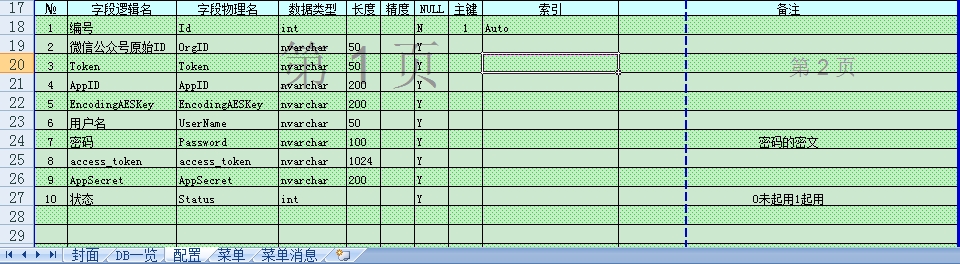
4. Code:
1. Http request code (HttpRequestUtil class):
#region 请求Url,不发送数据
/// <summary>
/// 请求Url,不发送数据
/// </summary>
public static string RequestUrl(string url)
{
 return RequestUrl(url, "POST");
}
#endregion

#region 请求Url,不发送数据
/// <summary>
/// 请求Url,不发送数据
/// </summary>
public static string RequestUrl(string url, string method)
{
 // 设置参数
 HttpWebRequest request = WebRequest.Create(url) as HttpWebRequest;
 CookieContainer cookieContainer = new CookieContainer();
 request.CookieContainer = cookieContainer;
 request.AllowAutoRedirect = true;
 request.Method = method;
 request.ContentType = "text/html";
 request.Headers.Add("charset", "utf-8");

 //发送请求并获取相应回应数据
 HttpWebResponse response = request.GetResponse() as HttpWebResponse;
 //直到request.GetResponse()程序才开始向目标网页发送Post请求
 Stream responseStream = response.GetResponseStream();
 StreamReader sr = new StreamReader(responseStream, Encoding.UTF8);
 //返回结果网页(html)代码
 string content = sr.ReadToEnd();
 return content;
}
#endregion
2. Auxiliary method (Tools class):
namespace SWX.Utils
{
/// <summary>
/// 工具类
/// </summary>
public class Tools
{
#region 获取Json字符串某节点的值
/// <summary>
/// 获取Json字符串某节点的值
/// </summary>
public static string GetJsonValue(string jsonStr, string key)
{
string result = string.Empty;
if (!string.IsNullOrEmpty(jsonStr))
{
key = "\"" + key.Trim('"') + "\"";
int index = jsonStr.IndexOf(key) + key.Length + 1;
if (index > key.Length + 1)
{
//先截逗号,若是最后一个,截“}”号,取最小值
int end = jsonStr.IndexOf(',', index);
if (end == -1)
{
end = jsonStr.IndexOf('}', index);
}
result = jsonStr.Substring(index, end - index);
result = result.Trim(new char[] { '"', ' ', '\'' }); //过滤引号或空格
}
}
return result;
}
#endregion
}
}3. Determine whether access_token has expired (WXApi class):
#region 验证Token是否过期
/// <summary>
/// 验证Token是否过期
/// </summary>
public static bool TokenExpired(string access_token)
{
 string jsonStr = HttpRequestUtil.RequestUrl(string.Format("https://api.weixin.qq.com/cgi-bin/menu/get?access_token={0}", access_token));
 if (Tools.GetJsonValue(jsonStr, "errcode") == "42001")
 {
  return true;
 }
 return false;
}
#endregion
4. Request the WeChat interface to obtain access_token (WXApi Class):
#region 获取Token
/// <summary>
/// 获取Token
/// </summary>
public static string GetToken(string appid, string secret)
{
 string strJson = HttpRequestUtil.RequestUrl(string.Format("https://api.weixin.qq.com/cgi-bin/token?grant_type=client_credential&appid={0}&secret={1}", appid, secret));
 return Tools.GetJsonValue(strJson, "access_token");
}
#endregion
5. Global storage and update access_token (AdminUtil class):
#region 获取access_token
/// <summary>
/// 获取access_token
/// </summary>
public static string GetAccessToken(PageBase page)
{
string access_token = string.Empty;
UserInfo user = GetLoginUser(page);
if (user != null)
{
if (string.IsNullOrWhiteSpace(user.access_token)) //尚未保存过access_token
{
access_token = WXApi.GetToken(user.AppID, user.AppSecret);
}
else
{
if (WXApi.TokenExpired(user.access_token)) //access_token过期
{
access_token = WXApi.GetToken(user.AppID, user.AppSecret);
}
else
{
return user.access_token;
}
}
MSSQLHelper.ExecuteSql(string.Format("update SWX_Config set access_token='{0}' where UserName='{1}'", access_token, user.UserName));
}
return access_token;
}
#endregionThe above is the entire content of this article. I hope it will be helpful to everyone in the development of WeChat public platform.
For more articles related to the acquisition, storage and update of access_token in C# WeChat public platform development, please pay attention to the PHP Chinese website!