


 WeChat AppletWeChat DevelopmentiOS implements a password input box similar to WeChat and Alipay (UIKeyInput protocol)
iOS implements a password input box similar to WeChat and Alipay (UIKeyInput protocol)

Currently, I need to implement the function of sending red envelopes in the project. I wrote a password input box control, mainly using the UIKeyInput protocol and CoreGraphics framework. The effect is similar to WeChat payment. If it feels good, I will share my ideas and production process. Write it down and share it with everyone.
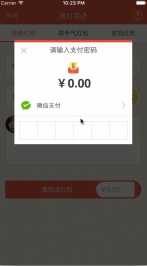
Let your custom View have the input function (UIKeyInput protocol)
The UIKeyInput protocol can provide the responder with a simple keyboard input function. Just make the responder that requires a keyboard the first responder. There are three methods that must be implemented in the UIKeyInput protocol, which are the following methods:
#pragma mark - UIKeyInput
/**
 * 用于显示的文本对象是否有任何文本
 */
- (BOOL)hasText {
  return self.textStore.length > 0;
}

/**
 * 插入文本
 */
- (void)insertText:(NSString *)text {
  if (self.textStore.length < self.passWordNum) {
    //判断是否是数字
    NSCharacterSet *cs = [[NSCharacterSet characterSetWithCharactersInString:MONEYNUMBERS] invertedSet];
    NSString*filtered = [[text componentsSeparatedByCharactersInSet:cs] componentsJoinedByString:@""];
    BOOL basicTest = [text isEqualToString:filtered];
    if(basicTest) {
     if ([self.delegate respondsToSelector:@selector(passWordDidChange:)]) {
        [self.delegate passWordDidChange:self];
      }
      if (self.textStore.length == self.passWordNum) {
        if ([self.delegate respondsToSelector:@selector(passWordCompleteInput:)]) {
          [self.delegate passWordCompleteInput:self];
        }
      }
      [self.textStore appendString:text];
      [self setNeedsDisplay];
    }
  }
}

/**
 * 删除文本
 */
- (void)deleteBackward {
  if (self.textStore.length > 0) {
    [self.textStore deleteCharactersInRange:NSMakeRange(self.textStore.length - 1, 1)];
   if ([self.delegate respondsToSelector:@selector(passWordDidChange:)]) {
      [self.delegate passWordDidChange:self];
    }
  }
  [self setNeedsDisplay];
}

/**
 * 是否能成为第一响应者
 */
- (BOOL)canBecomeFirstResponder {
  return YES;
}

/**
 * 点击成为第一相应者
 */
- (void)touchesBegan:(NSSet<UITouch *> *)touches withEvent:(UIEvent *)event {
  if (![self isFirstResponder]) {
    [self becomeFirstResponder];
  }
}
Draw the password input box through CoreGraphics
The idea of implementation is to draw the outer frame and outline of the password input box through the CoreGraphics framework. The small black dot inside is then used to determine the number of input digits based on the string obtained from the keyboard. The specific implementation is as follows:
/**
 * 设置正方形的边长
 */
- (void)setSquareWidth:(CGFloat)squareWidth {
  _squareWidth = squareWidth;
  [self setNeedsDisplay];
}

/**
 * 设置键盘的类型
 */
- (UIKeyboardType)keyboardType {
  return UIKeyboardTypeNumberPad;
}

/**
 * 设置密码的位数
 */
- (void)setPassWordNum:(NSUInteger)passWordNum {
  _passWordNum = passWordNum;
  [self setNeedsDisplay];
}

/**
 * 绘制
 */
- (void)drawRect:(CGRect)rect {
  CGFloat height = rect.size.height;
  CGFloat width = rect.size.width;
  CGFloat x = (width - self.squareWidth*self.passWordNum)/2.0;
  CGFloat y = (height - self.squareWidth)/2.0;
  CGContextRef context = UIGraphicsGetCurrentContext();
  //画外框
  CGContextAddRect(context, CGRectMake( x, y, self.squareWidth*self.passWordNum, self.squareWidth));
  CGContextSetLineWidth(context, 1);
  CGContextSetStrokeColorWithColor(context, self.rectColor.CGColor);
  CGContextSetFillColorWithColor(context, [UIColor whiteColor].CGColor);
  //画竖条
  for (int i = 1; i <= self.passWordNum; i++) {
    CGContextMoveToPoint(context, x+i*self.squareWidth, y);
    CGContextAddLineToPoint(context, x+i*self.squareWidth, y+self.squareWidth);
     CGContextClosePath(context);
  }
  CGContextDrawPath(context, kCGPathFillStroke);
  CGContextSetFillColorWithColor(context, self.pointColor.CGColor);
  //画黑点
  for (int i = 1; i <= self.textStore.length; i++) {
    CGContextAddArc(context, x+i*self.squareWidth - self.squareWidth/2.0, y+self.squareWidth/2, self.pointRadius, 0, M_PI*2, YES);
    CGContextDrawPath(context, kCGPathFill);
  }
}
The above is the entire content of this article. I hope it will be helpful to everyone's learning. I hope everyone will support the PHP Chinese website.
For more iOS implementation of password input boxes similar to WeChat and Alipay (UIKeyInput protocol) related articles, please pay attention to the PHP Chinese website!

Hot AI Tools

Undresser.AI Undress
AI-powered app for creating realistic nude photos

AI Clothes Remover
Online AI tool for removing clothes from photos.

Undress AI Tool
Undress images for free

Clothoff.io
AI clothes remover

AI Hentai Generator
Generate AI Hentai for free.

Hot Article
Hot Tools

Atom editor mac version download
The most popular open source editor

SublimeText3 Linux new version
SublimeText3 Linux latest version

Dreamweaver CS6
Visual web development tools

mPDF
mPDF is a PHP library that can generate PDF files from UTF-8 encoded HTML. The original author, Ian Back, wrote mPDF to output PDF files "on the fly" from his website and handle different languages. It is slower than original scripts like HTML2FPDF and produces larger files when using Unicode fonts, but supports CSS styles etc. and has a lot of enhancements. Supports almost all languages, including RTL (Arabic and Hebrew) and CJK (Chinese, Japanese and Korean). Supports nested block-level elements (such as P, DIV),

SAP NetWeaver Server Adapter for Eclipse
Integrate Eclipse with SAP NetWeaver application server.

