


 Web Front-endHTML TutorialThe default behavior of the parent element tag and the interaction between click events
The default behavior of the parent element tag and the interaction between click events

The content of this article is about the influence between the href default behavior of the parent element a tag and the response of the click event bound to the child element. It has certain reference value. Friends in need can refer to it. , hope it helps you.
Encountered a problem during the development process, simply write a demo The running environment is Chrome 68
Describe this problem, when there is nesting inside the a tag, the href default behavior of the parent element a tag There is an impact on the response to the click event bound to the child element. Page structure:
nbsp;html>
<meta>
<meta>
<meta>
<title>a标签内部点击事件失效</title>
<style>
* {
margin: 0;
padding: 0;
}
.father {
display: block;
width: 500px;
height: 200px;
background-color: rgb(210, 111, 30);
}
.child-one {
display: block;
width: 200px;
height: 50px;
background-color: rgb(174, 43, 226);
}
.child-two {
display: block;
width: 200px;
height: 50px;
background-color: rgb(43, 226, 67);
}
.child-three {
display: block;
width: 200px;
height: 50px;
background-color: rgb(43, 137, 226);
}
</style>
<a>父标签
<span>
子标签1
</span>
<object>
<a>
子标签2
</a>
</object>
<object>
<a>
子标签3
</a>
</object>
</a>
<script>
let father = document.querySelector('.father');
let ele1 = document.querySelector('.child-one');
let ele2 = document.querySelector('.child-two');
let ele3 = document.querySelector('.child-three');
ele1.addEventListener('click', function (e) {
e.stopPropagation();
// e.preventDefault();
alert('click child-one')
window.location.href = 'child-one'
}, false)
ele2.addEventListener('click', function (e) {
e.stopPropagation();
alert('click child-two')
// window.location.href='child-two'
}, false)
ele3.addEventListener('click', function (e) {
alert('click child-three')
window.location.href = 'child-three'
}, false)
father.addEventListener('click', function (e) {
alert('click father')
window.location.href = 'father'
}, false)
</script>
The example is as shown below (if the a tag is nested, the browser will parse it incorrectly, so it is wrapped with an object tag).
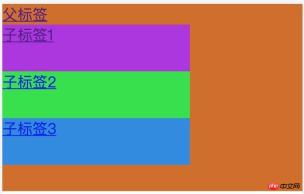
Perform the operation:
When the parent tag is clicked, 111 will pop up first, and then jump to the parent The href link of the tag.
Explanation that onclick is executed before hrefWhen child-one is clicked, the click event bound to the element is executed, and alert will pop up, but the location still jumps to father.
After preventing bubbling, the execution results still do not meet expectations. After addingpreventDefault, the child element's own jump is performed.When child-two is clicked, a response message will pop up, and the href link will jump.
When child-three is clicked,
click child-threepops up first, and thenhref child-three, indicating that the click event precedes href execution.
The above four operations are all easy to understand except 2. In 2, why is the parent element still executed after preventing the event from bubbling? href jump.
Thinking:
First of all, it is certain that event bubbling is indeed blocked because the onclick of the parent element is not executed.
So I guess, the default behavior of the tag cannot be prevented by canceling bubbling. Even if the event does not bubble up to the parent element, the child element is inside the parent element <a></a> , the <a></a> tag default behavior will still be performed.
Solution:
Add e.preventDefault() in the child elementPrevent default behavior
The parent element does not use<a> tag, use other tags to bind click events and child elements to prevent bubbling </a>
The parent element does not use the href attribute, directly in <a></a> Binding the click event on the label
Recommended related articles:
linkWhat is the difference between label link CSS and @import loading?
HTML tag: Summary of usage of img tag
The above is the detailed content of The default behavior of the parent element tag and the interaction between click events. For more information, please follow other related articles on the PHP Chinese website!

 The Future of HTML: Evolution and Trends in Web DesignApr 17, 2025 am 12:12 AM
The future of HTML is full of infinite possibilities. 1) New features and standards will include more semantic tags and the popularity of WebComponents. 2) The web design trend will continue to develop towards responsive and accessible design. 3) Performance optimization will improve the user experience through responsive image loading and lazy loading technologies.
 HTML vs. CSS vs. JavaScript: A Comparative OverviewApr 16, 2025 am 12:04 AM
The roles of HTML, CSS and JavaScript in web development are: HTML is responsible for content structure, CSS is responsible for style, and JavaScript is responsible for dynamic behavior. 1. HTML defines the web page structure and content through tags to ensure semantics. 2. CSS controls the web page style through selectors and attributes to make it beautiful and easy to read. 3. JavaScript controls web page behavior through scripts to achieve dynamic and interactive functions.
 HTML: Is It a Programming Language or Something Else?Apr 15, 2025 am 12:13 AM
HTMLisnotaprogramminglanguage;itisamarkuplanguage.1)HTMLstructuresandformatswebcontentusingtags.2)ItworkswithCSSforstylingandJavaScriptforinteractivity,enhancingwebdevelopment.
 HTML: Building the Structure of Web PagesApr 14, 2025 am 12:14 AM
HTML is the cornerstone of building web page structure. 1. HTML defines the content structure and semantics, and uses, etc. tags. 2. Provide semantic markers, such as, etc., to improve SEO effect. 3. To realize user interaction through tags, pay attention to form verification. 4. Use advanced elements such as, combined with JavaScript to achieve dynamic effects. 5. Common errors include unclosed labels and unquoted attribute values, and verification tools are required. 6. Optimization strategies include reducing HTTP requests, compressing HTML, using semantic tags, etc.
 From Text to Websites: The Power of HTMLApr 13, 2025 am 12:07 AM
HTML is a language used to build web pages, defining web page structure and content through tags and attributes. 1) HTML organizes document structure through tags, such as,. 2) The browser parses HTML to build the DOM and renders the web page. 3) New features of HTML5, such as, enhance multimedia functions. 4) Common errors include unclosed labels and unquoted attribute values. 5) Optimization suggestions include using semantic tags and reducing file size.
 Understanding HTML, CSS, and JavaScript: A Beginner's GuideApr 12, 2025 am 12:02 AM
WebdevelopmentreliesonHTML,CSS,andJavaScript:1)HTMLstructurescontent,2)CSSstylesit,and3)JavaScriptaddsinteractivity,formingthebasisofmodernwebexperiences.
 The Role of HTML: Structuring Web ContentApr 11, 2025 am 12:12 AM
The role of HTML is to define the structure and content of a web page through tags and attributes. 1. HTML organizes content through tags such as , making it easy to read and understand. 2. Use semantic tags such as, etc. to enhance accessibility and SEO. 3. Optimizing HTML code can improve web page loading speed and user experience.
 HTML and Code: A Closer Look at the TerminologyApr 10, 2025 am 09:28 AM
HTMLisaspecifictypeofcodefocusedonstructuringwebcontent,while"code"broadlyincludeslanguageslikeJavaScriptandPythonforfunctionality.1)HTMLdefineswebpagestructureusingtags.2)"Code"encompassesawiderrangeoflanguagesforlogicandinteract


Hot AI Tools

Undresser.AI Undress
AI-powered app for creating realistic nude photos

AI Clothes Remover
Online AI tool for removing clothes from photos.

Undress AI Tool
Undress images for free

Clothoff.io
AI clothes remover

AI Hentai Generator
Generate AI Hentai for free.

Hot Article
Hot Tools

SublimeText3 English version
Recommended: Win version, supports code prompts!

SecLists
SecLists is the ultimate security tester's companion. It is a collection of various types of lists that are frequently used during security assessments, all in one place. SecLists helps make security testing more efficient and productive by conveniently providing all the lists a security tester might need. List types include usernames, passwords, URLs, fuzzing payloads, sensitive data patterns, web shells, and more. The tester can simply pull this repository onto a new test machine and he will have access to every type of list he needs.

SAP NetWeaver Server Adapter for Eclipse
Integrate Eclipse with SAP NetWeaver application server.

VSCode Windows 64-bit Download
A free and powerful IDE editor launched by Microsoft

EditPlus Chinese cracked version
Small size, syntax highlighting, does not support code prompt function

