


 Web Front-endCSS TutorialSummary and sharing of background (properties, colors, pictures) settings in css
Summary and sharing of background (properties, colors, pictures) settings in css

This article is about some common sense about css background. It introduces css background properties, css background color, and css background image in detail. Friends in need can refer to
1. css background properties
1. CSS background property and CSS3 background image settings Summary sharing
In css, there are several background attributes as follows.
background    在一个声明中设置所有的背景属性。
background-attachment    设置背景图像是否固定或者随着页面的其余部分滚动。
background-color    设置元素的背景颜色。
background-image    设置元素的背景图像。
background-position    设置背景图像的开始位置。
background-repeat    设置是否及如何重复背景图像。
background-clip    规定背景的绘制区域。
background-origin    规定背景图片的定位区域。
background-size    规定背景图片的尺寸。
2. Must master CSS knowledge-background property
Note: background-color cannot be inherited, and its default value is transparent. Transparent means "transparent". That is, if an element does not specify a background color, the background is transparent so that the background of its ancestor elements is visible.
3. css background fixed style background-attachment attribute basic introduction
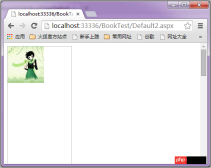
The background-attachment attribute has only 2 attribute values. scroll means that the background image scrolls as the object scrolls, which is the default option; fixed means that the background image is fixed on the page, and only other content scrolls with the scroll bar.
2. css background color
1. Use CSS to cleverly create background color gradient animation examples
The text starts here. Sometimes, well, it should be said that in some specific occasions, we may need the following animation effect, gradient + animation:

2. Use css3 to implement the background Gradient method
Before I didn’t understand that CSS could also be used to make background gradients, I always used PS to apply background gradient pictures to the web pages I created. However, not long ago, I learned that CSS3 can also do background gradients, and it has become much easier to achieve background gradient effects. Here are some methods of doing background gradients in CSS3
3. CSS3 An example of using RGBa to adjust transparency in
In CSS3, an opacity attribute is added to allow developers to set the transparency of elements. Now opacity has been supported by mainstream modern browsers, but opacity will Setting the set element and its sub-elements to the same transparency at the same time is quite inflexible and often causes a lot of trouble in actual development. In fact, there is another color transparency solution in CSS3 - RGBa. Compared with opacity, RGBa can set transparency on a single element without affecting its sub-elements. However, RGBa's browser support is not as extensive as opacity, so it has attracted relatively little attention from developers.
3. css background image
1. CSS implements responsive full-screen background image

A very popular web page format currently is full-screen large images. This article will use the simplest way to achieve this effect. The CSS property background-size is used, no javascript is required.

Before CSS3 we could edit the background Add an image. CSS3 allows us to add multiple images to an element. Multiple backgrounds can add multiple image resources to the background attribute, separated by commas
and then use background-position to position them. The position you want
3. CSS full-screen background image setting django loading image path detailed description
This article introduces the css full-screen background image setting django loading image path The detailed explanation is very good, and I would like to give it as a reference for everyone.
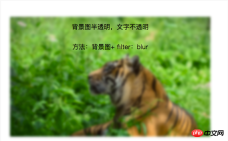
Method 1 (frosted glass effect): background image + pseudo class + flite: blur(3px)
Method 2 (semi-transparent effect): background image + positioning + background:rgba(255,255,255,0.3)
CSS two methods to achieve transparent background image and opaque text effect
In projects, it is often used to put some text introduction on the background image. Here are two techniques to achieve transparent background images and opaque text effects. Record them for future learning.

Questions and answers related to the background attribute in css
1. css3 - css How to write css so that the background color does not fill the border?
2. css3 - How to make the height of css background image 100% and the width maintain proportion?
3. css3 - css background adaptive problem
4. css3 - How to make the webpage CSS background image Gaussian blurred and display it in full screen
【Related recommendations】
1. Free css online video tutorial
2. php.cn Dugu Jiujian (2) -css video tutorial
3. Learn CSS video tutorial css background at your fingertips
The above is the detailed content of Summary and sharing of background (properties, colors, pictures) settings in css. For more information, please follow other related articles on the PHP Chinese website!

 Draggin' and Droppin' in ReactApr 17, 2025 am 11:52 AM
The React ecosystem offers us a lot of libraries that all are focused on the interaction of drag and drop. We have react-dnd, react-beautiful-dnd,
 Fast SoftwareApr 17, 2025 am 11:49 AM
There have been some wonderfully interconnected things about fast software lately.
 Nested Gradients with background-clipApr 17, 2025 am 11:47 AM
I can't say I use background-clip all that often. I'd wager it's hardly ever used in day-to-day CSS work. But I was reminded of it in a post by Stefan Judis,
 Using requestAnimationFrame with React HooksApr 17, 2025 am 11:46 AM
Animating with requestAnimationFrame should be easy, but if you haven’t read React’s documentation thoroughly then you will probably run into a few things
 Need to scroll to the top of the page?Apr 17, 2025 am 11:45 AM
Perhaps the easiest way to offer that to the user is a link that targets an ID on the element. So like...
 The Best (GraphQL) API is One You WriteApr 17, 2025 am 11:36 AM
Listen, I am no GraphQL expert but I do enjoy working with it. The way it exposes data to me as a front-end developer is pretty cool. It's like a menu of
 Weekly Platform News: Text Spacing Bookmarklet, Top-Level Await, New AMP Loading IndicatorApr 17, 2025 am 11:26 AM
In this week's roundup, a handy bookmarklet for inspecting typography, using await to tinker with how JavaScript modules import one another, plus Facebook's
 Various Methods for Expanding a Box While Preserving the Border RadiusApr 17, 2025 am 11:19 AM
I've recently noticed an interesting change on CodePen: on hovering the pens on the homepage, there's a rectangle with rounded corners expanding in the back.


Hot AI Tools

Undresser.AI Undress
AI-powered app for creating realistic nude photos

AI Clothes Remover
Online AI tool for removing clothes from photos.

Undress AI Tool
Undress images for free

Clothoff.io
AI clothes remover

AI Hentai Generator
Generate AI Hentai for free.

Hot Article
Hot Tools

ZendStudio 13.5.1 Mac
Powerful PHP integrated development environment

Zend Studio 13.0.1
Powerful PHP integrated development environment

EditPlus Chinese cracked version
Small size, syntax highlighting, does not support code prompt function

Safe Exam Browser
Safe Exam Browser is a secure browser environment for taking online exams securely. This software turns any computer into a secure workstation. It controls access to any utility and prevents students from using unauthorized resources.

Dreamweaver CS6
Visual web development tools

