

이번에는 Vue + better-scroll을 사용하여 모바일 알파벳순 색인 탐색을 구현하는 방법을 보여 드리겠습니다. Vue + better-scroll을 사용하여 모바일 알파벳순 색인 탐색을 구현하는 데 있어 주의 사항은 무엇입니까? 보세요.
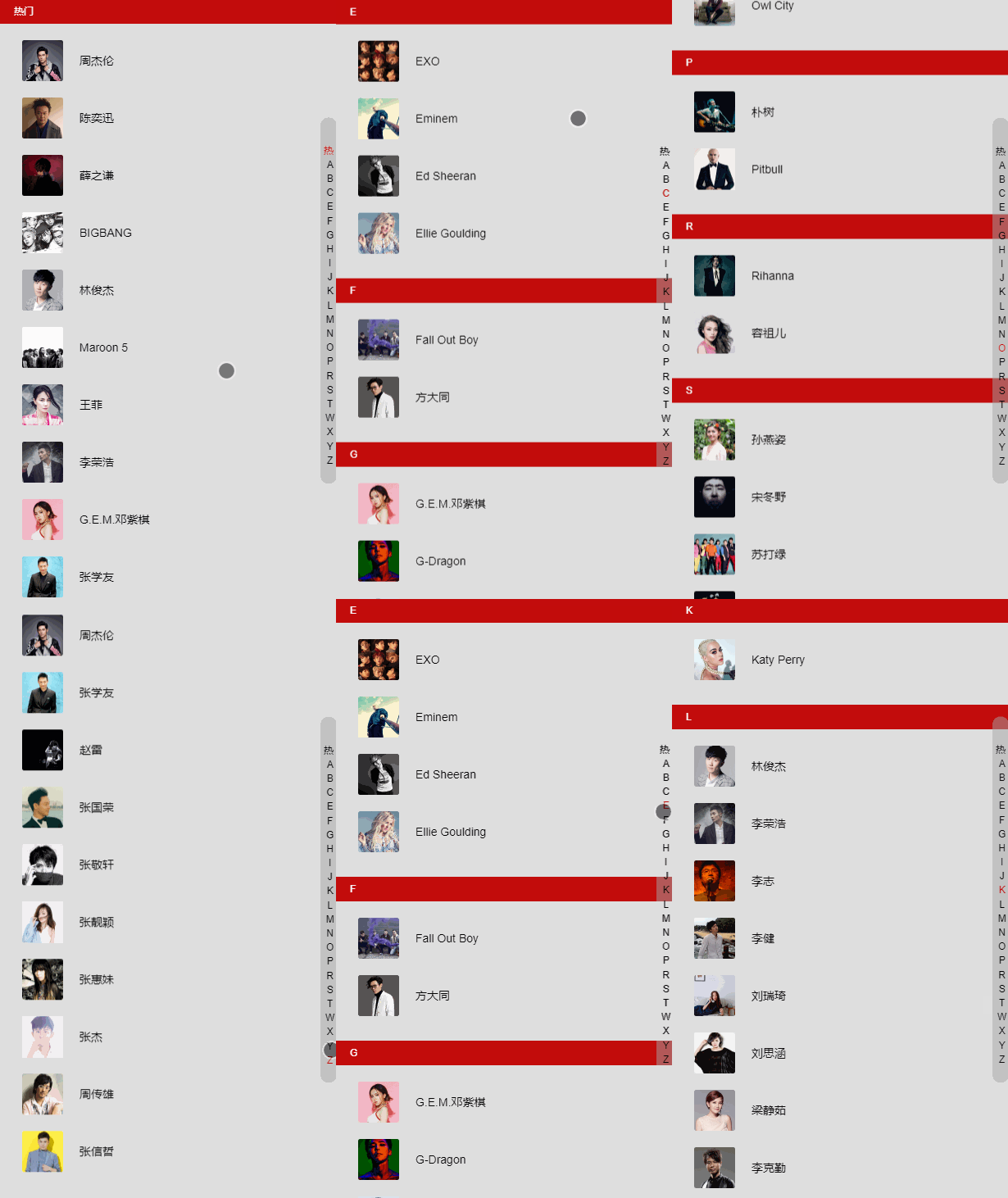
데모: 목록 보기, 보려면 Chrome 모바일 모드를 사용하세요. 모바일 모드로 전환 후 슬라이드가 안되면 새로고침 하시면 괜찮습니다.
Github: 모바일 알파벳순 인덱스 탐색
Rendering
구성 환경
vue-cli와 better-scroll을 사용하기 때문에 vue-cli를 먼저 설치한 후 npm install better-scroll .
better-scroll에 대한 간략한 소개:
better-scroll은 모바일 측(PC는 이미 지원됨)의 다양한 스크롤 시나리오 요구 사항을 해결하는 데 초점을 맞춘 플러그인입니다. 핵심은 iscroll 구현을 기반으로 하며 iscroll을 기반으로 일부 기능을 확장하고 성능 최적화를 구현했습니다.
better-scroll은 기본 JS를 기반으로 구현되며 프레임워크에 의존하지 않습니다. 컴파일된 코드 크기는 63kb, 압축 후 35kb, gzip 후에는 9kb에 불과합니다. 매우 가벼운 JS lib입니다.
이 두 가지 외에도 scss 및 vue-lazyload도 사용됩니다. 모두가 scss 전처리기를 알고 있으며 다른 것들도 마찬가지입니다. Lazyload는 그것 없이도 사용할 수 있는 지연 로딩을 구현합니다. 주요 목적은 경험을 최적화하는 것입니다.
데이터는 NetEase Cloud의 가수 목록을 직접 사용합니다. 게으른 경우 데이터에 직접 입력하십시오.
CSS 스타일은 올리지 않고 소스코드만 보시면 됩니다.
기본 스타일 구현
v-for와 양면 중첩을 직접 사용하여 가수 목록과 오른쪽 인덱스 열을 구현합니다.
HTML 구조:
<ul>
 <li v-for="group in singers"
 class="list-group"
 :key="group.id"
 ref="listGroup">
  <h2 class="list-group-title">{{ group.title }}</h2>
  <ul>
   <li v-for="item in group.items"
   class="list-group-item" :key="item.id">
    <img v-lazy="item.avatar" class="avatar">
    <span class="name">{{ item.name }}</span>
   </li>
  </ul>
 </li>
</ul>
<p class="list-shortcut">
 <ul>
  <li v-for="(item, index) in shortcutList"
  class="item"
  :data-index="index"
  :key="item.id"
  >
   {{ item }}
  </li>
 </ul>
</p>shortcutList는 속성을 계산하여 얻습니다. 제목의 첫 번째 문자만 가져옵니다.
shortcutList () {
 return this.singers.map((group) => {
  return group.title.substr(0, 1)
 })
}더 나은 스크롤을 사용하세요
스크롤을 달성하려면 더 나은 스크롤을 사용하세요. 그런데 사용할 때는 import를 사용하는 것을 잊지 마세요.
created () {
 // 初始化 better-scroll 必须要等 dom 加载完毕
 setTimeout(() => {
  this._initSrcoll()
 }, 20)
},
methods: {
 _initSrcoll () {
  console.log('didi')
  this.scroll = new BScroll(this.$refs.listView, {
   // 获取 scroll 事件,用来监听。
   probeType: 3
  })
 }
}더 나은 스크롤 초기화를 위해 생성된 메소드를 사용하고, DOM이 로드될 때까지 기다려야 하기 때문에 setTimeout을 사용합니다. 그렇지 않으면 better-scroll이 dom을 얻을 수 없으면 초기화에 실패하게 됩니다.
여기서 메소드는 2가지로 작성되어 있어서 지저분해 보이지 않게 직접 호출해 주시면 됩니다.
초기화 중에 두 개의 프로브 유형이 전달됩니다. 3. 설명: 프로브 유형이 3인 경우 스크롤 이벤트는 화면 슬라이딩 중뿐만 아니라 운동량 스크롤 애니메이션 실행 중에도 실시간으로 전달됩니다. 이 값이 설정되지 않은 경우 기본값은 0입니다. 이는 스크롤 이벤트가 전달되지 않음을 의미합니다.
점프를 달성하려면 클릭 이벤트를 추가하고 이벤트를 인덱스에 이동하세요
먼저 터치스타트 이벤트를 인덱스에 바인딩해야 합니다(손가락이 화면을 누를 때 트리거됨). v-on을 직접 사용하면 됩니다. 그런 다음 인덱스 값을 얻을 수 있도록 인덱스에 데이터 인덱스를 추가해야 합니다. :data-index="index" 를 사용하세요.
<p class="list-shortcut">
 <ul>
  <li v-for="(item, index) in shortcutList"
  class="item"
  :data-index="index"
  :key="item.id"
  @touchstart="onShortcutStart"
  @touchmove.stop.prevent="onShortcutMove"
  >
   {{ item }}
  </li>
 </ul>
</p>onShortcutStart 메소드를 바인딩하세요. 인덱스 점프 클릭 기능을 구현합니다. 슬라이딩 점프를 구현하려면 또 다른 onShortcutMove 메소드를 바인딩하세요.
created () {
 // 添加一个 touch 用于记录移动的属性
 this.touch = {}
 // 初始化 better-scroll 必须要等 dom 加载完毕
 setTimeout(() => {
  this._initSrcoll()
 }, 20)
},
methods: {
 _initSrcoll () {
  this.scroll = new BScroll(this.$refs.listView, {
   probeType: 3,
   click: true
  })
 },
 onShortcutStart (e) {
  // 获取到绑定的 index
  let index = e.target.getAttribute('data-index')
  // 使用 better-scroll 的 scrollToElement 方法实现跳转
  this.scroll.scrollToElement(this.$refs.listGroup[index])
  // 记录一下点击时候的 Y坐标 和 index
  let firstTouch = e.touches[0].pageY
  this.touch.y1 = firstTouch
  this.touch.anchorIndex = index
 },
 onShortcutMove (e) {
  // 再记录一下移动时候的 Y坐标,然后计算出移动了几个索引
  let touchMove = e.touches[0].pageY
  this.touch.y2 = touchMove

  // 这里的 16.7 是索引元素的高度
  let delta = Math.floor((this.touch.y2 - this.touch.y1) / 18)
  // 计算最后的位置
  // * 1 是因为 this.touch.anchorIndex 是字符串,用 * 1 偷懒的转化一下
  let index = this.touch.anchorIndex * 1 + delta
  this.scroll.scrollToElement(this.$refs.listGroup[index])
 }
}이렇게 하면 인덱싱 기능을 구현할 수 있습니다.
물론 만족스럽지 못하죠. 멋진 특수효과도 추가해야겠죠? 예를 들어 인덱스 하이라이팅 등등~~
모바일 콘텐츠 인덱스 하이라이팅
으음, 지금은 좀 복잡하네요. 하지만 인내심을 가지면 이해할 수 있다.
콘텐츠가 스크롤될 때 Y축 오프셋 값을 반환하려면 더 나은 스크롤의 on 메서드가 필요합니다. 따라서 better-scroll을 초기화할 때 일부 코드를 추가해야 합니다. 그런데 데이터에 scrollY를 추가하고 currentIndex(강조 표시된 인덱스의 위치를 기록하는 데 사용됨)를 수신해야 하므로 데이터에 추가하는 것을 잊지 마세요.
_initSrcoll () {
 this.scroll = new BScroll(this.$refs.listView, {
  probeType: 3,
  click: true
 })
 // 监听Y轴偏移的值
 this.scroll.on('scroll', (pos) => {
  this.scrollY = pos.y
 })
}그런 다음 콘텐츠의 높이를 계산하고 계산 높이() 메서드를 추가하여 인덱스 콘텐츠의 높이를 계산해야 합니다.
_calculateHeight () {
 this.listHeight = []
 const list = this.$refs.listGroup
 let height = 0
 this.listHeight.push(height)
 for (let i = 0; i < list.length; i++) {
  let item = list[i]
  height += item.clientHeight
  this.listHeight.push(height)
 }
}
// [0, 760, 1380, 1720, 2340, 2680, 2880, 3220, 3420, 3620, 3960, 4090, 4920, 5190, 5320, 5590, 5790, 5990, 6470, 7090, 7500, 7910, 8110, 8870]
// 得到这样的值然后在 watch 中监听 scrollY,看代码:
watch: {
 scrollY (newVal) {
  // 向下滑动的时候 newVal 是一个负数,所以当 newVal > 0 时,currentIndex 直接为 0
  if (newVal > 0) {
   this.currentIndex = 0
   return
  }
  // 计算 currentIndex 的值
  for (let i = 0; i < this.listHeight.length - 1; i++) {
   let height1 = this.listHeight[i]
   let height2 = this.listHeight[i + 1]
   if (-newVal >= height1 && -newVal < height2) {
    this.currentIndex = i
    return
   }
  }
  // 当超 -newVal > 最后一个高度的时候
  // 因为 this.listHeight 有头尾,所以需要 - 2
  this.currentIndex = this.listHeight.length - 2
 }
}得到 currentIndex 的之后,在 html 中使用。
给索引绑定 class --> :class="{'current': currentIndex === index}"
最后再处理一下滑动索引的时候改变 currentIndex。
因为代码可以重复利用,且需要处理边界情况,所以就把
this.scroll.scrollToElement(this.$refs.listGroup[index])
重新写了个函数,来减少代码量。
// 在 scrollToElement 的时候,改变 scrollY,因为有 watch 所以就会计算出 currentIndex
scrollToElement (index) {
 // 处理边界情况
 // 因为 index 通过滑动距离计算出来的
 // 所以向上滑超过索引框框的时候就会 < 0,向上就会超过最大值
 if (index < 0) {
  return
 } else if (index > this.listHeight.length - 2) {
  index = this.listHeight.length - 2
 }
 // listHeight 是正的, 所以加个 -
 this.scrollY = -this.listHeight[index]
 this.scroll.scrollToElement(this.$refs.listGroup[index])
}lazyload
lazyload 插件也顺便说一下哈,增加一下用户体验。
使用方法
先 npm 安装
在 main.js 中 import,然后 Vue.use
import VueLazyload from 'vue-lazyload'
Vue.use(VueLazyload, {
 loading: require('./common/image/default.jpg')
})添加一张 loading 图片,使用 webpack 的 require 获取图片。
然后在需要使用的时候,把 :src="" 换成 v-lazy="" 就实现了图片懒加载的功能。
总结
移动端字母索引导航就这么实现啦,感觉还是很有难度的哈(对我来说)。
主要就是使用了 better-scroll 的 on 获取移动偏移值(实现高亮)、scrollToElement 跳转到相应的位置(实现跳转)。以及使用 touch 事件监听触摸,来获取开始的位置,以及滑动距离(计算最后的位置)。
相信看了本文案例你已经掌握了方法,更多精彩请关注php中文网其它相关文章!
推荐阅读:
위 내용은 Vue + 더 나은 스크롤을 사용하여 모바일 알파벳순 인덱스 탐색을 구현하는 방법의 상세 내용입니다. 자세한 내용은 PHP 중국어 웹사이트의 기타 관련 기사를 참조하세요!





























![[웹 프런트엔드] Node.js 빠른 시작](https://img.php.cn/upload/course/000/000/067/662b5d34ba7c0227.png)



