


 Web Front-end
JS Tutorial
How to write Form components using async-validator (detailed tutorial)
Web Front-end
JS Tutorial
How to write Form components using async-validator (detailed tutorial)
How to write Form components using async-validator (detailed tutorial)

This article mainly introduces the method of writing Form components using async-validator. Now I share it with you and give it as a reference.
In front-end development, form verification is a very common function. Some UI libraries such as ant.design and Element ui have implemented Form components with verification functions. async-validator is a library that can perform asynchronous verification of data. Both the Form component of ant.design and Element ui use async-validator. This article will briefly introduce the basic usage of async-validator and use this library to implement a simple Form component with verification function.
1. Basic usage of async-validator
The function of async-validator is to verify whether the data is legal and give prompt information according to the verification rules.
The following demonstrates the most basic usage of async-validator.
import AsyncValidator from 'async-validator'
// 校验规则
const descriptor = {
 username: [
 {
  required: true,
  message: '请填写用户名'
 },
 {
  min: 3,
  max: 10,
  message: '用户名长度为3-10'
 }
 ]
}
// 根据校验规则构造一个 validator
const validator = new AsyncValidator(descriptor)
const data = {
 username: 'username'
}
validator.validate(model, (errors, fields) => {
 console.log(errors)
})When the data does not comply with the verification rules, the corresponding error message can be obtained in the callback function of validator.validate.
When the common verification rules in async-validator cannot meet the needs, we can write a custom verification function to verify the data. A simple check function is as follows.
function validateData (rule, value, callback) {
 let err
 if (value === 'xxxx') {
  err = '不符合规范'
 }
 callback(err)
}
const descriptor = {
 complex: [
  {
  validator: validateData
  }
 ]
}
const validator = new AsyncValidator(descriptor)async-validator supports asynchronous verification of data, so when writing a custom verification function, the callback in the verification function must be called regardless of whether the verification passes or not.
2. Write Form component and FormItem component
Now that we know how to use async-validator, how to combine this library with the Form component to be written.
Implementation ideas
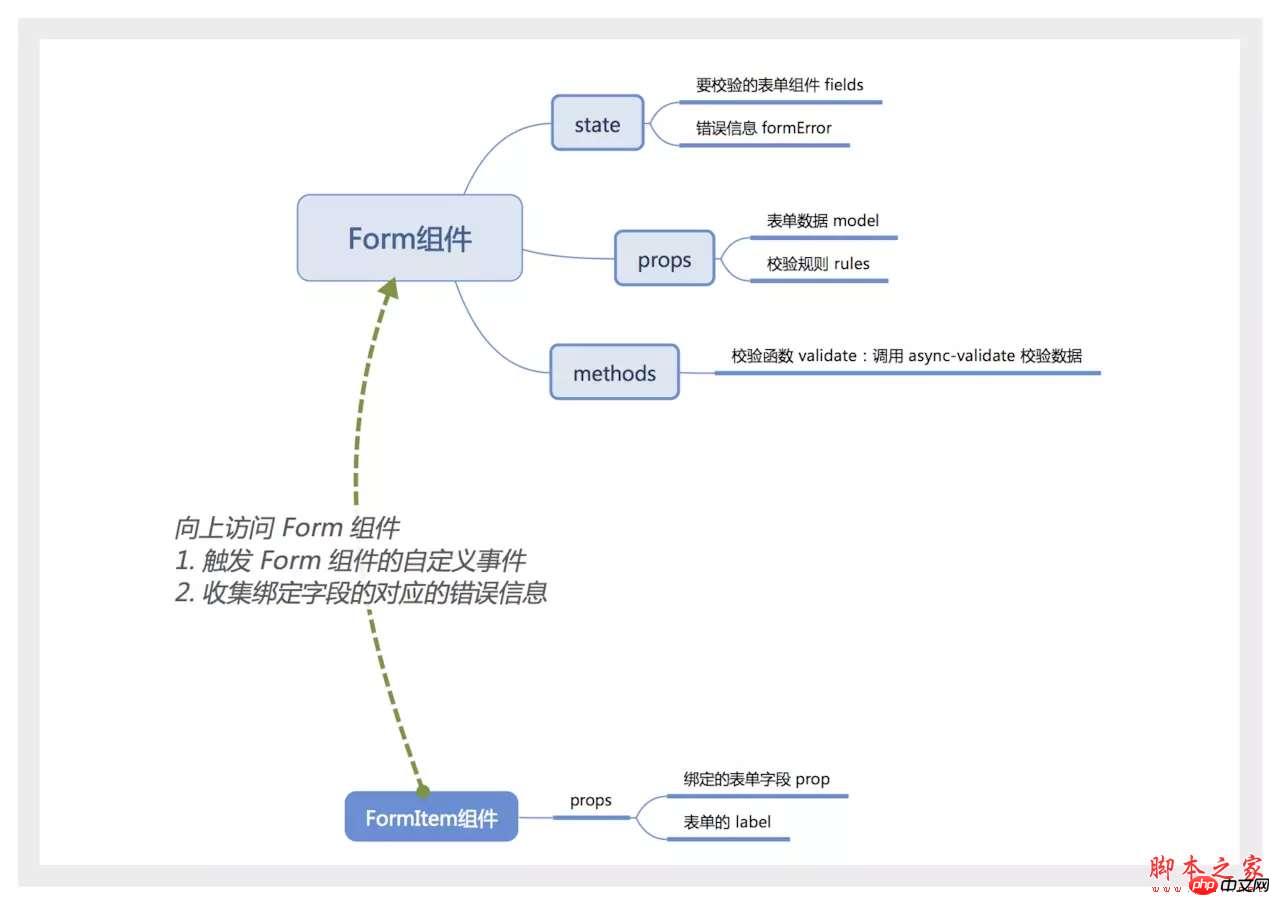
Use a picture to describe the implementation ideas.
Form component
The Form component should be a container that contains an indefinite number of FormItem or other elements. You can use Vue's built-in slot component to represent the content in the Form.
The Form component also needs to know how many FormItem components it contains that need to be verified. Normally, the communication between parent and child components is achieved by binding events on the child components, but using slot here, the events of the child components cannot be monitored. Here you can listen to events through $on on the Form component, and trigger the custom event of the Form component before the FormItem is mounted or destroyed.
According to this idea, we first write the Form component.
<template>
<form class="v-form">
<slot></slot>
</form>
</template>
<script>
import AsyncValidator from 'async-validator'
export default {
name: 'v-form',
componentName: 'VForm', // 通过 $options.componentName 来找 form 组件
data () {
return {
fields: [], // field: {prop, el},保存 FormItem 的信息。
formError: {}
}
},
computed: {
formRules () {
const descriptor = {}
this.fields.forEach(({prop}) => {
if (!Array.isArray(this.rules[prop])) {
console.warn(`prop 为 ${prop} 的 FormItem 校验规则不存在或者其值不是数组`)
descriptor[prop] = [{ required: true }]
return
}
descriptor[prop] = this.rules[prop]
})
return descriptor
},
formValues () {
return this.fields.reduce((data, {prop}) => {
data[prop] = this.model[prop]
return data
}, {})
}
},
methods: {
validate (callback) {
const validator = new AsyncValidator(this.formRules)
validator.validate(this.formValues, (errors) => {
let formError = {}
if (errors && errors.length) {
errors.forEach(({message, field}) => {
formError[field] = message
})
} else {
formError = {}
}
this.formError = formError
// 让错误信息的顺序与表单组件的顺序相同
const errInfo = []
this.fields.forEach(({prop, el}, index) => {
if (formError[prop]) {
errInfo.push(formError[prop])
}
})
callback(errInfo)
})
}
},
props: {
model: Object,
rules: Object
},
created () {
this.$on('form.addField', (field) => {
if (field) {
this.fields = [...this.fields, field]
}
})
this.$on('form.removeField', (field) => {
if (field) {
this.fields = this.fields.filter(({prop}) => prop !== field.prop)
}
})
}
}
</script>FormItem component
The FormItem component is much simpler. First, you have to look up to find the Form component that contains it. Next, the corresponding error information can be calculated based on formError.
<template>
<p class="form-item">
<label :for="prop" class="form-item-label" v-if="label">
{{ label }}
</label>
<p class="form-item-content">
<slot></slot>
</p>
</p>
</template>
<script>
export default {
name: 'form-item',
computed: {
form () {
let parent = this.$parent
while (parent.$options.componentName !== 'VForm') {
parent = parent.$parent
}
return parent
},
fieldError () {
if (!this.prop) {
return ''
}
const formError = this.form.formError
return formError[this.prop] || ''
}
},
props: {
prop: String,
label: String
}
}
</script>FormItem also needs to trigger some custom events of the Form component in the mounted and beforeDestroy hooks.
<script>
export default {
// ...
methods: {
dispatchEvent (eventName, params) {
if (typeof this.form !== 'object' && !this.form.$emit) {
console.error('FormItem必须在Form组件内')
return
}
this.form.$emit(eventName, params)
}
},
mounted () {
if (this.prop) {
this.dispatchEvent('form.addField', {
prop: this.prop,
el: this.$el
})
}
},
beforeDestroy () {
if (this.prop) {
this.dispatchEvent('form.removeField', {
prop: this.prop
})
}
}
}
</script>Finally create a new index.js to export the written components.
import VForm from './Form.vue'
import FormItem from './FormItem.vue'

export {
 VForm,
 FormItem
}3. How to use
The verification function of the form is in the Form component. You can access the Form component through $ref and call the validate function to obtain the corresponding verification information.
The usage is as follows:
<template>
<v-form :model="formData" :rules="rules" ref="form">
<form-item label="手机号" prop="tel">
<input type="tel" maxlength="11" v-model.trim="formData.tel"/>
</form-item>
<button @click="handleSubmit">保存</button>
</v-form>
</template>
<script>
import { VForm, FormItem } from './common/Form'
export default {
data () {
return {
formData: {
tel: ''
},
rules: {
tel: [
{required: true, message: '您的手机号码未输入'},
{pattern: /^1[34578]\d{9}$/, message: '您的手机号码输入错误'}
]
}
}
},
methods: {
handleSubmit () {
this.$refs.form.validate(errs => {
console.log(errs)
})
}
},
components: {
VForm,
FormItem
}
}
</script>Click here for the complete code.
4. Summary
This article briefly introduces the usage of async-validator and implements a Form component with verification function. The Form implemented here has many shortcomings: (1) It is only verified when the form is submitted. (2) The FormItem component should also adjust the UI based on the verification results and give corresponding prompts. Therefore, the Form component is more suitable for use on mobile terminals with less interaction.
Based on this implementation idea, you can write more customized Form components according to application scenarios.
The above is what I compiled for everyone. I hope it will be helpful to everyone in the future.
Related articles:
How to use the Swiper plug-in in Angular.js to solve the problem of not being able to slide
How to call the third chapter in Angular5 Third-party js plug-in (detailed tutorial)
How to use third-party js library in angular2 (detailed tutorial)
The above is the detailed content of How to write Form components using async-validator (detailed tutorial). For more information, please follow other related articles on the PHP Chinese website!

Hot AI Tools

Undresser.AI Undress
AI-powered app for creating realistic nude photos

AI Clothes Remover
Online AI tool for removing clothes from photos.

Undress AI Tool
Undress images for free

Clothoff.io
AI clothes remover

AI Hentai Generator
Generate AI Hentai for free.

Hot Article
Hot Tools

Notepad++7.3.1
Easy-to-use and free code editor

SublimeText3 Chinese version
Chinese version, very easy to use

Zend Studio 13.0.1
Powerful PHP integrated development environment

Dreamweaver CS6
Visual web development tools

SublimeText3 Mac version
God-level code editing software (SublimeText3)
Hot Topics
 1384
1384
 52
52

 How do I create and publish my own JavaScript libraries?
Mar 18, 2025 pm 03:12 PM
How do I create and publish my own JavaScript libraries?
Mar 18, 2025 pm 03:12 PM
Article discusses creating, publishing, and maintaining JavaScript libraries, focusing on planning, development, testing, documentation, and promotion strategies.
 How do I optimize JavaScript code for performance in the browser?
Mar 18, 2025 pm 03:14 PM
How do I optimize JavaScript code for performance in the browser?
Mar 18, 2025 pm 03:14 PM
The article discusses strategies for optimizing JavaScript performance in browsers, focusing on reducing execution time and minimizing impact on page load speed.
 What should I do if I encounter garbled code printing for front-end thermal paper receipts?
Apr 04, 2025 pm 02:42 PM
What should I do if I encounter garbled code printing for front-end thermal paper receipts?
Apr 04, 2025 pm 02:42 PM
Frequently Asked Questions and Solutions for Front-end Thermal Paper Ticket Printing In Front-end Development, Ticket Printing is a common requirement. However, many developers are implementing...
 Who gets paid more Python or JavaScript?
Apr 04, 2025 am 12:09 AM
Who gets paid more Python or JavaScript?
Apr 04, 2025 am 12:09 AM
There is no absolute salary for Python and JavaScript developers, depending on skills and industry needs. 1. Python may be paid more in data science and machine learning. 2. JavaScript has great demand in front-end and full-stack development, and its salary is also considerable. 3. Influencing factors include experience, geographical location, company size and specific skills.
 How do I debug JavaScript code effectively using browser developer tools?
Mar 18, 2025 pm 03:16 PM
How do I debug JavaScript code effectively using browser developer tools?
Mar 18, 2025 pm 03:16 PM
The article discusses effective JavaScript debugging using browser developer tools, focusing on setting breakpoints, using the console, and analyzing performance.
 How to merge array elements with the same ID into one object using JavaScript?
Apr 04, 2025 pm 05:09 PM
How to merge array elements with the same ID into one object using JavaScript?
Apr 04, 2025 pm 05:09 PM
How to merge array elements with the same ID into one object in JavaScript? When processing data, we often encounter the need to have the same ID...
 How do I use source maps to debug minified JavaScript code?
Mar 18, 2025 pm 03:17 PM
How do I use source maps to debug minified JavaScript code?
Mar 18, 2025 pm 03:17 PM
The article explains how to use source maps to debug minified JavaScript by mapping it back to the original code. It discusses enabling source maps, setting breakpoints, and using tools like Chrome DevTools and Webpack.
 Demystifying JavaScript: What It Does and Why It Matters
Apr 09, 2025 am 12:07 AM
Demystifying JavaScript: What It Does and Why It Matters
Apr 09, 2025 am 12:07 AM
JavaScript is the cornerstone of modern web development, and its main functions include event-driven programming, dynamic content generation and asynchronous programming. 1) Event-driven programming allows web pages to change dynamically according to user operations. 2) Dynamic content generation allows page content to be adjusted according to conditions. 3) Asynchronous programming ensures that the user interface is not blocked. JavaScript is widely used in web interaction, single-page application and server-side development, greatly improving the flexibility of user experience and cross-platform development.
