


 Web Front-end
JS Tutorial
Detailed explanation of VUE's extension of ElTableColumn in element-ui
Web Front-end
JS Tutorial
Detailed explanation of VUE's extension of ElTableColumn in element-ui
Detailed explanation of VUE's extension of ElTableColumn in element-ui

This article mainly introduces the detailed explanation of VUE's ElTableColumn extension in element-ui. Now I share it with you and give it as a reference.
The company has a new requirement. Click on the head of ElTableColumn to search. My colleagues have already made this function, but it is a bit inconvenient to use. I plan to encapsulate it into a component and learn about it.
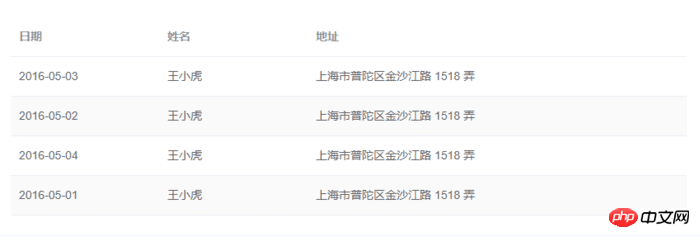
ElTableColumn originally looked like this:
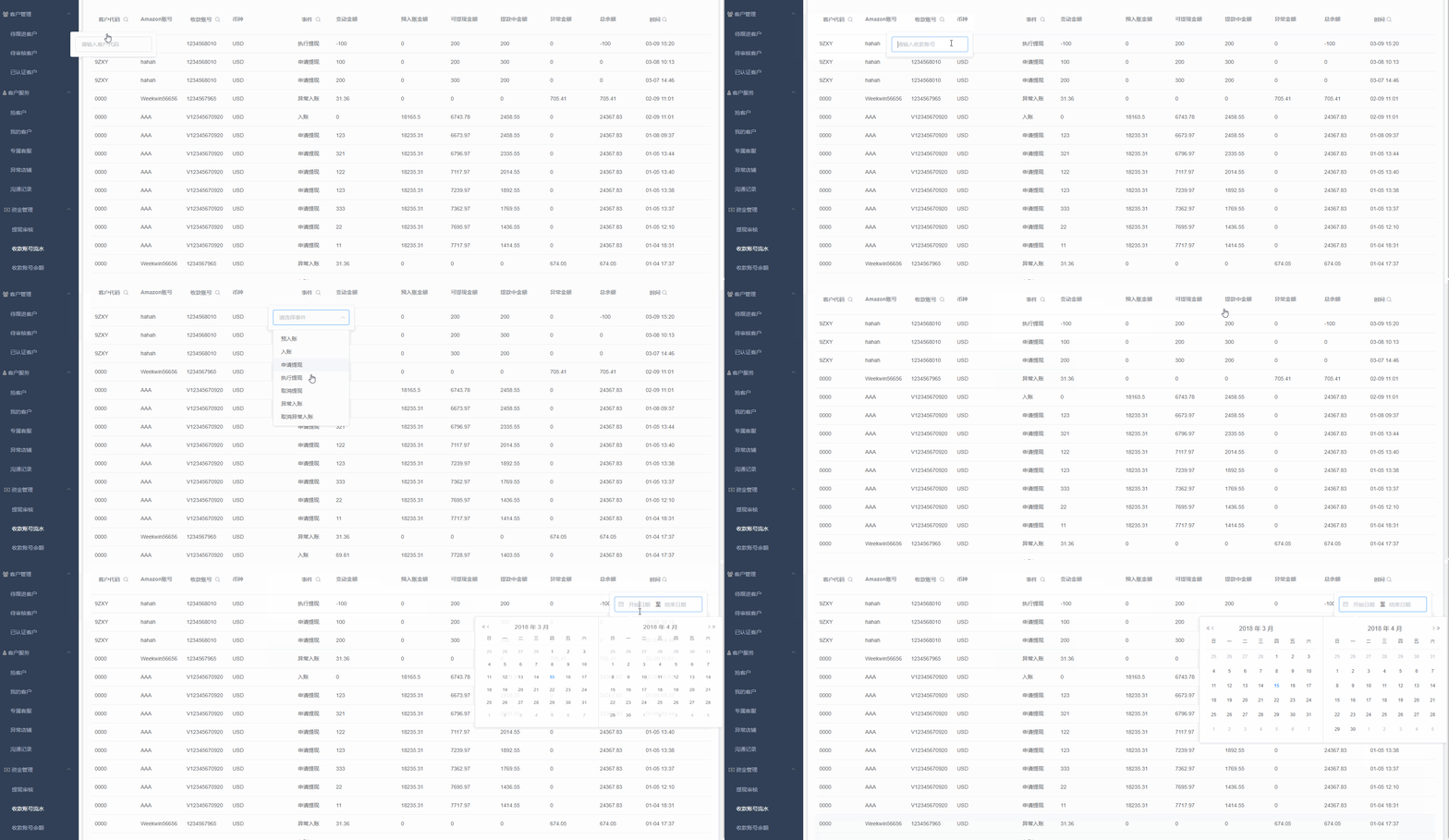
What it wants to do is like this:
I’ll just put the code directly, it’s too much to explain one after another.
Structure of the code:
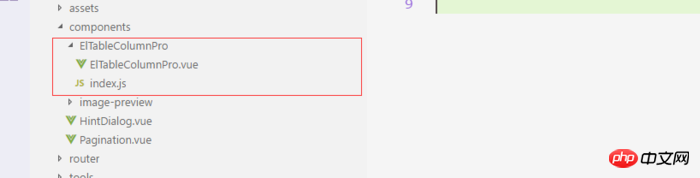
Components
<!-- ElTableColumnPro.vue -->
<template>
<el-table-column v-if="visible" :formatter="formatter" :align='align' :prop="prop" :header-align="headerAlign" :label="label" :width="width" :render-header="renderHeader" >
<template slot-scope="scope">
<slot :row="scope.row" :$index="scope.$index" >
<span>{{fomatMethod(scope.row[prop])}}</span>
</slot>
</template>
</el-table-column>
</template>
<script>
import moment from "moment";
export default {
name: "el-table-column-pro",
props: {
prop: {
type: String
},
label: {
type: String
},
width: {
type: Number
},
renderType: {
type: String,
validator: value => ["date", "input", "select"].includes(value)
},
placeholder: {
type: String
},
rederWidth: {
type: String,
default: "230px"
},
param: {
type: String,
default: ""
},
startDate: {
type: String
},
endDate: {
type: String
},
selectList: {
type: Array
},
isClear: {
type: Boolean,
default:true
},
visible: {
type: Boolean,
default: true
},
filterIcon: {
type: String,
default: "el-icon-search"
},
callback: {
type: Function
},
formatter: {
type: Function,
default:(row, column, cellValue)=>cellValue
},
align:{
type:String
},
headerAlign:{
type:String
}
},
data() {
return {
formatD:this.filterIcon
};
},
methods: {
fomatMethod(value){
return this.formatter('','',value)
},
renderHeader(createElement, { column, $index }) {
switch (this.renderType) {
case "date":
return this.renderDate(createElement, { column, $index });
case "input":
return this.rederInput(createElement, { column, $index });
case "select":
return this.rederSelect(createElement, { column, $index });
default:
return column.label;
}
},
rederInput(createElement, { column, $index }) {
return createElement(
"p",
{
class: "filters",
style: {
color: column.color
}
},
[
createElement(
"el-popover",
{
props: {
placement: "bottom",
width: "200",
trigger: "click"
}
},
[
createElement("el-input", {
props: {
placeholder: this.placeholder,
value: this.param
},
nativeOn: {
keyup: event => {
if (event.keyCode === 13) {
this.$emit("update:param", event.target.value);
this.callback && this.callback();
}
}
},
on: {
blur: event => {
this.$emit("update:param", event.target.value);
this.callback && this.callback();
}
}
}),
createElement(
"span",
{
slot: "reference"
},
[
column.label,
createElement("i", {
class: this.filterIcon,
style: {
marginLeft: "4px"
}
})
]
)
]
)
]
);
},
rederSelect(createElement, { column, $index }) {
return createElement(
"p",
{
class: "filters",
style: {
color: column.color
}
},
[
createElement(
"el-popover",
{
props: {
placement: "bottom",
width: "200",
trigger: "click"
}
},
[
createElement(
"el-select",
{
props: {
placeholder: this.placeholder,
value: this.param,
clearable: this.isClear
},
on: {
input: value => {
this.$emit("update:param", value);
this.callback && this.callback();
}
}
},
[
this.selectList.map(item => {
return createElement("el-option", {
props: {
value: item.value,
label: item.label
}
});
})
]
),
createElement(
"span",
{
slot: "reference"
},
[
column.label,
createElement("i", {
class: this.filterIcon,
style: {
marginLeft: "4px"
}
})
]
)
]
)
]
);
},
renderDate(createElement, { column, $index }) {
return createElement(
"p",
{
class: "filters"
},
[
createElement(
"el-popover",
{
props: {
placement: "bottom",
width: this.rederWidth,
trigger: "click"
}
},
[
createElement("el-date-picker", {
props: {
placeholder: this.placeholder,
value: this.value,
type: "daterange",
rangeSeparator:"至",
startPlaceholder:"开始日期",
endPlaceholder:"结束日期",
},
style: {
width: this.rederWidth
},
on: {
input: value => {
if (value) {
const startDate = moment(value[0]).format("YYYY-MM-DD");
const endDate = moment(value[1]).format("YYYY-MM-DD");
this.$emit("update:startDate", startDate);
this.$emit("update:endDate", endDate);
this.callback && this.callback();
}
}
}
}),
createElement(
"span",
{
slot: "reference"
},
[
column.label,
createElement("i", {
class: this.filterIcon,
style: {
marginLeft: "4px"
}
})
]
)
]
)
]
);
}
}
};
</script>
<!-- index.js -->
import ElTableColumnPro from './ElTableColumnPro'
ElTableColumnPro.install = function(Vue) {
Vue.component(ElTableColumnPro.name, ElTableColumnPro);
};
export default ElTableColumnPro;Install
import ElTableColumnPro from 'components/ElTableColumnPro/index'
...
...
...

Vue.use(ElTableColumnPro)
Use
 <el-table :data="bankFlow" style="width:100%" stripe>
    <el-table-column-pro :visible="showMore" prop="transactionId" label="流水号" :width="120"> </el-table-column-pro>
    <el-table-column-pro prop="clientCode" label="客户代码 " :width="120" placeholder="请输入客户代码" :callback="requestTransactionLogs" renderType="input" :param.sync="request_params.clientCode"> </el-table-column-pro>
    <el-table-column-pro prop="eventTypeName" label="事件 " placeholder="请选择事件"  :selectList="listEventEnum" :callback="requestTransactionLogs" renderType="select" :param.sync="request_params.event" :width="100"> </el-table-column-pro>
    <el-table-column-pro prop="createTime" :callback="requestTransactionLogs" :startDate.sync="request_params.startDate" :endDate.sync="request_params.endDate" :formatter="$timeformat" label="时间" renderType="date" :width="180" ></el-table-column-pro>
 </el-table>
 <el-table :data="lists.content" v-loading="loading" @row-dblclick="detail" >
    <el-table-column-pro :width="120" prop="clientCode" label="客户代码 " align="center" header-align="center" placeholder="请输入客户代码" :callback="getLists" renderType="input" :param.sync="params.clientCode"></el-table-column-pro>
    <el-table-column-pro label="内容 " placeholder="请输入内容" :callback="getLists" renderType="input" :param.sync="params.content">
        <template slot-scope="scope">
           <pre class="brush:php;toolbar:false">{{scope.row.content}}
The above is what I compiled for everyone. I hope it will be helpful to everyone in the future.
Related articles:
Ajax return value automatically adds pre tag solution
ajax uses actions with different namespaces Method
#Use ajax to preview the link and you can see the content of the link
##
The above is the detailed content of Detailed explanation of VUE's extension of ElTableColumn in element-ui. For more information, please follow other related articles on the PHP Chinese website!

Hot AI Tools

Undresser.AI Undress
AI-powered app for creating realistic nude photos

AI Clothes Remover
Online AI tool for removing clothes from photos.

Undress AI Tool
Undress images for free

Clothoff.io
AI clothes remover

AI Hentai Generator
Generate AI Hentai for free.

Hot Article
Hot Tools

Notepad++7.3.1
Easy-to-use and free code editor

SublimeText3 Chinese version
Chinese version, very easy to use

Zend Studio 13.0.1
Powerful PHP integrated development environment

Dreamweaver CS6
Visual web development tools

SublimeText3 Mac version
God-level code editing software (SublimeText3)
Hot Topics
 1384
1384
 52
52

 From start to finish: How to use php extension cURL to make HTTP requests
Jul 29, 2023 pm 05:07 PM
From start to finish: How to use php extension cURL to make HTTP requests
Jul 29, 2023 pm 05:07 PM
From start to finish: How to use php extension cURL for HTTP requests Introduction: In web development, it is often necessary to communicate with third-party APIs or other remote servers. Using cURL to make HTTP requests is a common and powerful way. This article will introduce how to use PHP to extend cURL to perform HTTP requests, and provide some practical code examples. 1. Preparation First, make sure that php has the cURL extension installed. You can execute php-m|grepcurl on the command line to check
 How to use Vue and Element-UI to implement lazy loading of images
Jul 22, 2023 pm 04:05 PM
How to use Vue and Element-UI to implement lazy loading of images
Jul 22, 2023 pm 04:05 PM
How to use Vue and Element-UI to implement lazy loading of images Lazy loading (Lazyloading) is a technology that delays loading of images, which can effectively increase page loading speed, save bandwidth and improve user experience. In the Vue project, we can use Element-UI and some plug-ins to implement the image lazy loading function. This article will introduce how to use Vue and Element-UI to implement lazy loading of images, and attach corresponding code examples. 1. Install the necessary dependencies before starting
 Extensions and third-party modules for PHP functions
Apr 13, 2024 pm 02:12 PM
Extensions and third-party modules for PHP functions
Apr 13, 2024 pm 02:12 PM
To extend PHP function functionality, you can use extensions and third-party modules. Extensions provide additional functions and classes that can be installed and enabled through the pecl package manager. Third-party modules provide specific functionality and can be installed through the Composer package manager. Practical examples include using extensions to parse complex JSON data and using modules to validate data.
 How to implement calendar and date selection functions using Vue and Element-UI
Jul 22, 2023 pm 05:30 PM
How to implement calendar and date selection functions using Vue and Element-UI
Jul 22, 2023 pm 05:30 PM
Introduction to how to use Vue and Element-UI to implement calendar and date selection functions: In front-end development, calendar and date selection functions are one of the very common requirements. Vue and Element-UI are a pair of very powerful development tools. Combining them can easily implement calendar and date selection functions. This article will introduce how to use Vue and Element-UI to create a simple calendar and date selection function, and provide code examples to help readers understand the specific steps and methods of implementation. Preparation: at the beginning
 How to install mbstring extension under CENTOS7?
Jan 06, 2024 pm 09:59 PM
How to install mbstring extension under CENTOS7?
Jan 06, 2024 pm 09:59 PM
1.UncaughtError:Calltoundefinedfunctionmb_strlen(); When the above error occurs, it means that we have not installed the mbstring extension; 2. Enter the PHP installation directory cd/temp001/php-7.1.0/ext/mbstring 3. Start phpize(/usr/local/bin /phpize or /usr/local/php7-abel001/bin/phpize) command to install php extension 4../configure--with-php-config=/usr/local/php7-abel
 How to use Vue and Element-UI to implement data filtering and search functions
Jul 21, 2023 pm 08:40 PM
How to use Vue and Element-UI to implement data filtering and search functions
Jul 21, 2023 pm 08:40 PM
How to use Vue and Element-UI to implement data filtering and search functions. In modern web development, data filtering and search functions are very common and important requirements. Vue and Element-UI are currently very popular front-end frameworks. They provide many powerful tools and components that can help us easily implement data filtering and search functions. This article will introduce how to use Vue and Element-UI to implement these functions, and provide detailed code examples. First, we need to prepare a
 How to use Vue and Element-UI to implement drag-and-drop sorting function
Jul 22, 2023 pm 04:12 PM
How to use Vue and Element-UI to implement drag-and-drop sorting function
Jul 22, 2023 pm 04:12 PM
How to use Vue and Element-UI to implement drag-and-drop sorting function Preface: In web development, drag-and-drop sorting function is a common and practical function. This article will introduce how to use Vue and Element-UI to implement the drag-and-drop sorting function, and demonstrate the implementation process through code examples. 1. Environment setup and installation Node.js Before starting, you need to install Node.js. You can visit https://nodejs.org/ to download and install the version corresponding to the operating system. Install VueCL
 How to use the Aurora Push extension to implement batch message push function in PHP applications
Jul 25, 2023 pm 08:07 PM
How to use the Aurora Push extension to implement batch message push function in PHP applications
Jul 25, 2023 pm 08:07 PM
How to use the Aurora Push extension to implement batch message push function in PHP applications. In the development of mobile applications, message push is a very important function. Jiguang Push is a commonly used message push service that provides rich functions and interfaces. This article will introduce how to use the Aurora Push extension to implement batch message push functionality in PHP applications. Step 1: Register a Jiguang Push account and obtain an API key. First, we need to register on the Jiguang Push official website (https://www.jiguang.cn/push)
