


 Web Front-end
JS Tutorial
Examples of ajax response to json strings and json arrays (graphic tutorial)
Web Front-end
JS Tutorial
Examples of ajax response to json strings and json arrays (graphic tutorial)
Examples of ajax response to json strings and json arrays (graphic tutorial)

Below I will bring you an example of ajax responding to json strings and json arrays. Let me share it with you now and give it as a reference for everyone.
I have been too busy at work recently, so I took some time in the evening to sort out the scenarios in which json strings and json arrays are returned in the background during ajax requests, as well as processing examples in the front desk.
Look at the code directly.
Background response of json string
package com.ajax;

import java.io.IOException;
import java.io.PrintWriter;

import javax.servlet.ServletException;
import javax.servlet.annotation.WebServlet;
import javax.servlet.http.HttpServlet;
import javax.servlet.http.HttpServletRequest;
import javax.servlet.http.HttpServletResponse;

@WebServlet("/jsonStr")
public class JsonStr extends HttpServlet {

 /**
 *
 */
 private static final long serialVersionUID = 1L;

 @Override
 protected void doGet(HttpServletRequest req, HttpServletResponse resp)
  throws ServletException, IOException {
 // 构造json对象
 String resStr = "{" + "name:" + "\"zhangsan\"," + "id:" + "\"id001\"" + "}";

 // 输出json对象到前台
 PrintWriter out = resp.getWriter();
 out.write(resStr);
 out.flush();
 out.close();
 }

 @Override
 protected void doPost(HttpServletRequest req, HttpServletResponse resp)
  throws ServletException, IOException {
 doGet(req, resp);
 }
}Background response of json array
package com.ajax;

import java.io.IOException;
import java.io.PrintWriter;

import javax.servlet.ServletException;
import javax.servlet.annotation.WebServlet;
import javax.servlet.http.HttpServlet;
import javax.servlet.http.HttpServletRequest;
import javax.servlet.http.HttpServletResponse;

@WebServlet("/jsonArr")
public class JsonArr extends HttpServlet {

 /**
 *
 */
 private static final long serialVersionUID = 1L;

 @Override
 protected void doGet(HttpServletRequest req, HttpServletResponse resp)
  throws ServletException, IOException {
 // 构造json对象
 String resStr1 = "{" + "name:" + "\"zhangsan\"," + "id:" + "\"id001\"" + "}";
 String resStr2 = "{" + "name:" + "\"lisi\"," + "id:" + "\"id002\"" + "}";
 String resStr3 = "{" + "name:" + "\"wangwu\"," + "id:" + "\"id003\"" + "}";

 // 构造json数组
 String jsonArr = "[" + resStr1 + "," + resStr2 + "," + resStr3 + "]";

 // 输出json数组到前台
 PrintWriter out = resp.getWriter();
 out.write(jsonArr);
 out.flush();
 out.close();
 }

 @Override
 protected void doPost(HttpServletRequest req, HttpServletResponse resp)
  throws ServletException, IOException {
 doGet(req, resp);
 }
}Foreground page
<%@ page language="java" contentType="text/html; charset=UTF-8"
  pageEncoding="UTF-8"%>
<!DOCTYPE html PUBLIC "-//W3C//DTD HTML 4.01 Transitional//EN" "http://www.w3.org/TR/html4/loose.dtd">
<html>
<head>
<meta http-equiv="Content-Type" content="text/html; charset=UTF-8">
<title>Json</title>
</head>
<body>
 <br><br>
 <input type="button" value="JsonStr" onclick="jsonStr()" />
 <br><br>
 <table>
 <tr>
  <td>username</td>
  <td><input id="username"></td>
 </tr>
 <tr>
  <td>id</td>
  <td><input id="id"></td>
 </tr>
 </table>
 <br><br><br>
 <input type="button" value="JsonArr" onclick="jsonArr()" />
 <br><br>
 <table border="1" bordercolor="red">
 <caption>Json Array</caption>
 <thead>
  <tr>
  <th>Username</th>
  <th>Id</th>
  </tr>
 </thead>
 <tbody id="tb">
 </tbody>
 </table>
</body>
<script type="text/javascript">
 // json字符串处理方法
 function jsonStr() {
 var xhr = new XMLHttpRequest();
 xhr.open("get", "jsonStr");
 xhr.onreadystatechange = function(data) {
  if (xhr.readyState == 4 && xhr.status == 200) {
  // 将json字符串转换为json对象
  var obj = eval("(" + data.target.responseText + ")");
  document.getElementById("username").value = obj.name;
  document.getElementById("id").value = obj.id;
  }
 };
 xhr.send(null);
 }

 // json数组处理方法
 function jsonArr() {
 var xhr = new XMLHttpRequest();
 xhr.open("get", "jsonArr");
 xhr.onreadystatechange = function(data) {
  if (xhr.readyState == 4 && xhr.status == 200) {
  // 将json字符串转换为json数组
  var obj = eval("(" + data.target.responseText + ")");

  // 创建代码片段,用于存放表格行
  var oFragment = document.createDocumentFragment();

  // 根据json数组长度,产生行数据
  for (var i=0; i<obj.length; i++) {
   var trObj = document.createElement("tr");
   trObj.innerHTML = "<td>" + obj[i].name + "</td><td>" + obj[i].id + "</td>";
   oFragment.appendChild(trObj);
  }

  // 将行数据添加在表格的tBody部分
  document.getElementById("tb").appendChild(oFragment);
  }
 };
 xhr.send(null);
 }
</script>
</html>Page rendering
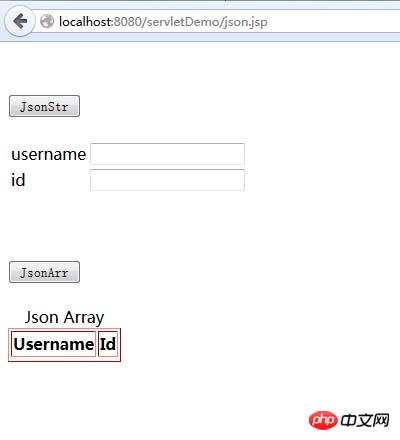
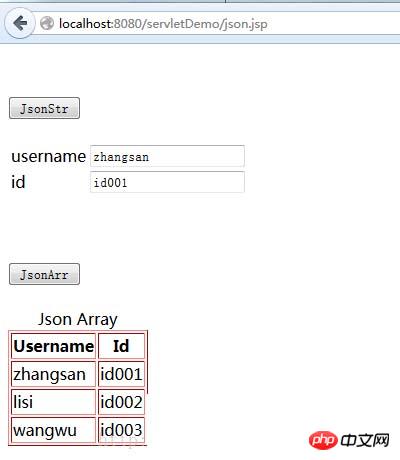
The effect after clicking the JsonStr and JsonArr buttons
The above is what I compiled for everyone , I hope it will be helpful to everyone in the future.
Related articles:
A brief analysis and solutions to Ajax synchronization and asynchronous issues
Two methods for Ajax to solve redundant refreshes
The above is the detailed content of Examples of ajax response to json strings and json arrays (graphic tutorial). For more information, please follow other related articles on the PHP Chinese website!

Hot AI Tools

Undresser.AI Undress
AI-powered app for creating realistic nude photos

AI Clothes Remover
Online AI tool for removing clothes from photos.

Undress AI Tool
Undress images for free

Clothoff.io
AI clothes remover

AI Hentai Generator
Generate AI Hentai for free.

Hot Article
Hot Tools

Notepad++7.3.1
Easy-to-use and free code editor

SublimeText3 Chinese version
Chinese version, very easy to use

Zend Studio 13.0.1
Powerful PHP integrated development environment

Dreamweaver CS6
Visual web development tools

SublimeText3 Mac version
God-level code editing software (SublimeText3)
Hot Topics
 1379
1379
 52
52

 Performance optimization tips for converting PHP arrays to JSON
May 04, 2024 pm 06:15 PM
Performance optimization tips for converting PHP arrays to JSON
May 04, 2024 pm 06:15 PM
Performance optimization methods for converting PHP arrays to JSON include: using JSON extensions and the json_encode() function; adding the JSON_UNESCAPED_UNICODE option to avoid character escaping; using buffers to improve loop encoding performance; caching JSON encoding results; and considering using a third-party JSON encoding library.
 How do annotations in the Jackson library control JSON serialization and deserialization?
May 06, 2024 pm 10:09 PM
How do annotations in the Jackson library control JSON serialization and deserialization?
May 06, 2024 pm 10:09 PM
Annotations in the Jackson library control JSON serialization and deserialization: Serialization: @JsonIgnore: Ignore the property @JsonProperty: Specify the name @JsonGetter: Use the get method @JsonSetter: Use the set method Deserialization: @JsonIgnoreProperties: Ignore the property @ JsonProperty: Specify name @JsonCreator: Use constructor @JsonDeserialize: Custom logic
 PHP and Ajax: Building an autocomplete suggestion engine
Jun 02, 2024 pm 08:39 PM
PHP and Ajax: Building an autocomplete suggestion engine
Jun 02, 2024 pm 08:39 PM
Build an autocomplete suggestion engine using PHP and Ajax: Server-side script: handles Ajax requests and returns suggestions (autocomplete.php). Client script: Send Ajax request and display suggestions (autocomplete.js). Practical case: Include script in HTML page and specify search-input element identifier.
 How to get variables from PHP method using Ajax?
Mar 09, 2024 pm 05:36 PM
How to get variables from PHP method using Ajax?
Mar 09, 2024 pm 05:36 PM
Using Ajax to obtain variables from PHP methods is a common scenario in web development. Through Ajax, the page can be dynamically obtained without refreshing the data. In this article, we will introduce how to use Ajax to get variables from PHP methods, and provide specific code examples. First, we need to write a PHP file to handle the Ajax request and return the required variables. Here is sample code for a simple PHP file getData.php:
 In-depth understanding of PHP: Implementation method of converting JSON Unicode to Chinese
Mar 05, 2024 pm 02:48 PM
In-depth understanding of PHP: Implementation method of converting JSON Unicode to Chinese
Mar 05, 2024 pm 02:48 PM
In-depth understanding of PHP: Implementation method of converting JSONUnicode to Chinese During development, we often encounter situations where we need to process JSON data, and Unicode encoding in JSON will cause us some problems in some scenarios, especially when Unicode needs to be converted When encoding is converted to Chinese characters. In PHP, there are some methods that can help us achieve this conversion process. A common method will be introduced below and specific code examples will be provided. First, let us first understand the Un in JSON
 PHP vs. Ajax: Solutions for creating dynamically loaded content
Jun 06, 2024 pm 01:12 PM
PHP vs. Ajax: Solutions for creating dynamically loaded content
Jun 06, 2024 pm 01:12 PM
Ajax (Asynchronous JavaScript and XML) allows adding dynamic content without reloading the page. Using PHP and Ajax, you can dynamically load a product list: HTML creates a page with a container element, and the Ajax request adds the data to that element after loading it. JavaScript uses Ajax to send a request to the server through XMLHttpRequest to obtain product data in JSON format from the server. PHP uses MySQL to query product data from the database and encode it into JSON format. JavaScript parses the JSON data and displays it in the page container. Clicking the button triggers an Ajax request to load the product list.
 Quick tips for converting PHP arrays to JSON
May 03, 2024 pm 06:33 PM
Quick tips for converting PHP arrays to JSON
May 03, 2024 pm 06:33 PM
PHP arrays can be converted to JSON strings through the json_encode() function (for example: $json=json_encode($array);), and conversely, the json_decode() function can be used to convert from JSON to arrays ($array=json_decode($json);) . Other tips include avoiding deep conversions, specifying custom options, and using third-party libraries.
 PHP Tutorial: How to Convert JSON Unicode to Chinese Characters
Mar 05, 2024 pm 06:36 PM
PHP Tutorial: How to Convert JSON Unicode to Chinese Characters
Mar 05, 2024 pm 06:36 PM
JSON (JavaScriptObjectNotation) is a lightweight data exchange format commonly used for data exchange between web applications. When processing JSON data, we often encounter Unicode-encoded Chinese characters (such as "u4e2du6587") and need to convert them into readable Chinese characters. In PHP, we can achieve this conversion through some simple methods. Next, we will detail how to convert JSONUnico
