


jQuery's operation of selecting all and unselecting all checkboxes

Let me show you the renderings first. If you feel good about it, please continue to refer to the implementation code.
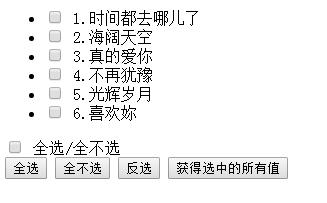
HTML code:
<body>
<ul id="list">
<li><label><input type="checkbox" name="items" value="1"> 1.时间都去哪儿了</label></li>
<li><label><input type="checkbox" name="items" value="2"> 2.海阔天空</label></li>
<li><label><input type="checkbox" name="items" value="3"> 3.真的爱你</label></li>
<li><label><input type="checkbox" name="items" value="4"> 4.不再犹豫</label></li>
<li><label><input type="checkbox" name="items" value="5"> 5.光辉岁月</label></li>
<li><label><input type="checkbox" name="items" value="6"> 6.喜欢妳</label></li>
</ul>
<input type="checkbox" id="all"> 全选/全不选</br>
<input type="button" value="全选" class="btn" id="selectAll">
<input type="button" value="全不选" class="btn" id="unSelect">
<input type="button" value="反选" class="btn" id="reverse">
<input type="button" value="获得选中的所有值" id="btn" id="getValue">
</body>
jquery code:
<script type="text/javascript">
$(function(){
//全选/全不选
$("#all").click(function(){
$("[name=items]:checkbox").attr("checked",this.checked);
});
$("[name=items]:checkbox").click(function(){
var flag=true;
$("[name=items]:checkbox").each(function(){
if(!this.checked){
flag=false;
}
});
$("#all").attr("checked",flag);
})
//全选
$("#selectAll").click(function(){
$("[name=items]:checkbox").each(function(){
$(this).attr("checked",true);
});
});
//全不选
$("#unSelect").click(function(){
$("[name=items]:checkbox").each(function(){
$(this).attr("checked",false);
});
});
//反选
$("#reverse").click(function(){
$("[name=items]:checkbox").each(function(){ //遍历每一个复选框
//$(this).attr("checked",!$(this).attr("checked")); //jQuery方法取复选框的反向值
this.checked=!this.checked; //js方法
});
});
//输出选中的值
$("#btn").click(function(){
var str="你选中的是:\r\n";
$("[name=items]:checkbox:checked").each(function(){
str+=$(this).val()+"\r\n";
});
alert(str);
});
})
</script>
Note: Due to the change of jquery version, the new version can only be clicked once. The older version is ok, but the new version cannot use attr to set the selected state. The first solution The method is to use the native js method this.checked=true/false;
The second solution is to replace attr with prop.
The above is the jQuery operation introduced by the editor to you to select all and unselect all of the checkbox checkboxes. I hope it will be helpful to you. If you have any questions, please let me know. Leave a message and the editor will reply to you in time. I would also like to thank you all for your support of the PHP Chinese website!
For more jQuery-related articles on the checkbox checkbox’s selection of all, unselect, and inverse selection, please pay attention to the PHP Chinese website!

Hot AI Tools

Undresser.AI Undress
AI-powered app for creating realistic nude photos

AI Clothes Remover
Online AI tool for removing clothes from photos.

Undress AI Tool
Undress images for free

Clothoff.io
AI clothes remover

AI Hentai Generator
Generate AI Hentai for free.

Hot Article
Hot Tools

Notepad++7.3.1
Easy-to-use and free code editor

SublimeText3 Chinese version
Chinese version, very easy to use

Zend Studio 13.0.1
Powerful PHP integrated development environment

Dreamweaver CS6
Visual web development tools

SublimeText3 Mac version
God-level code editing software (SublimeText3)
Hot Topics
 1378
1378
 52
52

 How do I create and publish my own JavaScript libraries?
Mar 18, 2025 pm 03:12 PM
How do I create and publish my own JavaScript libraries?
Mar 18, 2025 pm 03:12 PM
Article discusses creating, publishing, and maintaining JavaScript libraries, focusing on planning, development, testing, documentation, and promotion strategies.
 How do I optimize JavaScript code for performance in the browser?
Mar 18, 2025 pm 03:14 PM
How do I optimize JavaScript code for performance in the browser?
Mar 18, 2025 pm 03:14 PM
The article discusses strategies for optimizing JavaScript performance in browsers, focusing on reducing execution time and minimizing impact on page load speed.
 What should I do if I encounter garbled code printing for front-end thermal paper receipts?
Apr 04, 2025 pm 02:42 PM
What should I do if I encounter garbled code printing for front-end thermal paper receipts?
Apr 04, 2025 pm 02:42 PM
Frequently Asked Questions and Solutions for Front-end Thermal Paper Ticket Printing In Front-end Development, Ticket Printing is a common requirement. However, many developers are implementing...
 How do I debug JavaScript code effectively using browser developer tools?
Mar 18, 2025 pm 03:16 PM
How do I debug JavaScript code effectively using browser developer tools?
Mar 18, 2025 pm 03:16 PM
The article discusses effective JavaScript debugging using browser developer tools, focusing on setting breakpoints, using the console, and analyzing performance.
 Who gets paid more Python or JavaScript?
Apr 04, 2025 am 12:09 AM
Who gets paid more Python or JavaScript?
Apr 04, 2025 am 12:09 AM
There is no absolute salary for Python and JavaScript developers, depending on skills and industry needs. 1. Python may be paid more in data science and machine learning. 2. JavaScript has great demand in front-end and full-stack development, and its salary is also considerable. 3. Influencing factors include experience, geographical location, company size and specific skills.
 How do I use source maps to debug minified JavaScript code?
Mar 18, 2025 pm 03:17 PM
How do I use source maps to debug minified JavaScript code?
Mar 18, 2025 pm 03:17 PM
The article explains how to use source maps to debug minified JavaScript by mapping it back to the original code. It discusses enabling source maps, setting breakpoints, and using tools like Chrome DevTools and Webpack.
 Getting Started With Chart.js: Pie, Doughnut, and Bubble Charts
Mar 15, 2025 am 09:19 AM
Getting Started With Chart.js: Pie, Doughnut, and Bubble Charts
Mar 15, 2025 am 09:19 AM
This tutorial will explain how to create pie, ring, and bubble charts using Chart.js. Previously, we have learned four chart types of Chart.js: line chart and bar chart (tutorial 2), as well as radar chart and polar region chart (tutorial 3). Create pie and ring charts Pie charts and ring charts are ideal for showing the proportions of a whole that is divided into different parts. For example, a pie chart can be used to show the percentage of male lions, female lions and young lions in a safari, or the percentage of votes that different candidates receive in the election. Pie charts are only suitable for comparing single parameters or datasets. It should be noted that the pie chart cannot draw entities with zero value because the angle of the fan in the pie chart depends on the numerical size of the data point. This means any entity with zero proportion
 TypeScript for Beginners, Part 2: Basic Data Types
Mar 19, 2025 am 09:10 AM
TypeScript for Beginners, Part 2: Basic Data Types
Mar 19, 2025 am 09:10 AM
Once you have mastered the entry-level TypeScript tutorial, you should be able to write your own code in an IDE that supports TypeScript and compile it into JavaScript. This tutorial will dive into various data types in TypeScript. JavaScript has seven data types: Null, Undefined, Boolean, Number, String, Symbol (introduced by ES6) and Object. TypeScript defines more types on this basis, and this tutorial will cover all of them in detail. Null data type Like JavaScript, null in TypeScript
