


How to deal with line breaks caused by float attributes in html5

In h5 development, float attributes are often used to solve some layout problems. However, in some complex layouts, you may also encounter phenomena such as using the float attribute, which causes the elements in a row to be unable to be aligned or the float elements to wrap. When encountering this kind of problem, we can modify the position of the element to solve the problem of line wrapping or misalignment of elements.
<p class="container">
    <a href="address-manager.html">
        <i class="icon-home icon-large"></i>
        <p>修改收货地址</p>
        <i class="icon-angle-right icon-2x"></i>
    </a>
</p>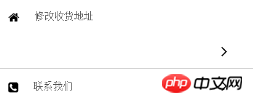
For example, when I was writing a menu-like layout, this phenomenon occurred in the "Modify Address" column. When I moved the element that I wanted to float to the right (towards The arrow on the right) is adjusted to the position of the first element in the code to solve the problem of float line wrapping.
Since various browsers have some differences in styles, there is another situation where line wrapping problems will occur when the width of the element floating to the right is not enough. In this case, it can be solved by simply modifying the width.
Next, let’s summarize the characteristics related to the float attribute learned during the information search process:
(1) float is a floating positioning attribute in CSS
Features:
1. The float box can float left and right until its outer edge meets the containing box or another floating box;
2. The floating box is out of the regular flow of the document, and the regular flow of the document will ignore the existence of the floating box;
3. Floating boxes will not affect the layout of block-level boxes, but will affect the arrangement of inline boxes;
4. When the height of the floating box exceeds the height of the containing box (that is, the parent layout), the containing box will not automatically extend its height. If the containing box does not include other ordinary flows, the height of the containing box will be 0, which is the so-called height collapse phenomenon. .
The above situation is actually a manifestation of the floating box affecting the inline box.
The above is the detailed content of How to deal with line breaks caused by float attributes in html5. For more information, please follow other related articles on the PHP Chinese website!

Hot AI Tools

Undresser.AI Undress
AI-powered app for creating realistic nude photos

AI Clothes Remover
Online AI tool for removing clothes from photos.

Undress AI Tool
Undress images for free

Clothoff.io
AI clothes remover

AI Hentai Generator
Generate AI Hentai for free.

Hot Article
Hot Tools

Notepad++7.3.1
Easy-to-use and free code editor

SublimeText3 Chinese version
Chinese version, very easy to use

Zend Studio 13.0.1
Powerful PHP integrated development environment

Dreamweaver CS6
Visual web development tools

SublimeText3 Mac version
God-level code editing software (SublimeText3)
Hot Topics
 1378
1378
 52
52

 Table Border in HTML
Sep 04, 2024 pm 04:49 PM
Table Border in HTML
Sep 04, 2024 pm 04:49 PM
Guide to Table Border in HTML. Here we discuss multiple ways for defining table-border with examples of the Table Border in HTML.
 HTML margin-left
Sep 04, 2024 pm 04:48 PM
HTML margin-left
Sep 04, 2024 pm 04:48 PM
Guide to HTML margin-left. Here we discuss a brief overview on HTML margin-left and its Examples along with its Code Implementation.
 Nested Table in HTML
Sep 04, 2024 pm 04:49 PM
Nested Table in HTML
Sep 04, 2024 pm 04:49 PM
This is a guide to Nested Table in HTML. Here we discuss how to create a table within the table along with the respective examples.
 HTML Table Layout
Sep 04, 2024 pm 04:54 PM
HTML Table Layout
Sep 04, 2024 pm 04:54 PM
Guide to HTML Table Layout. Here we discuss the Values of HTML Table Layout along with the examples and outputs n detail.
 HTML Input Placeholder
Sep 04, 2024 pm 04:54 PM
HTML Input Placeholder
Sep 04, 2024 pm 04:54 PM
Guide to HTML Input Placeholder. Here we discuss the Examples of HTML Input Placeholder along with the codes and outputs.
 HTML Ordered List
Sep 04, 2024 pm 04:43 PM
HTML Ordered List
Sep 04, 2024 pm 04:43 PM
Guide to the HTML Ordered List. Here we also discuss introduction of HTML Ordered list and types along with their example respectively
 Moving Text in HTML
Sep 04, 2024 pm 04:45 PM
Moving Text in HTML
Sep 04, 2024 pm 04:45 PM
Guide to Moving Text in HTML. Here we discuss an introduction, how marquee tag work with syntax and examples to implement.
 HTML onclick Button
Sep 04, 2024 pm 04:49 PM
HTML onclick Button
Sep 04, 2024 pm 04:49 PM
Guide to HTML onclick Button. Here we discuss their introduction, working, examples and onclick Event in various events respectively.
