


使用提交按钮,提交数据
在表单中有两种按钮可以使用,分别为:提交按钮、重置。这一小节讲解提交按钮:当用户需要提交表单信息到服务器时,需要用到提交按钮。
语法:
<input type="submit" value="提交">
typetype:只有当type值设置为submit时,按钮才有提交作用:只有当type值设置为submit时,按钮才有提交作用
value:按钮上显示的文字
value
按钮上显示的文字
举例
举例
:
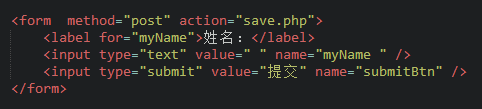
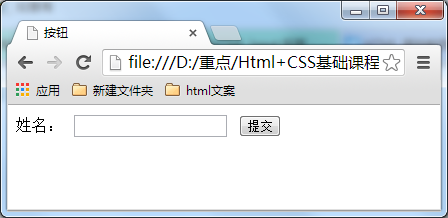 在浏览器中显示的结果:
新建文件
<!DOCTYPE HTML>
<html>
<head>
<meta http-equiv="Content-Type" content="text/html; charset=utf-8">
<title>提交按钮</title>
<style>
h1 {text-align:center;}
div {margin-left: auto;
margin-right: auto; width:500px;}
</style>
</head>
<body>
<div id="top">
<img src="https://www.baidu.com/img/bdlogo.png" title="sorry图片来源出问题">
</div>
<div id="banner">
<h1>公开调查问卷</h1>
</div>
<div id="reserch">
<form method="post" action="save.php">
<label for="myName">姓 名:</label>
<input type="text" value="" name="myName " /><br />
<label for="id">身份证号:</label>
<input type="text" value="" name="id" /> <br />
<hr />
<label for="gender">性别:</label>
<label>男</label>
<input type="radio" value="1" name="gender" />
<labe >女</label>
<input type="radio" value="2" name="gender" /><br>
<hr />
<label>爱好:</label>
<label>运动</label>
<input type="checkbox" value="sport" name="运动" />
<label>唱歌</label>
<input type="checkbox" value="singing" name="唱歌" />
<label>跳舞</label>
<input type="checkbox" value="dacing" name="跳舞" />
<label>看书</label>
<input type="checkbox" value="book" name="看书" /><br />
<hr />
<label>年龄段</label>
<select>
<option value="20"><20</option>
<option value="30">20-40</option>
<option value="40">>40</option>
</select><br />
<hr />
<label>喜欢的课程:</label>
<select multiple="multiple">
<option value="math">数学</option>
<option value="language">语言</option>
<option value="history">历史</option>
</select>
<br /> <hr />
<input type="submit" value="提交" name="submitBtn" />
</form>
</div>
</body>
</html>
预览
Clear
- 课程推荐
- 课件下载














 课件暂不提供下载,工作人员正在整理中,后期请多关注该课程~