


jQuery表单选择器
无论是提交还是传递数据,表单元素在动态交互页面的作用是非常重要的。jQuery中专门加入了表单选择器,从而能够极其方便地获取到某个类型的表单元素
表单选择器的具体方法描述:
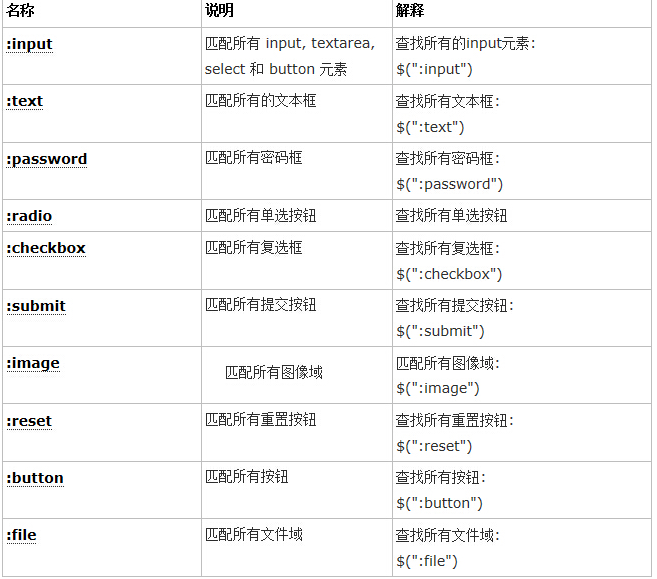
注意事项:
除了input筛选选择器,几乎每个表单类别筛选器都对应一个input元素的type值。大部分表单类别筛选器可以使用属性筛选器替换。比如 $(':password') == $('[type=password]')
如果想得到表单内表单元素的个数,代码如下:
$("#form1 :input").length; //注意与$("#form1 input")的区别如果想得到表单内单行文本框的个数,代码如下:
$("#form1 :text").length;如果想得到表单内密码框的个数,代码如下:
$("#form1 :password").length;同理,其他表单选择器的操作与此类似
获取页面中的所有<p>元素,给每一个<p>元素添加onclick事件,例如:
$("p").click(function({
            //doing somethingr(操作)
})
获取id为tb的元素,然后寻找它下面的tbody标签,再寻找tbody下索引值是偶数的tr元素改变它的背景色(css("property","value");用来设置jQuery对象的样式)例如:
$('#tb tbody tr:even').css("backgroundColor","#888");
先使用属性选择器,然后用表单对象属性过滤,最后获取jQuery对象的长度,例如:
$('#btn').click(function(){
                  var   length=$("input[name='check']:checked").length;
                  alert("选中的个数为:"+length);
})
清空所有input type="text" 文本框内容:$("input:text").val("");
新建文件
<!DOCTYPE html>
<html>
<head>
<meta http-equiv="Content-type" content="text/html; charset=utf-8" />
<title></title>
<style>
input{
display: block;
margin: 10px;
padding:10px;
}
</style>
<script src="http://code.jquery.com/jquery-3.1.1.min.js"></script>
<style>
input{
display: block;
margin: 10px;
padding:10px;
}
</style>
</head>
<body>
<h2>子元素筛选选择器</h2>
<h3>input、text、password、radio、checkbox</h3>
<h3>submit、image、reset、button、file</h3>
<div class="left first-div">
<form>
<input type="text" value="text类型"/>
<input type="password" value="password"/>
<input type="radio"/>
<input type="checkbox"/>
<input type="submit" />
<input type="image" />
<input type="reset" />
<input type="button" value="Button" />
<input type="file" />
</form>
</div>
<script type="text/javascript">
//查找所有 input, textarea, select 和 button 元素
//:input 选择器基本上选择所有表单控件
$(':input').css("border", "1px groove red");
</script>
<script type="text/javascript">
//匹配所有input元素中类型为text的input元素
$('input:text').css("background", "#A2CD5A");
</script>
<script type="text/javascript">
//匹配所有input元素中类型为password的input元素
$('input:password').css("background", "yellow");
</script>
<script type="text/javascript">
//匹配所有input元素中的单选按钮,并选中
$('input:radio').attr('checked','true');
</script>
<script type="text/javascript">
//匹配所有input元素中的复选按钮,并选中
$('input:checkbox').attr('checked','true');
</script>
<script type="text/javascript">
//匹配所有input元素中的提交的按钮,修改背景颜色
$('input:submit').css("background", "#C6E2FF");
</script>
<script type="text/javascript">
//匹配所有input元素中的图像类型的元素,修改背景颜色
$('input:image').css("background", "#F4A460");
</script>
<script type="text/javascript">
//匹配所有input元素中类型为按钮的元素
$('input:button').css("background", "red");
</script>
<script type="text/javascript">
//匹配所有input元素中类型为file的元素
$('input:file').css("background", "#CD1076");
</script>
</body>
</html>
预览
Clear
- 课程推荐
- 课件下载














 课件暂不提供下载,工作人员正在整理中,后期请多关注该课程~