


CSS基礎教學優先級
CSS優先權
#單一選擇器的優先級
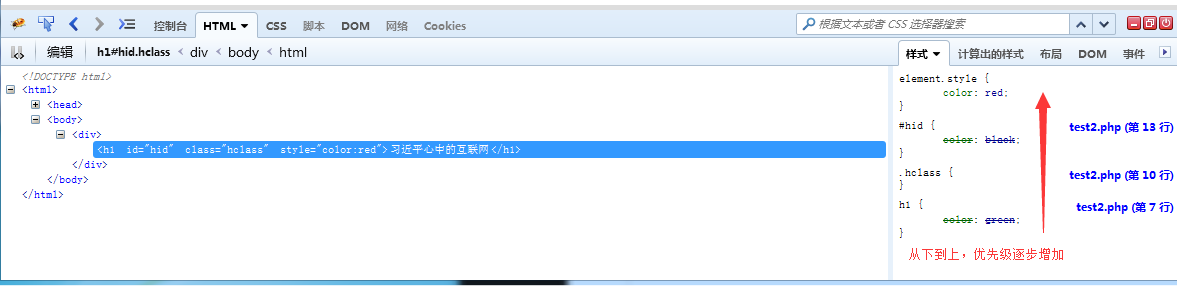
行內樣式> id選擇器> class選擇器>標籤選擇器
<!DOCTYPE HTML>
<html>
    <head>
        <meta http-equiv="Content-Type" content="text/html; charset=utf-8">
        <title>php.cn</title>
    <style type="text/css">
     h1{
         color:green;
     }
    .hclass{
        color:bule;
    }
    #hid{
        color:black;
    }
    </style>
    </head>
    <body>
        <div>
        <h1 class="hclass" id="hid"  style="color:red">习近平心中的互联网</h1>
        </div>
    </body>
</html>
利用firebug觀察:
多選擇器的優先權
#多個選擇器的優先級,一般情況下,指向越準確,優先順序越高。
特殊情況下,我們需要假設一些值:
標籤選擇器 優先權為1
類別選擇器優先級為10
Id選擇器 優先級為100
行內樣式 優先級為1000
計算以下優先權
.news h1{color:red;} 優先權:10 + 1 = 11
.title{color:blue;}優先權:10
div.news h1{color:red;} 優先權:1 + 10 + 1 = 12
h1.title{color:blue;} 優先權:1 + 10 = 11
新建檔案
<!DOCTYPE HTML>
<html>
<head>
<meta http-equiv="Content-Type" content="text/html; charset=utf-8">
<title>php.cn</title>
<style type="text/css">
h1{
color:green;
}
.hclass{
color:bule;
}
#hid{
color:black;
}
</style>
</head>
<body>
<div>
<h1 class="hclass" id="hid" style="color:red">习近平心中的互联网</h1>
</div>
</body>
</html>
預覽
Clear
- 課程推薦
- 課件下載












 課件暫不提供下載,工作人員正在整理中,後期請多關注該課程~