


CSS輪廓
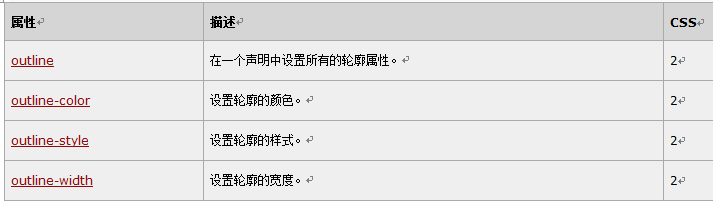
涉及的屬性有:
outline 在一個宣告中設定所有的輪廓屬性。
outline-color 設定輪廓的顏色。
outline-style 設定輪廓的樣式。
outline-width 設定輪廓的寬度。
為了示範我們先在原來的html 中加入兩個p 標籤:
<p class="one">This is some text in a paragraph.</p>
<p class="two">This is some text in a paragraph.</p>
然後在CSS 中加入這幾個屬性的具體設置,設定參數就不過多的贅述:
<!DOCTYPE html PUBLIC "-//W3C//DTD XHTML 1.0 Transitional//EN" "http://www.w3.org/TR/xhtml1/DTD/xhtml1-transitional.dtd">
<html>
<head>
    <style type="text/css">
        p.one
        {
            border:red solid thin;
            outline-style:solid;
            outline-width:thin;
        }
        p.two
        {
            border:red solid thin;
            outline-style:dotted;
            outline-width:3px;
        }
    </style>
</head>
<body>

<p class="one">This is some text in a paragraph.</p>
<p class="two">This is some text in a paragraph.</p>

<p><b>注释:</b>只有在规定了 !DOCTYPE 时,Internet Explorer 8 (以及更高版本) 才支持 outline-width 属性。</p>
</body>
</html>
下面是效果圖:

#CSS 邊框屬性
"CSS" 欄位中的數字指示哪個CSS 版本定義了該屬性。
新建檔案
<!DOCTYPE html PUBLIC "-//W3C//DTD XHTML 1.0 Transitional//EN" "http://www.w3.org/TR/xhtml1/DTD/xhtml1-transitional.dtd">
<html>
<head>
<style type="text/css">
p.one
{
border:red solid thin;
outline-style:solid;
outline-width:thin;
}
p.two
{
border:red solid thin;
outline-style:dotted;
outline-width:3px;
}
</style>
</head>
<body>
<p class="one">This is some text in a paragraph.</p>
<p class="two">This is some text in a paragraph.</p>
<p><b>注释:</b>只有在规定了 !DOCTYPE 时,Internet Explorer 8 (以及更高版本) 才支持 outline-width 属性。</p>
</body>
</html>
預覽
Clear
- 課程推薦
- 課件下載














 課件暫不提供下載,工作人員正在整理中,後期請多關注該課程~