


PHP開發簡單圖書借閱系統之建立主頁面
本節我們來建立使用者登入後跳轉的主頁面。
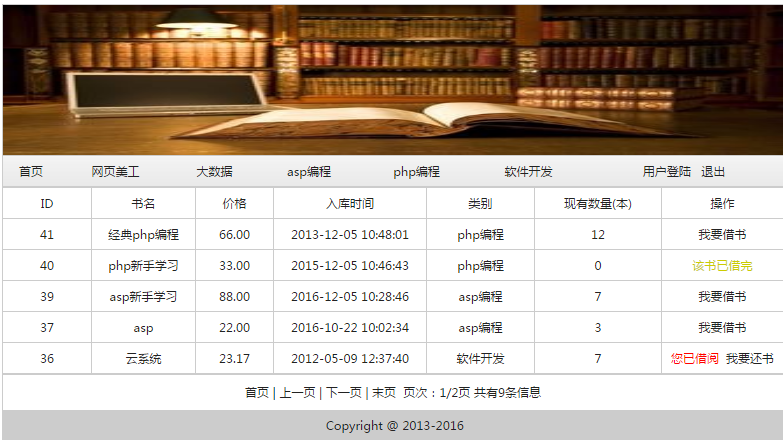
主頁頭是各種書籍的目錄分類。
主頁用來顯示id號,書名,價格,入庫時間,類別,現有書的庫存數,以及書的借閱操作。
主頁底部用來顯示分頁相關的項目和資訊總數
前面創建了可以呼叫的公共頭部檔案head.php
<?php include("head.php");?>使用<table>標籤,使用<tr><td>來簡單的佈局
<html>
<head>
<meta http-equiv="Content-Type" content="text/html; charset=utf-8" />
<title>图书管理系统主页面</title>
<style>
body,td,th {font-family: 微软雅黑;font-size: 9px;color: #222;}
body {background-color: #FFFFFF;line-height:20px;}
a:link {color: #222;text-decoration: none;}
a:visited {text-decoration: none;color: #222;}
a:hover {text-decoration: underline;color: #FF0000;}
a:active {text-decoration: none;color: #999999;}
</style>
</head>
<body>
<?php include("head.php");?>
<table width="100%" border="0" align="center" cellpadding="0" cellspacing="1" bgcolor="#CCCCCC">
<tr>
<td width="" height="30" align="center" bgcolor="#FFFFFF" class="line2">ID</td>
<td width="" align="center" bgcolor="#FFFFFF" class="line2">书名</td>
<td width="" align="center" bgcolor="#FFFFFF" class="line2">价格</td>
<td width="" align="center" bgcolor="#FFFFFF" class="line2">入库时间</td>
<td width="" align="center" bgcolor="#FFFFFF" class="line2">类别</td>
<td width="" align="center" bgcolor="#FFFFFF" class="line2">现有数量(本)</td>
<td width="" align="center" bgcolor="#FFFFFF" class="line2">操作</td>
</tr>
<tr>
<td height="30" align="center" bgcolor="#FFFFFF"></td>
<td align="center" bgcolor="#FFFFFF"></td>
<td align="center" bgcolor="#FFFFFF"></td>
<td align="center" bgcolor="#FFFFFF"></td>
<td align="center" bgcolor="#FFFFFF"></td>
<td align="center" bgcolor="#FFFFFF"></td>
<td align="center" bgcolor="#FFFFFF" class="line2"></td>
</tr>
</table>
<table width="100%" border="0" align="center" cellpadding="2" cellspacing="1" bgcolor="#CCCCCC">
<tr>
<td height="35" align="center" bgcolor="#FFFFFF">
首页 | 上一页 |<a href="">下一页</a> |<a href="">末页</a>
页次:/页 共有/条信息</td>
</tr>
</table>
<table width="100%" height="30" border="0" align="center" cellpadding="2" cellspacing="1" bgcolor="#CCCCCC">
<tr>
<td height="19" align="center"> Copyright @ 2013-2016</td>
</tr>
</table>
</body>
</html>
新建檔案
<html>
<head>
<meta http-equiv="Content-Type" content="text/html; charset=utf-8" />
<title>图书管理系统主页面</title>
<style>
body,td,th {font-family: 微软雅黑;font-size: 9px;color: #222;}
body {background-color: #FFFFFF;line-height:20px;}
a:link {color: #222;text-decoration: none;}
a:visited {text-decoration: none;color: #222;}
a:hover {text-decoration: underline;color: #FF0000;}
a:active {text-decoration: none;color: #999999;}
</style>
</head>
<body>
<?php include("head.php");?>
<table width="100%" border="0" align="center" cellpadding="0" cellspacing="1" bgcolor="#CCCCCC">
<tr>
<td width="" height="30" align="center" bgcolor="#FFFFFF" class="line2">ID</td>
<td width="" align="center" bgcolor="#FFFFFF" class="line2">书名</td>
<td width="" align="center" bgcolor="#FFFFFF" class="line2">价格</td>
<td width="" align="center" bgcolor="#FFFFFF" class="line2">入库时间</td>
<td width="" align="center" bgcolor="#FFFFFF" class="line2">类别</td>
<td width="" align="center" bgcolor="#FFFFFF" class="line2">现有数量(本)</td>
<td width="" align="center" bgcolor="#FFFFFF" class="line2">操作</td>
</tr>
<tr>
<td height="30" align="center" bgcolor="#FFFFFF"></td>
<td align="center" bgcolor="#FFFFFF"></td>
<td align="center" bgcolor="#FFFFFF"></td>
<td align="center" bgcolor="#FFFFFF"></td>
<td align="center" bgcolor="#FFFFFF"></td>
<td align="center" bgcolor="#FFFFFF"></td>
<td align="center" bgcolor="#FFFFFF" class="line2"></td>
</tr>
</table>
<table width="100%" border="0" align="center" cellpadding="2" cellspacing="1" bgcolor="#CCCCCC">
<tr>
<td height="35" align="center" bgcolor="#FFFFFF">
首页 | 上一页 |<a href="">下一页</a> |<a href="">末页</a>
页次:/页 共有/条信息</td>
</tr>
</table>
<table width="100%" height="30" border="0" align="center" cellpadding="2" cellspacing="1" bgcolor="#CCCCCC">
<tr>
<td height="19" align="center"> Copyright @ 2013-2016</td>
</tr>
</table>
</body>
</html>
預覽
Clear
- 課程推薦
- 課件下載














 課件暫不提供下載,工作人員正在整理中,後期請多關注該課程~