


PHP開發簡單圖書借閱系統之用戶登入頁
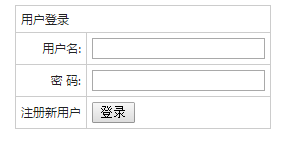
繼續使用<form>表單和<table>表格來建立登入頁面
<meta http-equiv="Content-Type" content="text/html; charset=utf-8" />
<form  name="myform" method="post" onSubmit="return CheckPost()" action="" style="margin-bottom:5px;">
  <table width="" border="0" align="center" cellpadding="5" cellspacing="1" bgcolor="#CCCCCC">
    <tr>
      <td height="" colspan="2" bgcolor="#FFFFFF">用户登录</td>
    </tr>
    <tr>
      <td width="" align="right" bgcolor="#FFFFFF">用户名:
      </td>
      <td width="" bgcolor="#FFFFFF"><input type="text" name="username"></td>
    </tr>
    <tr>
      <td align="right" bgcolor="#FFFFFF">密 码:
      </td>
      <td bgcolor="#FFFFFF"><input type="password" name="password"></td>
    </tr>
    <tr>
      <td align="right" bgcolor="#FFFFFF"><a href="reg.php">注册新用户</a>
      </td>
      <td bgcolor="#FFFFFF"><input type="submit" name="submit" value="登录"></td>
    </tr>
  </table>
</form>
增加了一個「註冊新使用者」跳轉頁,如果沒有註冊則跳到註冊頁面註冊。
完整的登入頁面landing.php程式碼:
<html>
<head>
  <meta http-equiv="Content-Type" content="text/html; charset=utf-8" />
  <title>简单图书管理系统登录</title>
  <style>
    body,td,th {font-family: 微软雅黑;font-size: 9px;color: #222;}
    body {background-color: #FFFFFF;line-height:20px;}
    a:link {color: #222;text-decoration: none;}
    a:visited {text-decoration: none;color: #222;}
    a:hover {text-decoration: underline;color: #FF0000;}
    a:active {text-decoration: none;color: #999999;}
  </style>
</head>
<body>
<form  name="myform" method="post" onSubmit="return CheckPost()" action="" style="margin-bottom:5px;">
  <table width="" border="0" align="center" cellpadding="5" cellspacing="1" bgcolor="#CCCCCC">
    <tr>
      <td height="" colspan="2" bgcolor="#FFFFFF">用户登录</td>
    </tr>
    <tr>
      <td width="" align="right" bgcolor="#FFFFFF">用户名:
      </td>
      <td width="" bgcolor="#FFFFFF"><input type="text" name="username"></td>
    </tr>
    <tr>
      <td align="right" bgcolor="#FFFFFF">密 码:
      </td>
      <td bgcolor="#FFFFFF"><input type="password" name="password"></td>
    </tr>
    <tr>
      <td align="right" bgcolor="#FFFFFF"><a href="reg.php">注册新用户</a>
      </td>
      <td bgcolor="#FFFFFF"><input type="submit" name="submit" value="登录"></td>
    </tr>
  </table>
</form>
</body>
</html>
新建檔案
<html>
<head>
<meta http-equiv="Content-Type" content="text/html; charset=utf-8" />
<title>简单图书管理系统登录</title>
<style>
body,td,th {font-family: 微软雅黑;font-size: 9px;color: #222;}
body {background-color: #FFFFFF;line-height:20px;}
a:link {color: #222;text-decoration: none;}
a:visited {text-decoration: none;color: #222;}
a:hover {text-decoration: underline;color: #FF0000;}
a:active {text-decoration: none;color: #999999;}
</style>
</head>
<body>
<form name="myform" method="post" onSubmit="return CheckPost()" action="" style="margin-bottom:5px;">
<table width="" border="0" align="center" cellpadding="5" cellspacing="1" bgcolor="#CCCCCC">
<tr>
<td height="" colspan="2" bgcolor="#FFFFFF">用户登录</td>
</tr>
<tr>
<td width="" align="right" bgcolor="#FFFFFF">用户名:
</td>
<td width="" bgcolor="#FFFFFF"><input type="text" name="username"></td>
</tr>
<tr>
<td align="right" bgcolor="#FFFFFF">密 码:
</td>
<td bgcolor="#FFFFFF"><input type="password" name="password"></td>
</tr>
<tr>
<td align="right" bgcolor="#FFFFFF"><a href="reg.php">注册新用户</a>
</td>
<td bgcolor="#FFFFFF"><input type="submit" name="submit" value="登录"></td>
</tr>
</table>
</form>
</body>
</html>
預覽
Clear
- 課程推薦
- 課件下載














 課件暫不提供下載,工作人員正在整理中,後期請多關注該課程~