


CSS Fonts(字體)
CSS 字體
CSS字體屬性定義字體,加粗,大小,文字樣式。
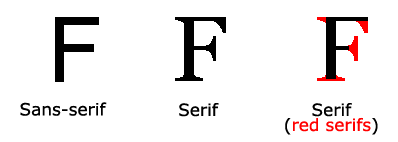
 在電腦螢幕上,sans-serif字體被認為是比serif字體容易閱讀
CSS字體
在CSS中,有兩種類型的字體系列名稱:
通用字體系列 - 擁有相似外觀的字體系統組合(如"Serif" 或"Monospace")
特定字體系列 - 一個特定的字體系列(如"Times" 或"Courier")
| Generic family | 字體系列 | 說明 |
|---|---|---|
| Serif | Times New Roman | ##Serif|
| Georgia | Serif字體中字元在行的末端擁有額外的裝飾 | #Sans-serif##Arial |
| Verdana | #"Sans"是指無- 這些字體在末端沒有額外的裝飾 #Monospace |
字體系列
font-family 屬性設定文字的字體系列。
font-family 屬性應該設定幾個字體名稱作為一種"後備"機制,如果瀏覽器不支援第一種字體,他將嘗試下一種字體。
注意: 如果字體系列的名稱超過一個字,它必須用引號,如Font Family:"宋體"。
多個字體系列是用一個逗號分隔指明:
<!DOCTYPE html>
<html>
<head>
<meta charset="utf-8">
<title>php中文网(php.cn)</title>
<style>
p.serif{font-family:"Times New Roman",Times,serif;}
p.sansserif{font-family:Arial,Helvetica,sans-serif;}
</style>
</head>

<body>
<h1>CSS font-family</h1>
<p class="serif">这一段的字体是 Times New Roman </p>
<p class="sansserif">这一段的字体是 Arial.</p>

</body>
</html>
運行程式嘗試
字體樣式
主要是用來指定斜體文字的字體樣式屬性。
這個屬性有三個值:
#正常- 正常顯示文字
斜體- 以斜體字顯示的文字
傾斜的文字- 文字向一邊傾斜(和斜體非常類似,但不太支援)
實例
    <!DOCTYPE html>
<html>
<head>
    <meta charset="utf-8">
    <title>php中文网(php.cn)</title>
    <style>
        p.normal {font-style:normal;}
        p.italic {font-style:italic;}
        p.oblique {font-style:oblique;}
    </style>
</head>

<body>
<p class="normal">这是一段正常的字体 - </p>
<p class="italic">这是一段正常斜体字倾斜的文字 </p>
<p class="oblique">文字向一边倾斜(和斜体非常类似,但不太支持)</p>
</body>

</html>
執行程式嘗試
#字體大小
font-size 屬性設定文字的大小。
能否管理文字的大小,在網頁設計上是非常重要的。但是,你不能透過調整字體大小使段落看起來像標題,或使標題看起來像段落。
請務必使用正確的HTML標籤,就<h1> - <h6>表示標題和<p>表示段落:
#字體大小的值可以是絕對或相對的大小。
絕對大小:
#設定一個指定大小的文字
#不允許使用者在所有瀏覽器中改變文字大小
#確定了輸出的物理尺寸時絕對大小很有用
相對大小:
#相對於周圍的元素來設定大小
允許使用者在瀏覽器中改變文字大小
# 注意:如果你不指定一個字體的大小,預設大小和普通文字段落一樣,是16像素(16px=1em)。
設定字型大小像素
#設定文字的大小與像素,讓您完全控製文字大小:
實例
     <!DOCTYPE html>
<html>
<head>
<meta charset="utf-8">
<title>php中文网(php.cn)</title>
<style>
h1 {font-size:40px;}
h2 {font-size:30px;}
p {font-size:14px;}
</style>
</head>
<body>

<h1>This is heading 1</h1>
<h2>This is heading 2</h2>
<p>This is a paragraph.</p>
<p>Specifying the font-size in px allows Internet Explorer 9, Firefox, Chrome, Opera, and Safari to resize the text.</p>
<p><b>注意:</b>这个例子在 IE9之前的版本不工作, prior version 9.</p>

</body>
</html>
運行程式嘗試
##用em來設定字體大小
為了避免Internet Explorer 中無法調整文字的問題,許多開發者使用em 單位來取代像素。 em的尺寸單位由W3C建議。 1em和目前字體大小相等。在瀏覽器中預設的文字大小是16px。 因此,1em的預設大小是16px。可以透過下面這個公式將像素轉換為em:px/16=em#實例
<!DOCTYPE html>
<html>
<head>
<meta charset="utf-8">
<title>php中文网(php.cn)</title>
<style>
h1 {font-size:2.5em;} /* 40px/16=2.5em */
h2 {font-size:1.875em;} /* 30px/16=1.875em */
p {font-size:0.875em;} /* 14px/16=0.875em */
</style>
</head>
<body>

<h1>This is heading 1</h1>
<h2>This is heading 2</h2>
<p>This is a paragraph.</p>
<p>Specifying the font-size in em allows all major browsers to resize the text.
Unfortunately, there is still a problem with older versions of IE. When resizing the text, it becomes larger/smaller than it should.
</p>
</body>
</html>
運行程式嘗試
在上面的例子,em的文字大小是與前面的例子中像素一樣。不過,如果使用 em 單位,則可以在所有瀏覽器中調整文字大小。
不幸的是,仍然是IE瀏覽器的問題。調整文字的大小時,會比正常的尺寸更大或更小。
使用百分比和EM組合
#在所有瀏覽器的解決方案中,設定元素的預設字體大小的是百分比:
#實例##<!DOCTYPE html>
<html>
<head>
<meta charset="utf-8">
<title>php中文网(php.cn)</title>
<style>
body {font-size:100%;}
h1 {font-size:2.5em;}
h2 {font-size:1.875em;}
p {font-size:0.875em;}
</style>
</head>
<body>
<h1>This is heading 1</h1>
<h2>This is heading 2</h2>
<p>This is a paragraph.</p>
<p>Specifying the font-size in percent and em displays the same size in all
major browsers, and allows all browsers to resize the text!</p>
</body>
</html>
實例#設定字型加粗
     <!DOCTYPE html>
<html>
<head>
    <meta charset="utf-8">
    <title>php中文网(php.cn)</title>
    <style>
        p.normal {font-weight:normal;}
        p.light {font-weight:lighter;}
        p.thick {font-weight:bold;}
        p.thicker {font-weight:900;}
    </style>
</head>

<body>
<p class="normal">你要记得,紫檀未灭,我亦未去。</p>
<p class="light">谁在岁月里长长叹息。</p>
<p class="thick">汉霄苍茫,牵住繁华哀伤,弯眉间,命中注定,成为过往。</p>
<p class="thicker">php中文网(php.cn)</p>
</body>

</html>
CSS字型屬性
#Property 描述 font #在一個宣告中設定所有的字型屬性 #font-family 指定文字的字體系列 #font-size 指定文字的字體大小 font-style 指定文字的字體樣式 #font-variant 以小型大寫字體或正常字體顯示文字. font-weight 指定字體的粗細。
- 課程推薦
- 課件下載











 課件暫不提供下載,工作人員正在整理中,後期請多關注該課程~