



 0
0


按照教程用nginx+uwsgi部署django项目,监听8000端口正常,80端口访问时显示404 not found.
django项目目录为/home/wu/Documents/env/myblog
项目文件夹下文档结构
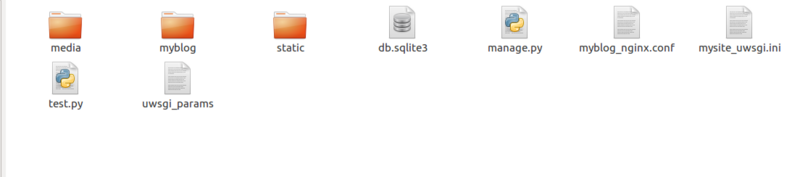
myblog_nginx.conf文件
# mysite_nginx.conf
# the upstream component nginx needs to connect to
upstream django {
    server unix:///home/wu/Documents/env/myblog/mysite.sock; # for a file socket
    #server 127.0.0.1:8001; # for a web port socket (we'll use this first)
}
# configuration of the server
server {
    # the port your site will be served on
    listen      80;
    # the domain name it will serve for
    server_name .example.com; # substitute your machine's IP address or FQDN
    charset     utf-8;
    # max upload size
    client_max_body_size 75M;   # adjust to taste
    # Django media
    location /media  {
        alias /home/wu/Documents/env/myblog/media;  # your Django project's media files - amend as required
    }
    location /static {
        alias /home/wu/Documents/env/myblog/static; # your Django project's static files - amend as required
    }
    # Finally, send all non-media requests to the Django server.
    location / {
    root /home/wu/Documents/env/myblog;
        uwsgi_pass  django;
        include     /home/wu/Documents/env/myblog/uwsgi_params; # the uwsgi_params file you installed
    }
}
mysite_uwsgi.ini文件
# mysite_uwsgi.ini file
[uwsgi]

# Django-related settings
# the base directory (full path)
chdir           = /home/wu/Documents/env/myblog
# Django's wsgi file
module          = myblog.wsgi
# the virtualenv (full path)
home            = /home/wu/Documents/env

# process-related settings
# master
master          = true
# maximum number of worker processes
processes       = 10
# the socket (use the full path to be safe
socket          = /home/wu/Documents/env/myblog/mysite.sock
# ... with appropriate permissions - may be needed
chmod-socket    = 666
# clear environment on exit
vacuum          = true
myblog_nginx.conf文件中改为8000端口时没问题
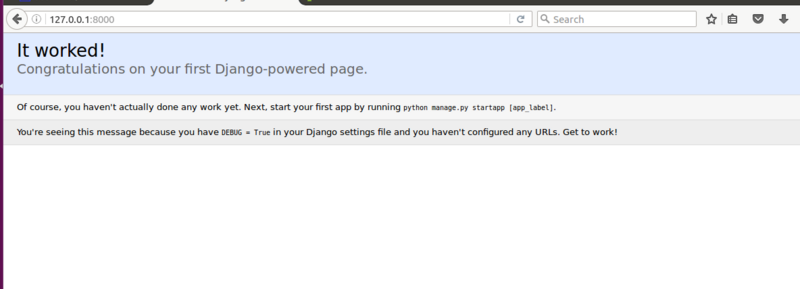
改为80端口后,raload,restart nginx,uwsgi --ini mysite_uwsgi.ini,然后访问

求指点,搞了好久都没解决这个问题,感激不尽!!!
Your Answer
2 answers
0
 0
0
是不是你其他地方配置了
server {
    listen      80;
    xxx
}
#导致没进入你的server块,看下nginx.conf,或者其他虚拟主机的配置文件。

另外你的
server {
    /*这个去掉吧,或者你可以测试重复,host配置一个xxx.com,
    这边也配置为xxx.com,相比于listen 80,会优先进入这个server块。*/
    #server_name .example.com;
}

2016-11-14 11:22:05

Hot tools Tags


Hot Questions
How to pass an array into a SQL Server stored procedure
2026-01-31 22:24:05
What to do with mysqli problems? Errors like mysqli_fetch_array(): Argument #1 must be of type mysqli_result and such
2026-01-31 22:02:53
Convert a JavaScript string in dot notation into an object reference
2026-01-31 21:22:07
MySQL error #2014 - Commands out of sync; you can't run this command now [closed]
2026-01-31 21:01:19
How do I format a date in JavaScript?
2026-01-31 20:43:18

Popular tool

vc9-vc14 (32+64 bit) runtime library collection (link below)
Download the collection of runtime libraries required for phpStudy installation
VC9 32-bit
VC9 32-bit phpstudy integrated installation environment runtime library
PHP programmer toolbox full version
Programmer Toolbox v1.0 PHP Integrated Environment
VC11 32-bit
VC11 32-bit phpstudy integrated installation environment runtime library
SublimeText3 Chinese version
Chinese version, very easy to use
Hot Topics
Douyin level price list 1-75
 20522
7
20522
7
 20522
20522
 7
7
wifi shows no ip assigned
13634
4
13634
4
Hot Article
What should I do if I can't always get the spot? Ouyitun Bibao multi-currency rotation and rebalancing strategy
2026-04-04
By DDD
Is the Martingale strategy effective? Detailed explanation of Ouyi DCA robot parameter setting
2026-04-03
By DDD
14 Hidden iOS 26 Features You Probably Missed
2026-04-01
By DDD
PHP runtime getting and monitoring script maximum memory limit (bytes)
2026-04-01
By DDD