


PHP 개발 사용자 로그인 모듈 HTML 로그인 페이지
먼저 HTML+CSS 코드를 사용하여 간단한 제출 양식을 작성하세요
<!DOCTYPE html>
<html>
<head>
    <title>用户登录页面</title>
    <meta charset="UTF-8"/>
    <style type="text/css">
        *{margin:0px;padding:0px;}
        ul{
            width:400px;
            list-style:none;
            margin:50px auto;
        }
        li{
            padding:12px;
            position:relative;
        }
        label{
            width:80px;
            display:inline-block;
            float:left;
            line-height:30px;
        }
        input[type='text'],input[type='password']{
            height:30px;
        }
        img{
            margin-left:10px;
        }
        input[type="submit"]{
            margin-left:80px;
            padding:5px 10px;
        }
    </style>
</head>
<body>
<form action="logins.php" method="post">
    <ul>
        <li>
            <label>用户名:</label>
            <input type="text" name="username" placeholder="请输入登录账号"/>
        </li>
        <li>
            <label>密码:</label>
            <input type="password" name="password" placeholder="请输入密码" />
        </li>
        <li>
            <label>验证码:</label>
            <input type="text" name="code" size="4" style="float:left"/>
        </li>
        <li>
            <input type="submit" value="登录" />
        </li>
    </ul>
</form>
</body>
두 번째로 내부에 인증 코드 모듈을 표시하려면 JavaScript 문을 추가하고 외부 인증 코드를 도입해야 합니다. PHP 파일:
<body>
<li>
    <label>验证码:</label>
    <input type="text" name="code" size="4" style="float:left"/>
    <a href="javascript:;" onclick="document.getElementById('captcha_img').src='captcha.php?r='+Math.random()">
        <img id="captcha_img" border='1' src='captcha.php?r=echo rand(); ?>' style="width:100px; height:30px" />
    </a>
</li>
</body>
댓글:
captcha.php는 외부 인증코드 파일로, 자바스크립트의 onclick 이벤트를 통해 인증코드를 변경할 수 있습니다.
다음은 전체 로그인 페이지 login.html 파일 코드입니다.
<!DOCTYPE html>
<html>
<head>
    <title>用户登录页面</title>
    <meta charset="UTF-8"/>
    <style type="text/css">
        *{margin:0px;padding:0px;}
        ul{
            width:400px;
            list-style:none;
            margin:50px auto;
        }
        li{
            padding:12px;
            position:relative;
        }
        label{
            width:80px;
            display:inline-block;
            float:left;
            line-height:30px;
        }
        input[type='text'],input[type='password']{
            height:30px;
        }
        img{
            margin-left:10px;
        }
        input[type="submit"]{
            margin-left:80px;
            padding:5px 10px;
        }
    </style>
</head>
<body>
<form action="logins.php" method="post">
    <ul>
        <li>
            <label>用户名:</label>
            <input type="text" name="username" placeholder="请输入登录账号"/>
        </li>
        <li>
            <label>密码:</label>
            <input type="password" name="password" placeholder="请输入密码" />
        </li>
        <li>
            <label>验证码:</label>
            <input type="text" name="code" size="4" style="float:left"/>
            <a href="javascript:;" onclick="document.getElementById('captcha_img').src='captcha.php?r='+Math.random()">
                <img id="captcha_img" border='1' src='captcha.php?r=echo rand(); ?>' style="width:100px; height:30px" />
            </a>
        </li>
        <li>
            <input type="submit" value="登录" />
        </li>
    </ul>
</form>
</body>
</html>
표시 효과:
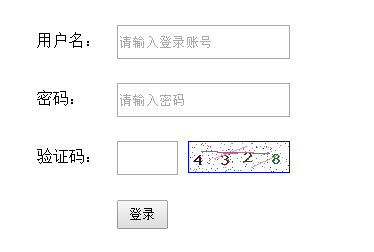
새로운 파일
<!DOCTYPE html>
<html>
<head>
<title>用户登录页面</title>
<meta charset="UTF-8"/>
<style type="text/css">
*{margin:0px;padding:0px;}
ul{
width:400px;
list-style:none;
margin:50px auto;
}
li{
padding:12px;
position:relative;
}
label{
width:80px;
display:inline-block;
float:left;
line-height:30px;
}
input[type='text'],input[type='password']{
height:30px;
}
img{
margin-left:10px;
}
input[type="submit"]{
margin-left:80px;
padding:5px 10px;
}
</style>
</head>
<body>
<form action="logins.php" method="post">
<ul>
<li>
<label>用户名:</label>
<input type="text" name="username" placeholder="请输入登录账号"/>
</li>
<li>
<label>密码:</label>
<input type="password" name="password" placeholder="请输入密码" />
</li>
<li>
<label>验证码:</label>
<input type="text" name="code" size="4" style="float:left"/>
<a href="javascript:;" onclick="document.getElementById('captcha_img').src='captcha.php?r='+Math.random()">
<img id="captcha_img" border='1' src='captcha.php?r=echo rand(); ?>' style="width:100px; height:30px" />
</a>
</li>
<li>
<input type="submit" value="登录" />
</li>
</ul>
</form>
</body>
</html>
시사
Clear
- 코스 추천
- 코스웨어 다운로드














 현재 코스웨어를 다운로드할 수 없습니다. 현재 직원들이 정리하고 있습니다. 앞으로도 본 강좌에 많은 관심 부탁드립니다~
이 강좌를 시청한 학생들도 학습하고 있습니다.

PHP로 사업을 시작하는 방법에 대해 간단히 이야기해 보겠습니다.
웹 프론트 엔드 개발에 대한 빠른 소개
민망한 물건 백과사전 사이트를 모방한 Mini 버전 MVC 프레임워크의 대규모 실용 Tianlongbabu 개발
PHP 실용 개발 시작하기: 빠른 PHP 생성 [중소기업 포럼]
로그인 인증 및 클래식 게시판
컴퓨터 네트워크 지식 수집
빠른 시작 Node.JS 정식 버전
당신을 가장 잘 이해하는 프론트엔드 강좌: HTML5/CSS3/ES6/NPM/Vue/...[원본]
자신만의 PHP MVC 프레임워크 작성(깊이 있는 40개 장/자세한 내용/초보자가 발전하려면 읽어야 함)