


백스테이지 카테고리 추가 기능
1, 새로운 typeadd.php를 생성합니다
타입 테이블의 fid 필드에 따라 네이티브 Infinitus 분류 함수를 사용하면 코드는 다음과 같습니다
<?php
include 'include/mysqli.php';
?>
<!DOCTYPE html>
<html>
<head>
<meta charset="UTF-8">
<title>添加类别</title>
<link rel="stylesheet" type="text/css" href="css/style.css">
</head>
<body>
<form method="post" action="typesave.php?action=add">
<ul class="typecontent">
<?php
?>
<li>父类名称<select name="fid">
<option value="0">根目录</option>
<?php
function show($fid,$i){
$i++;
$blank="";
for($n=0;$n<$i;$n++){
$blank.="---";
}
global $mysqli;
$sql="select *from type where fid=$fid order by orderid desc";
$result=$mysqli->query($sql);
$id=$_GET["id"];
while($row=$result->fetch_assoc()){
?>
<option <?php if($id==$row['id']){echo "selected";}?> value="<?php echo $row['id']?>"><?php echo $blank.$row['typename'].$blank?></option>
<?php
show($fid=$row['id'],$i);
}
?>
<?php }
show(0,0);
?>
</select>
</li>
<li>类别名称<input class="inp" type="text" name="typename"></li>
<li>排 序<input class="inp" type="text" name="orderid"></li>
<li>
<input class="btn" type="submit" name="dosub" value="添加"></li>
</ul>
</form>
</body>
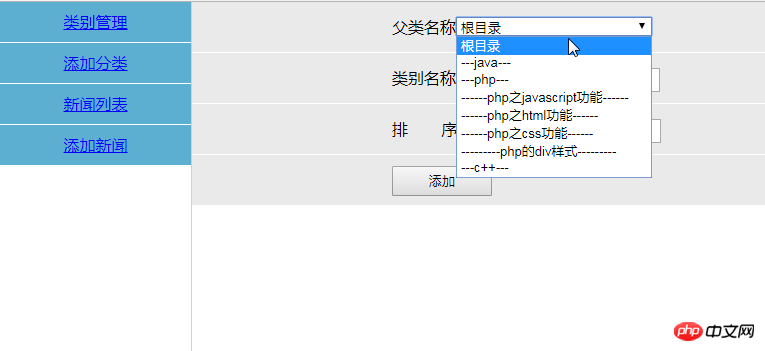
</html>페이지는 다음과 같이 표시됩니다.
2. 처리할 양식 제출 데이터를 가져옵니다.
코드는 다음과 같습니다.
<?php
header("Content-type:text/html;charset=utf-8");
include 'include/mysqli.php';
if($_GET["action"]=="add"){
    $fid=$_POST['fid'];
    $typename=$_POST["typename"];
    $orderid=$_POST["orderid"];
    if(empty($typename)){
        echo "<script>alert('类别名称不能为空!')</script>";
        return false;
    }
    $sql = "insert into type(typename,orderid,fid) values('$typename','$orderid','$fid')";
    if ($mysqli->query($sql)) {
        echo "<script>alert('类别添加成功')</script>";
        echo "<script>window.location='typelist.php'</script>";
    }
}elseif ($_GET["action"]=="update"){
    $typename=$_POST["typename"];
    $orderid=$_POST["orderid"];
    $id=$_POST["id"];
    if(empty($typename)){
        echo "<script>alert('类别名称不能为空!')</script>";
        return false;
    }
    $sql = "update type set typename='$typename',orderid='$orderid' where id='$id'";
    if ($mysqli->query($sql)) {
        echo "<script>alert('类别修改成功')</script>";
        echo "<script>window.location='typelist.php'</script>";
    }
}elseif ($_GET["action"]=="del"){
    $id=$_GET['id'];
    $sql = "delete from type where id=$id";
    if ($mysqli->query($sql)) {
        echo "<script>alert('类别删除成功')</script>";
        echo "<script>window.location='typelist.php'</script>";
    }
}elseif ($_GET["action"]=="delall"){
    $arrid=$_GET["arrid"];
    $arr=rtrim($arrid,",");
    $sql="delete from type where id in ($arr)";
    $result=$mysqli->query($sql);
    if($result){
        echo "<script>alert('类别删除成功!')</script>";
        echo "<script>window.location.href='typelist.php'</script>";
    }
}
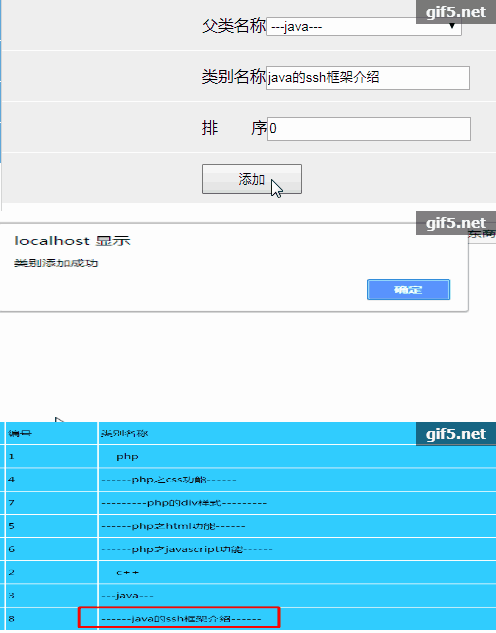
효과는 다음과 같이 표시됩니다.
새로운 파일
<?php
echo "类别添加功能";
시사
Clear
- 코스 추천
- 코스웨어 다운로드














 현재 코스웨어를 다운로드할 수 없습니다. 현재 직원들이 정리하고 있습니다. 앞으로도 본 강좌에 많은 관심 부탁드립니다~
이 강좌를 시청한 학생들도 학습하고 있습니다.

PHP로 사업을 시작하는 방법에 대해 간단히 이야기해 보겠습니다.
웹 프론트 엔드 개발에 대한 빠른 소개
민망한 물건 백과사전 사이트를 모방한 Mini 버전 MVC 프레임워크의 대규모 실용 Tianlongbabu 개발
PHP 실용 개발 시작하기: 빠른 PHP 생성 [중소기업 포럼]
로그인 인증 및 클래식 게시판
컴퓨터 네트워크 지식 수집
빠른 시작 Node.JS 정식 버전
당신을 가장 잘 이해하는 프론트엔드 강좌: HTML5/CSS3/ES6/NPM/Vue/...[원본]
자신만의 PHP MVC 프레임워크 작성(깊이 있는 40개 장/자세한 내용/초보자가 발전하려면 읽어야 함)