


브랜드 에디터
브랜드 편집
브랜드 편집 컨트롤러
BrandController.class.php
 public function edit(){
        $brand=D('brand');
        if(IS_POST){
            if($brand->create()){
                if($brand->save()){
                    $this->success('修改品牌成功!',U('index'));
                }else{
                    $this->error('修改品牌失败!');
                }
            }else{
                $this->error($brand->getError());
            }
            return;
        }
        $brands=$brand->find(I('id'));
        $this->assign('brands',$brands);
        $this->display();
    }
$brands=$brand->find(I('id'));
$this - >할당('브랜드',$브랜드);템플릿에 할당
인덱스 홈페이지에서 편집을 누르면 id 값이 편집 메소드로 전송됩니다
 <a href="__CONTROLLER__/edit/id/{$vo.id}" class="btn btn-primary btn-sm shiny">
   <i class="fa fa-edit"></i> 编辑
</a>
Edit template
<!DOCTYPE html>
<html><head>
        <meta charset="utf-8">
    <title>PHP中文网</title>

    <meta name="description" content="Dashboard">
    <meta name="viewport" content="width=device-width, initial-scale=1.0">
    <meta http-equiv="X-UA-Compatible" content="IE=edge">
    <meta http-equiv="Content-Type" content="text/html; charset=UTF-8">
    <!--Basic Styles-->
    <link href="/Public/style/bootstrap.css" rel="stylesheet">
    <link href="/Public/style/font-awesome.css" rel="stylesheet">
    <link href="/Public/style/weather-icons.css" rel="stylesheet">

    <!--Beyond styles-->
    <link id="beyond-link" href="/Public/style/beyond.css" rel="stylesheet" type="text/css">
    <link href="/Public/style/demo.css" rel="stylesheet">
    <link href="/Public/style/typicons.css" rel="stylesheet">
    <link href="/Public/style/animate.css" rel="stylesheet">

</head>
<body>
    <!-- 头部 -->
    <include file="Common/header" />

    <!-- /头部 -->

    <div class="main-container container-fluid">
        <div class="page-container">
                        <!-- Page Sidebar -->
            <include file="Common/left" />
            <!-- /Page Sidebar -->
            <!-- Page Content -->
            <div class="page-content">
                <!-- Page Breadcrumb -->
                <div class="page-breadcrumbs">
                    <ul class="breadcrumb">
                                        <li>
                        <a href="__MODULE__/Index/index">系统</a>
                    </li>
                                        <li>
                        <a href="__CONTROLLER__/lst">品牌列表</a>
                    </li>
                                        <li class="active">修改品牌</li>
                                        </ul>
                </div>
                <!-- /Page Breadcrumb -->

                <!-- Page Body -->
                <div class="page-body">

<div class="row">
    <div class="col-lg-12 col-sm-12 col-xs-12">
        <div class="widget">
            <div class="widget-header bordered-bottom bordered-blue">
                <span class="widget-caption">修改品牌</span>
            </div>
            <div class="widget-body">
                <div id="horizontal-form">
                    <form class="form-horizontal" role="form" action="" method="post" enctype="multipart/form-data" >
                        <input type="hidden" name="oldlogo" value="{$brands.brand_logo}">
                        <input type="hidden" name="id" value="{$brands.id}">
                        <div class="form-group">
                            <label for="username" class="col-sm-2 control-label no-padding-right">品牌名称</label>
                            <div class="col-sm-6">
                                <input class="form-control" id="brand_name" placeholder="" name="brand_name" value="{$brands.brand_name}" required="" type="text">
                            </div>
                            <p class="help-block col-sm-4 red">* 必填</p>
                        </div>
                        <div class="form-group">
                            <label for="username" class="col-sm-2 control-label no-padding-right">品牌logo</label>
                            <div class="col-sm-6">
                                <input  id="brand_logo" name="brand_logo" type="file">
                                <if condition="$brands['brand_logo'] eq ''">
                                暂无logo
                                <else />
                                <img src="{$brands.brand_logo}" height="40">
                                </if>
                            </div>
                        </div>
                        <div class="form-group">
                            <label for="username" class="col-sm-2 control-label no-padding-right">品牌网址</label>
                            <div class="col-sm-6">
                                <input class="form-control" id="brand_url" placeholder="" value="{$brands.brand_url}" name="brand_url" required="" type="text">
                            </div>
                        </div>
                        <div class="form-group">
                            <div class="col-sm-offset-2 col-sm-10">
                                <button type="submit" class="btn btn-default">保存信息</button>
                            </div>
                        </div>
                    </form>
                </div>
            </div>
        </div>
    </div>
</div>

                </div>
                <!-- /Page Body -->
            </div>
            <!-- /Page Content -->
        </div>
    </div>

        <!--Basic Scripts-->
    <script src="/Public/style/jquery_002.js"></script>
    <script src="/Public/style/bootstrap.js"></script>
    <script src="/Public/style/jquery.js"></script>
    <!--Beyond Scripts-->
    <script src="/Public/style/beyond.js"></script>

</body>
</html>
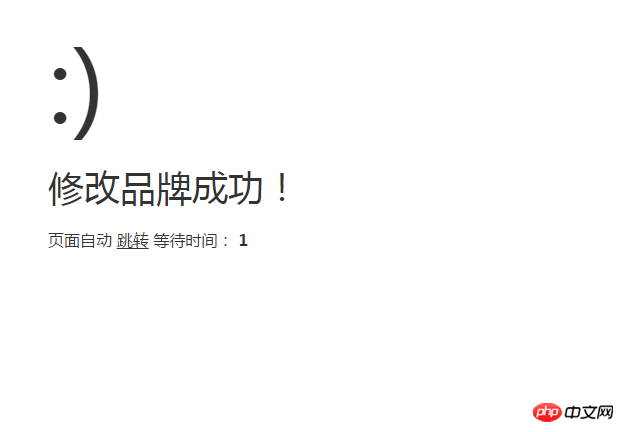

us 썸네일을 제외한 모든 항목이 성공적으로 수정된 것을 볼 수 있습니다. 다음 강의에서는 모델 레이어에서 썸네일을 처리하는 방법을 알려드리겠습니다.
새로운 파일
<!DOCTYPE html>
<html><head>
<meta charset="utf-8">
<title>PHP中文网</title>
<meta name="description" content="Dashboard">
<meta name="viewport" content="width=device-width, initial-scale=1.0">
<meta http-equiv="X-UA-Compatible" content="IE=edge">
<meta http-equiv="Content-Type" content="text/html; charset=UTF-8">
<!--Basic Styles-->
<link href="/Public/style/bootstrap.css" rel="stylesheet">
<link href="/Public/style/font-awesome.css" rel="stylesheet">
<link href="/Public/style/weather-icons.css" rel="stylesheet">
<!--Beyond styles-->
<link id="beyond-link" href="/Public/style/beyond.css" rel="stylesheet" type="text/css">
<link href="/Public/style/demo.css" rel="stylesheet">
<link href="/Public/style/typicons.css" rel="stylesheet">
<link href="/Public/style/animate.css" rel="stylesheet">
</head>
<body>
<!-- 头部 -->
<include file="Common/header" />
<!-- /头部 -->
<div class="main-container container-fluid">
<div class="page-container">
<!-- Page Sidebar -->
<include file="Common/left" />
<!-- /Page Sidebar -->
<!-- Page Content -->
<div class="page-content">
<!-- Page Breadcrumb -->
<div class="page-breadcrumbs">
<ul class="breadcrumb">
<li>
<a href="__MODULE__/Index/index">系统</a>
</li>
<li>
<a href="__CONTROLLER__/lst">品牌列表</a>
</li>
<li class="active">修改品牌</li>
</ul>
</div>
<!-- /Page Breadcrumb -->
<!-- Page Body -->
<div class="page-body">
<div class="row">
<div class="col-lg-12 col-sm-12 col-xs-12">
<div class="widget">
<div class="widget-header bordered-bottom bordered-blue">
<span class="widget-caption">修改品牌</span>
</div>
<div class="widget-body">
<div id="horizontal-form">
<form class="form-horizontal" role="form" action="" method="post" enctype="multipart/form-data" >
<input type="hidden" name="oldlogo" value="{$brands.brand_logo}">
<input type="hidden" name="id" value="{$brands.id}">
<div class="form-group">
<label for="username" class="col-sm-2 control-label no-padding-right">品牌名称</label>
<div class="col-sm-6">
<input class="form-control" id="brand_name" placeholder="" name="brand_name" value="{$brands.brand_name}" required="" type="text">
</div>
<p class="help-block col-sm-4 red">* 必填</p>
</div>
<div class="form-group">
<label for="username" class="col-sm-2 control-label no-padding-right">品牌logo</label>
<div class="col-sm-6">
<input id="brand_logo" name="brand_logo" type="file">
<if condition="$brands['brand_logo'] eq ''">
暂无logo
<else />
<img src="{$brands.brand_logo}" height="40">
</if>
</div>
</div>
<div class="form-group">
<label for="username" class="col-sm-2 control-label no-padding-right">品牌网址</label>
<div class="col-sm-6">
<input class="form-control" id="brand_url" placeholder="" value="{$brands.brand_url}" name="brand_url" required="" type="text">
</div>
</div>
<div class="form-group">
<div class="col-sm-offset-2 col-sm-10">
<button type="submit" class="btn btn-default">保存信息</button>
</div>
</div>
</form>
</div>
</div>
</div>
</div>
</div>
</div>
<!-- /Page Body -->
</div>
<!-- /Page Content -->
</div>
</div>
<!--Basic Scripts-->
<script src="/Public/style/jquery_002.js"></script>
<script src="/Public/style/bootstrap.js"></script>
<script src="/Public/style/jquery.js"></script>
<!--Beyond Scripts-->
<script src="/Public/style/beyond.js"></script>
</body></html>
시사
Clear
- 코스 추천
- 코스웨어 다운로드












 현재 코스웨어를 다운로드할 수 없습니다. 현재 직원들이 정리하고 있습니다. 앞으로도 본 강좌에 많은 관심 부탁드립니다~
이 강좌를 시청한 학생들도 학습하고 있습니다.

PHP로 사업을 시작하는 방법에 대해 간단히 이야기해 보겠습니다.
웹 프론트 엔드 개발에 대한 빠른 소개
민망한 물건 백과사전 사이트를 모방한 Mini 버전 MVC 프레임워크의 대규모 실용 Tianlongbabu 개발
PHP 실용 개발 시작하기: 빠른 PHP 생성 [중소기업 포럼]
로그인 인증 및 클래식 게시판
컴퓨터 네트워크 지식 수집
빠른 시작 Node.JS 정식 버전
당신을 가장 잘 이해하는 프론트엔드 강좌: HTML5/CSS3/ES6/NPM/Vue/...[원본]
자신만의 PHP MVC 프레임워크 작성(깊이 있는 40개 장/자세한 내용/초보자가 발전하려면 읽어야 함)