


브랜딩 추가 및 썸네일 조작
브랜드 썸네일 추가 및 운영
페이지 구성 추가
<!DOCTYPE html>
<html><head>
	    <meta charset="utf-8">
    <title>PHP中文网</title>

    <meta name="description" content="Dashboard">
    <meta name="viewport" content="width=device-width, initial-scale=1.0">
    <meta http-equiv="X-UA-Compatible" content="IE=edge">
    <meta http-equiv="Content-Type" content="text/html; charset=UTF-8">
    <!--Basic Styles-->
    <link href="__PUBLIC__/style/bootstrap.css" rel="stylesheet">
    <link href="__PUBLIC__/style/font-awesome.css" rel="stylesheet">
    <link href="__PUBLIC__/style/weather-icons.css" rel="stylesheet">

    <!--Beyond styles-->
    <link id="beyond-link" href="__PUBLIC__/style/beyond.css" rel="stylesheet" type="text/css">
    <link href="__PUBLIC__/style/demo.css" rel="stylesheet">
    <link href="__PUBLIC__/style/typicons.css" rel="stylesheet">
    <link href="__PUBLIC__/style/animate.css" rel="stylesheet">

</head>
<body>
	<!-- 头部 -->
	 <include file="Common/header" />

	<!-- /头部 -->

	<div class="main-container container-fluid">
		<div class="page-container">
			            <!-- Page Sidebar -->
             <include file="Common/left" />
            <!-- /Page Sidebar -->
            <!-- Page Content -->
            <div class="page-content">
                <!-- Page Breadcrumb -->
                <div class="page-breadcrumbs">
                    <ul class="breadcrumb">
                                        <li>
                        <a href="__MODULE__/Index/index">系统</a>
                    </li>
                                        <li>
                        <a href="__CONTROLLER__/index">品牌列表</a>
                    </li>
                    <li class="active">添加品牌</li>
                    </ul>
                </div>
                <!-- /Page Breadcrumb -->

                <!-- Page Body -->
                <div class="page-body">

<div class="row">
    <div class="col-lg-12 col-sm-12 col-xs-12">
        <div class="widget">
            <div class="widget-header bordered-bottom bordered-blue">
                <span class="widget-caption">新增品牌</span>
            </div>
            <div class="widget-body">
                <div id="horizontal-form">
                    <form class="form-horizontal" role="form" action="" method="post" enctype="multipart/form-data" >
                        <div class="form-group">
                            <label for="username" class="col-sm-2 control-label no-padding-right">品牌名称</label>
                            <div class="col-sm-6">
                                <input class="form-control" id="brand_name" placeholder="" name="brand_name" required="" type="text">
                            </div>
                            <p class="help-block col-sm-4 red">* 必填</p>
                        </div>
                        <div class="form-group">
                            <label for="username" class="col-sm-2 control-label no-padding-right">品牌logo</label>
                            <div class="col-sm-6">
                                <input  id="brand_logo" name="brand_logo" type="file">
                            </div>
                        </div>
                        <div class="form-group">
                            <label for="username" class="col-sm-2 control-label no-padding-right">品牌网址</label>
                            <div class="col-sm-6">
                                <input class="form-control" id="brand_url" placeholder="" name="brand_url" required="" type="text">
                            </div>
                        </div>
                        <div class="form-group">
                            <div class="col-sm-offset-2 col-sm-10">
                                <button type="submit" class="btn btn-default">保存信息</button>
                            </div>
                        </div>
                    </form>
                </div>
            </div>
        </div>
    </div>
</div>

                </div>
                <!-- /Page Body -->
            </div>
            <!-- /Page Content -->
		</div>
	</div>

	    <!--Basic Scripts-->
    <script src="__PUBLIC__/style/jquery_002.js"></script>
    <script src="__PUBLIC__/style/bootstrap.js"></script>
    <script src="__PUBLIC__/style/jquery.js"></script>
    <!--Beyond Scripts-->
    <script src="__PUBLIC__/style/beyond.js"></script>


</body>
</html>
새 컨트롤러 작성
 public function add(){
        $brand=D('brand');
        if(IS_POST){
            if($brand->create()){
                if($brand->add()){
                    $this->success('添加品牌成功!',U('index'));
                }else{
                     $this->error('添加品牌失败!');
                }
            }else{
               $this->error($brand->getError());
            }
            return;
        }
        $this->display();
    }
브랜드 모델 파일 작성
<?php
namespace Admin\Model;
use Think\Model;
class BrandModel extends Model {

    protected $_validate = array(
        array('brand_name','require','品牌名称不得为空!',1),

    );


    public function _before_insert(&$data,$option){
        if($_FILES['brand_logo']['tmp_name']){
            $upload = new \Think\Upload();// 实例化上传类
            $upload->maxSize   =     3145728 ;// 设置附件上传大小
            $upload->exts      =     array('jpg', 'gif', 'png', 'jpeg');// 设置附件上传类型
            $upload->autoSub = false;
            $upload->savePath  =      './Public/Uploads/Brand/'; // 设置附件上传目录
            $upload->rootPath  =      './';
            $info   =   $upload->uploadOne($_FILES['brand_logo']);
            $logo=$info['savepath'].$info['savename'];
            $image = new \Think\Image();
            $image->open($logo);
            $image->thumb(100, 30)->save($logo);
            $data['brand_logo']=$logo;
        }
    }

}
여기에서는 중점적으로 설명하겠습니다. .
_before_insert thinkphp 프레임워크의 사전 작업은 현재 작업을 수행할 때 사전 작업이 있는지 감지하고 존재하는 경우 먼저 실행된다는 의미입니다.
여기서 브랜드 추가 사전 작업을 할 때 이미지를 먼저 업로드해주세요
  if($_FILES['brand_logo']['tmp_name']){
            $upload = new \Think\Upload();// 实例化上传类
            $upload->maxSize   =     3145728 ;// 设置附件上传大小
            $upload->exts      =     array('jpg', 'gif', 'png', 'jpeg');// 设置附件上传类型
            $upload->autoSub = false;
            $upload->savePath  =      './Public/Uploads/Brand/'; // 设置附件上传目录
            $upload->rootPath  =      './';
            $info   =   $upload->uploadOne($_FILES['brand_logo']);
$info = $upload->uploadOne($_FILES['brand_logo']);
이미지 경로와 이름을 받아보세요
 $image = new \Think\Image();
            $image->open($logo);
            $image->thumb(100, 30)->save($logo);
            $data['brand_logo']=$logo;
썸네일 생성
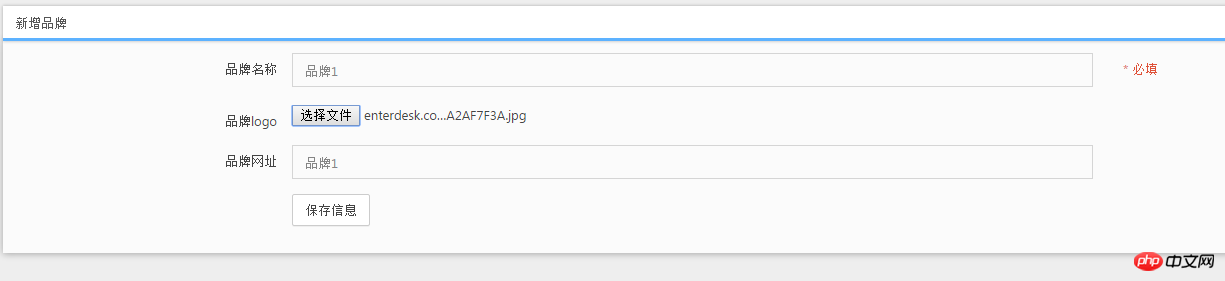

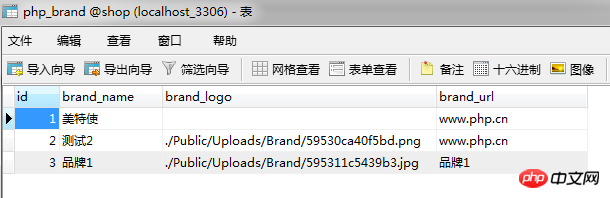
새 브랜드 완료
새로운 파일
시사
Clear
- 코스 추천
- 코스웨어 다운로드














 현재 코스웨어를 다운로드할 수 없습니다. 현재 직원들이 정리하고 있습니다. 앞으로도 본 강좌에 많은 관심 부탁드립니다~
이 강좌를 시청한 학생들도 학습하고 있습니다.

PHP로 사업을 시작하는 방법에 대해 간단히 이야기해 보겠습니다.
웹 프론트 엔드 개발에 대한 빠른 소개
민망한 물건 백과사전 사이트를 모방한 Mini 버전 MVC 프레임워크의 대규모 실용 Tianlongbabu 개발
PHP 실용 개발 시작하기: 빠른 PHP 생성 [중소기업 포럼]
로그인 인증 및 클래식 게시판
컴퓨터 네트워크 지식 수집
빠른 시작 Node.JS 정식 버전
당신을 가장 잘 이해하는 프론트엔드 강좌: HTML5/CSS3/ES6/NPM/Vue/...[원본]
자신만의 PHP MVC 프레임워크 작성(깊이 있는 40개 장/자세한 내용/초보자가 발전하려면 읽어야 함)