


PHP développe la page de connexion utilisateur d'un système simple de prêt de livres
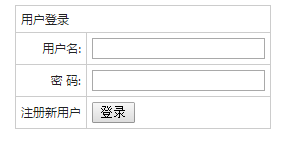
Continuez à utiliser les formulaires <form> et les tableaux <table> pour créer des pages de connexion
<meta http-equiv="Content-Type" content="text/html; charset=utf-8" />
<form  name="myform" method="post" onSubmit="return CheckPost()" action="" style="margin-bottom:5px;">
  <table width="" border="0" align="center" cellpadding="5" cellspacing="1" bgcolor="#CCCCCC">
    <tr>
      <td height="" colspan="2" bgcolor="#FFFFFF">用户登录</td>
    </tr>
    <tr>
      <td width="" align="right" bgcolor="#FFFFFF">用户名:
      </td>
      <td width="" bgcolor="#FFFFFF"><input type="text" name="username"></td>
    </tr>
    <tr>
      <td align="right" bgcolor="#FFFFFF">密 码:
      </td>
      <td bgcolor="#FFFFFF"><input type="password" name="password"></td>
    </tr>
    <tr>
      <td align="right" bgcolor="#FFFFFF"><a href="reg.php">注册新用户</a>
      </td>
      <td bgcolor="#FFFFFF"><input type="submit" name="submit" value="登录"></td>
    </tr>
  </table>
</form>
Ajout d'une page de renvoi "Enregistrer un nouvel utilisateur", si ce n'est pas le cas. passera à la page d'inscription pour vous inscrire.
Page de connexion complète landing.php code :
<html>
<head>
  <meta http-equiv="Content-Type" content="text/html; charset=utf-8" />
  <title>简单图书管理系统登录</title>
  <style>
    body,td,th {font-family: 微软雅黑;font-size: 9px;color: #222;}
    body {background-color: #FFFFFF;line-height:20px;}
    a:link {color: #222;text-decoration: none;}
    a:visited {text-decoration: none;color: #222;}
    a:hover {text-decoration: underline;color: #FF0000;}
    a:active {text-decoration: none;color: #999999;}
  </style>
</head>
<body>
<form  name="myform" method="post" onSubmit="return CheckPost()" action="" style="margin-bottom:5px;">
  <table width="" border="0" align="center" cellpadding="5" cellspacing="1" bgcolor="#CCCCCC">
    <tr>
      <td height="" colspan="2" bgcolor="#FFFFFF">用户登录</td>
    </tr>
    <tr>
      <td width="" align="right" bgcolor="#FFFFFF">用户名:
      </td>
      <td width="" bgcolor="#FFFFFF"><input type="text" name="username"></td>
    </tr>
    <tr>
      <td align="right" bgcolor="#FFFFFF">密 码:
      </td>
      <td bgcolor="#FFFFFF"><input type="password" name="password"></td>
    </tr>
    <tr>
      <td align="right" bgcolor="#FFFFFF"><a href="reg.php">注册新用户</a>
      </td>
      <td bgcolor="#FFFFFF"><input type="submit" name="submit" value="登录"></td>
    </tr>
  </table>
</form>
</body>
</html>
nouveau fichier
<html>
<head>
<meta http-equiv="Content-Type" content="text/html; charset=utf-8" />
<title>简单图书管理系统登录</title>
<style>
body,td,th {font-family: 微软雅黑;font-size: 9px;color: #222;}
body {background-color: #FFFFFF;line-height:20px;}
a:link {color: #222;text-decoration: none;}
a:visited {text-decoration: none;color: #222;}
a:hover {text-decoration: underline;color: #FF0000;}
a:active {text-decoration: none;color: #999999;}
</style>
</head>
<body>
<form name="myform" method="post" onSubmit="return CheckPost()" action="" style="margin-bottom:5px;">
<table width="" border="0" align="center" cellpadding="5" cellspacing="1" bgcolor="#CCCCCC">
<tr>
<td height="" colspan="2" bgcolor="#FFFFFF">用户登录</td>
</tr>
<tr>
<td width="" align="right" bgcolor="#FFFFFF">用户名:
</td>
<td width="" bgcolor="#FFFFFF"><input type="text" name="username"></td>
</tr>
<tr>
<td align="right" bgcolor="#FFFFFF">密 码:
</td>
<td bgcolor="#FFFFFF"><input type="password" name="password"></td>
</tr>
<tr>
<td align="right" bgcolor="#FFFFFF"><a href="reg.php">注册新用户</a>
</td>
<td bgcolor="#FFFFFF"><input type="submit" name="submit" value="登录"></td>
</tr>
</table>
</form>
</body>
</html>
Aperçu
Clear
- Recommandations de cours
- Téléchargement du didacticiel














 Le didacticiel n'est pas disponible au téléchargement pour le moment. Le staff est actuellement en train de l'organiser. Veuillez prêter plus d'attention à ce cours à l'avenir ~
Les étudiants qui ont regardé ce cours apprennent également

Parlons brièvement de la création d'une entreprise en PHP
Introduction rapide au développement web front-end
Développement pratique à grande échelle par Tianlongbabu du cadre MVC version Mini imitant le site Web de l'encyclopédie des choses embarrassantes
Premiers pas avec le développement pratique PHP : création rapide de PHP [Small Business Forum]
Vérification de connexion et forum de discussion classique
Collecte de connaissances sur les réseaux informatiques
Démarrage rapide de la version complète de Node.JS
Le cours front-end qui vous comprend le mieux : HTML5/CSS3/ES6/NPM/Vue/...[Original]
Écrivez votre propre framework PHP MVC (40 chapitres en profondeur/gros détails/à lire absolument pour que les débutants progressent)