


PHP développe une page d'enregistrement des utilisateurs d'un système simple de prêt de livres
Cette section crée d'abord une page frontale enregistrée
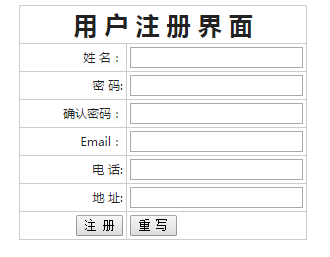
Affichez les champs que nous avons créés dans la table de base de données sur la page HTML.
Utilise les formulaires <form> et les tableaux <table>
<meta http-equiv="Content-Type" content="text/html; charset=utf-8" />
<form name="form1" method="post" action="" enctype='multipart/form-data' onSubmit="return checkreg()" >
   <table width="782" border="0" align="center" cellpadding="3" cellspacing="1" bgcolor="#CCCCCC">
      <tr>
         <th colspan="2" bgcolor="#FFFFFF"><font size="5">用 户 注 册 界 面</font></th>
      </tr>
      <tr>
         <td width="364" align="right" bgcolor="#FFFFFF">姓 名:</td>
         <td width="403" bgcolor="#FFFFFF">
            <input type="text" name="name">
      </tr>
      <tr>
         <td align="right" bgcolor="#FFFFFF">密 码:</td>
         <td bgcolor="#FFFFFF">
            <input type="password" name="password">
      </tr>
      <tr>
         <td align="right" bgcolor="#FFFFFF">确认密码:</td>
         <td bgcolor="#FFFFFF">
            <input type="password" name="pwd">
      </tr>
      <tr>
         <td align="right" bgcolor="#FFFFFF">Email:</td>
         <td bgcolor="#FFFFFF">
            <input type="text" name="email">
      </tr>
      <tr>
         <td align="right" bgcolor="#FFFFFF">电 话:</td>
         <td bgcolor="#FFFFFF">
            <input type="text" name="tel">
      </tr>
      <tr>
         <td align="right" bgcolor="#FFFFFF">地 址:</td>
         <td bgcolor="#FFFFFF">
            <input type="text" name="address">
      </tr>
      <tr>
         <td  align=right bgcolor="#FFFFFF" >
            <input type="submit" name="submit" value="注 册">
         </td>
         <td align=left bgcolor="#FFFFFF">
            <input type="reset" name="submit" value="重 写">
         </td>
      </tr>
   </table>
</form>
Fichier complet de la page d'inscription, code reg.php :
<html>
<head>
  <meta http-equiv="Content-Type" content="text/html; charset=utf-8" />
  <title>图书系统注册页面</title>
  <style>
	body,td,th {font-family: 微软雅黑;font-size: 9px;color: #222;}
	body {background-color: #FFFFFF;line-height:20px;}
	a:link {color: #222;text-decoration: none;}
	a:visited {text-decoration: none;color: #222;}
	a:hover {text-decoration: underline;color: #FF0000;}
	a:active {text-decoration: none;color: #999999;}
  </style>
</head>
<body>
<form name="form1" method="post" action="" enctype='multipart/form-data' onSubmit="return checkreg()" >
  <table width="" border="0" align="center" cellpadding="3" cellspacing="1" bgcolor="#CCCCCC">
	<tr>
	  <th colspan="2" bgcolor="#FFFFFF"><font size="5">用 户 注 册 界 面</font></th>
	</tr>
	<tr>
	  <td width="100px" align="right" bgcolor="#FFFFFF">姓 名:</td>
	  <td width="100px" bgcolor="#FFFFFF">
	  <input type="text" name="name">
	</tr>
	<tr>
      <td align="right" bgcolor="#FFFFFF">密 码:</td>
      <td bgcolor="#FFFFFF">
      <input type="password" name="password">
	</tr>
	<tr>
	   <td align="right" bgcolor="#FFFFFF">确认密码:</td>
	   <td bgcolor="#FFFFFF">
	   <input type="password" name="pwd">
        </tr>
	<tr>
	  <td align="right" bgcolor="#FFFFFF">Email:</td>
	  <td bgcolor="#FFFFFF">
	  <input type="text" name="email">
	</tr>
	<tr>
          <td align="right" bgcolor="#FFFFFF">电 话:</td>
	  <td bgcolor="#FFFFFF">
	  <input type="text" name="tel">
	</tr>
	<tr>
	  <td align="right" bgcolor="#FFFFFF">地 址:</td>
	  <td bgcolor="#FFFFFF">
	  <input type="text" name="address">
        </tr>
	<tr>
	  <td align=right bgcolor="#FFFFFF" >
	    <input type="submit" name="submit" value="注 册">
	  </td>
	  <td align=left bgcolor="#FFFFFF">
	    <input type="reset" name="submit" value="重 写">
	  </td>
        </tr>
   </table>
</form>
</body>
</html>
nouveau fichier
<html>
<head>
<meta http-equiv="Content-Type" content="text/html; charset=utf-8" />
<title>图书系统注册页面</title>
<style>
body,td,th {font-family: 微软雅黑;font-size: 9px;color: #222;}
body {background-color: #FFFFFF;line-height:20px;}
a:link {color: #222;text-decoration: none;}
a:visited {text-decoration: none;color: #222;}
a:hover {text-decoration: underline;color: #FF0000;}
a:active {text-decoration: none;color: #999999;}
</style>
</head>
<body>
<form name="form1" method="post" action="" enctype='multipart/form-data' onSubmit="return checkreg()" >
<table width="" border="0" align="center" cellpadding="3" cellspacing="1" bgcolor="#CCCCCC">
<tr>
<th colspan="2" bgcolor="#FFFFFF"><font size="5">用 户 注 册 界 面</font></th>
</tr>
<tr>
<td width="100px" align="right" bgcolor="#FFFFFF">姓 名:</td>
<td width="100px" bgcolor="#FFFFFF">
<input type="text" name="name">
</tr>
<tr>
<td align="right" bgcolor="#FFFFFF">密 码:</td>
<td bgcolor="#FFFFFF">
<input type="password" name="password">
</tr>
<tr>
<td align="right" bgcolor="#FFFFFF">确认密码:</td>
<td bgcolor="#FFFFFF">
<input type="password" name="pwd">
</tr>
<tr>
<td align="right" bgcolor="#FFFFFF">Email:</td>
<td bgcolor="#FFFFFF">
<input type="text" name="email">
</tr>
<tr>
<td align="right" bgcolor="#FFFFFF">电 话:</td>
<td bgcolor="#FFFFFF">
<input type="text" name="tel">
</tr>
<tr>
<td align="right" bgcolor="#FFFFFF">地 址:</td>
<td bgcolor="#FFFFFF">
<input type="text" name="address">
</tr>
<tr>
<td align=right bgcolor="#FFFFFF" >
<input type="submit" name="submit" value="注 册">
</td>
<td align=left bgcolor="#FFFFFF">
<input type="reset" name="submit" value="重 写">
</td>
</tr>
</table>
</form>
</body>
</html>
Aperçu
Clear
- Recommandations de cours
- Téléchargement du didacticiel














 Le didacticiel n'est pas disponible au téléchargement pour le moment. Le staff est actuellement en train de l'organiser. Veuillez prêter plus d'attention à ce cours à l'avenir ~
Les étudiants qui ont regardé ce cours apprennent également

Parlons brièvement de la création d'une entreprise en PHP
Introduction rapide au développement web front-end
Développement pratique à grande échelle par Tianlongbabu du cadre MVC version Mini imitant le site Web de l'encyclopédie des choses embarrassantes
Premiers pas avec le développement pratique PHP : création rapide de PHP [Small Business Forum]
Vérification de connexion et forum de discussion classique
Collecte de connaissances sur les réseaux informatiques
Démarrage rapide de la version complète de Node.JS
Le cours front-end qui vous comprend le mieux : HTML5/CSS3/ES6/NPM/Vue/...[Original]
Écrivez votre propre framework PHP MVC (40 chapitres en profondeur/gros détails/à lire absolument pour que les débutants progressent)