


Module de connexion utilisateur de développement PHP Page de connexion HTML
Tout d'abord, utilisez le code HTML+CSS pour rédiger un formulaire de soumission simple
<!DOCTYPE html>
<html>
<head>
    <title>用户登录页面</title>
    <meta charset="UTF-8"/>
    <style type="text/css">
        *{margin:0px;padding:0px;}
        ul{
            width:400px;
            list-style:none;
            margin:50px auto;
        }
        li{
            padding:12px;
            position:relative;
        }
        label{
            width:80px;
            display:inline-block;
            float:left;
            line-height:30px;
        }
        input[type='text'],input[type='password']{
            height:30px;
        }
        img{
            margin-left:10px;
        }
        input[type="submit"]{
            margin-left:80px;
            padding:5px 10px;
        }
    </style>
</head>
<body>
<form action="logins.php" method="post">
    <ul>
        <li>
            <label>用户名:</label>
            <input type="text" name="username" placeholder="请输入登录账号"/>
        </li>
        <li>
            <label>密码:</label>
            <input type="password" name="password" placeholder="请输入密码" />
        </li>
        <li>
            <label>验证码:</label>
            <input type="text" name="code" size="4" style="float:left"/>
        </li>
        <li>
            <input type="submit" value="登录" />
        </li>
    </ul>
</form>
</body>
Deuxièmement, afin d'afficher le module de code de vérification à l'intérieur, vous devez ajouter des instructions JavaScript et introduire un fichier PHP de code de vérification externe :
<body>
<li>
    <label>验证码:</label>
    <input type="text" name="code" size="4" style="float:left"/>
    <a href="javascript:;" onclick="document.getElementById('captcha_img').src='captcha.php?r='+Math.random()">
        <img id="captcha_img" border='1' src='captcha.php?r=echo rand(); ?>' style="width:100px; height:30px" />
    </a>
</li>
</body>
Remarque :
captcha.php est un fichier de code de vérification externe, et le code de vérification peut être modifié via l'événement onclick de JavaScript.
Ce qui suit est le code complet du fichier login.html de la page de connexion :
<!DOCTYPE html>
<html>
<head>
    <title>用户登录页面</title>
    <meta charset="UTF-8"/>
    <style type="text/css">
        *{margin:0px;padding:0px;}
        ul{
            width:400px;
            list-style:none;
            margin:50px auto;
        }
        li{
            padding:12px;
            position:relative;
        }
        label{
            width:80px;
            display:inline-block;
            float:left;
            line-height:30px;
        }
        input[type='text'],input[type='password']{
            height:30px;
        }
        img{
            margin-left:10px;
        }
        input[type="submit"]{
            margin-left:80px;
            padding:5px 10px;
        }
    </style>
</head>
<body>
<form action="logins.php" method="post">
    <ul>
        <li>
            <label>用户名:</label>
            <input type="text" name="username" placeholder="请输入登录账号"/>
        </li>
        <li>
            <label>密码:</label>
            <input type="password" name="password" placeholder="请输入密码" />
        </li>
        <li>
            <label>验证码:</label>
            <input type="text" name="code" size="4" style="float:left"/>
            <a href="javascript:;" onclick="document.getElementById('captcha_img').src='captcha.php?r='+Math.random()">
                <img id="captcha_img" border='1' src='captcha.php?r=echo rand(); ?>' style="width:100px; height:30px" />
            </a>
        </li>
        <li>
            <input type="submit" value="登录" />
        </li>
    </ul>
</form>
</body>
</html>
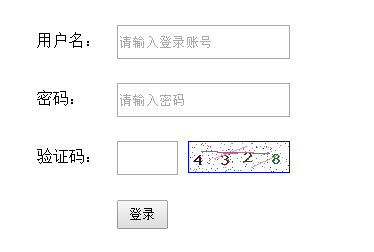
Effet d'affichage :
nouveau fichier
<!DOCTYPE html>
<html>
<head>
<title>用户登录页面</title>
<meta charset="UTF-8"/>
<style type="text/css">
*{margin:0px;padding:0px;}
ul{
width:400px;
list-style:none;
margin:50px auto;
}
li{
padding:12px;
position:relative;
}
label{
width:80px;
display:inline-block;
float:left;
line-height:30px;
}
input[type='text'],input[type='password']{
height:30px;
}
img{
margin-left:10px;
}
input[type="submit"]{
margin-left:80px;
padding:5px 10px;
}
</style>
</head>
<body>
<form action="logins.php" method="post">
<ul>
<li>
<label>用户名:</label>
<input type="text" name="username" placeholder="请输入登录账号"/>
</li>
<li>
<label>密码:</label>
<input type="password" name="password" placeholder="请输入密码" />
</li>
<li>
<label>验证码:</label>
<input type="text" name="code" size="4" style="float:left"/>
<a href="javascript:;" onclick="document.getElementById('captcha_img').src='captcha.php?r='+Math.random()">
<img id="captcha_img" border='1' src='captcha.php?r=echo rand(); ?>' style="width:100px; height:30px" />
</a>
</li>
<li>
<input type="submit" value="登录" />
</li>
</ul>
</form>
</body>
</html>
Aperçu
Clear
- Recommandations de cours
- Téléchargement du didacticiel














 Le didacticiel n'est pas disponible au téléchargement pour le moment. Le staff est actuellement en train de l'organiser. Veuillez prêter plus d'attention à ce cours à l'avenir ~
Les étudiants qui ont regardé ce cours apprennent également

Parlons brièvement de la création d'une entreprise en PHP
Introduction rapide au développement web front-end
Développement pratique à grande échelle par Tianlongbabu du cadre MVC version Mini imitant le site Web de l'encyclopédie des choses embarrassantes
Premiers pas avec le développement pratique PHP : création rapide de PHP [Small Business Forum]
Vérification de connexion et forum de discussion classique
Collecte de connaissances sur les réseaux informatiques
Démarrage rapide de la version complète de Node.JS
Le cours front-end qui vous comprend le mieux : HTML5/CSS3/ES6/NPM/Vue/...[Original]
Écrivez votre propre framework PHP MVC (40 chapitres en profondeur/gros détails/à lire absolument pour que les débutants progressent)