


 Backend Development
PHP Tutorial
PHP generates graphic verification code (enhanced interference type)
Backend Development
PHP Tutorial
PHP generates graphic verification code (enhanced interference type)
PHP generates graphic verification code (enhanced interference type)

Verification code usage scenario
In the process of developing the system, basically all systems will involve the login module, of which the verification code function is an indispensable part to prevent the system from being exploded. Effective Ways. As the saying goes, the devil is as high as the road. Nowadays, verification codes are becoming more and more complex and advanced. Common alphanumeric verification codes and behavioral verification codes are common. This article details simple alphanumeric verification codes.
Code
<?php
/*********************************************************************************
* InitPHP 3.8.2 国产PHP开发框架 扩展类库-验证码
*-------------------------------------------------------------------------------
* 版权所有: CopyRight By initphp.com
* 您可以自由使用该源码,但是在使用过程中,请保留作者信息。尊重他人劳动成果就是尊重自己
*-------------------------------------------------------------------------------
* Author:zhuli Dtime:2014-11-25
***********************************************************************************/
class Code
{
private $charset = "abcdefghjklmnpqrstuvwxyzABCDEFGHJKLMNPQRSTUVWXYZ23456789"; //随机因子
private $code; //验证码文字
private $codelen = 4; //验证码显示几个文字
private $width = 100; //验证码宽度
private $height = 40; //验证码高度
private $img; //验证码资源句柄
private $font; //指定的字体
private $fontsize = 20; //指定的字体大小
private $fontcolor; //字体颜色 随机
//构造类 编写字体
public function __construct()
{
$this->font = '/outputs/font/font.ttf';
}
//创建4个随机码
private function createCode()
{
$_leng = strlen($this->charset) - 1;
for ($i = 1; $i <= $this->codelen; $i++) {
$this->code .= $this->charset[mt_rand(0, $_leng)];
}
// session_start();
// $_SESSION['VerifyCode'] = strtolower($this->code);
Session::set('VerifyCode', strtolower($this->code));
return $this->code;
}
//创建背景
private function createBg()
{
//创建画布 给一个资源jubing
$this->img = imagecreatetruecolor($this->width, $this->height);
//背景颜色
$color = imagecolorallocate($this->img, mt_rand(157, 255), mt_rand(157, 255), mt_rand(157, 255));
//画出一个矩形
imagefilledrectangle($this->img, 0, $this->height, $this->width, 0, $color);
}
//创建字体
private function createFont()
{
$_x = ($this->width / $this->codelen); //字体长度
for ($i = 0; $i < $this->codelen; $i++) {
//文字颜色
$color = imagecolorallocate($this->img, mt_rand(0, 156), mt_rand(0, 156), mt_rand(0, 156));
//资源句柄 字体大小 倾斜度 字体长度 字体高度 字体颜色 字体 具体文本
imagettftext($this->img, $this->fontsize, mt_rand(-30, 30), $_x * $i + mt_rand(1, 5), $this->height / 1.4, $color, $this->font, $this->code[$i]);
}
}
//随机线条
private function createLine()
{
//随机线条
for ($i = 0; $i < 6; $i++) {
$color = imagecolorallocate($this->img, mt_rand(0, 156), mt_rand(0, 156), mt_rand(0, 156));
imageline($this->img, mt_rand(0, $this->width), mt_rand(0, $this->height), mt_rand(0, $this->width), mt_rand(0, $this->height), $color);
}
//随机雪花
for ($i = 0; $i < 45; $i++) {
$color = imagecolorallocate($this->img, mt_rand(220, 255), mt_rand(220, 255), mt_rand(220, 255));
imagestring($this->img, mt_rand(1, 5), mt_rand(0, $this->width), mt_rand(0, $this->height), '*', $color);
}
}
//输出背景
private function outPut()
{
//生成标头
header('Content-type:image/png');
//输出图片
imagepng($this->img);
//销毁结果集
imagedestroy($this->img);
}
//对外输出
public function doimg()
{
//加载背景
$this->createBg();
//加载文件
$this->createCode();
//加载线条
$this->createLine();
//加载字体
$this->createFont();
//加载背景
$this->outPut();
}
//获取验证码
public function getCode()
{
return strtolower($this->code);
}
//验证验证码
public function checkCode($code, $clear = false)
{
// session_start();
if (Session::get('VerifyCode') == strtolower($code)) {
if($clear) $this->clearCode();
return true;
}
if($clear) $this->clearCode();
return false;
}
//清除验证码
public function clearCode()
{
Session::del('VerifyCode');
// session_start();
// unset ($_SESSION['VerifyCode']);
}
}Verification
ob_clean();
$verify = new Code();
$verify->doimg();
This will output the following verification code
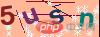
Parameters can be adjusted to control the size of the verification code, interference items, etc.
Expansion
Next, we will introduce the expansion function, how to strengthen the interference items of the verification code, and how to integrate it into the project for login verification.
1. Strengthen interference
First of all, we can see a few lines in the screenshot above. If outsiders use analysis tools to decode, it will be very simple to solve the problem. To generate our verification code, you need to add the number of lines at this time. Find the following code in the code and modify the number 6 above
//随机线条
private function createLine()
{
//随机线条
for ($i = 0; $i < 6; $i++) {
$color = imagecolorallocate($this->img, mt_rand(0, 156), mt_rand(0, 156), mt_rand(0, 156));
imageline($this->img, mt_rand(0, $this->width), mt_rand(0, $this->height), mt_rand(0, $this->width), mt_rand(0, $this->height), $color);
}
//随机雪花
for ($i = 0; $i < 45; $i++) {
$color = imagecolorallocate($this->img, mt_rand(220, 255), mt_rand(220, 255), mt_rand(220, 255));
imagestring($this->img, mt_rand(1, 5), mt_rand(0, $this->width), mt_rand(0, $this->height), '*', $color);
}
}. You can adjust it slowly, and then check the effect until you are satisfied. At the same time, you can see that there are many snowflake effects in the verification code. This is also an interference item. You can modify the number 45 above to adjust to a satisfactory result.
Note: The $charset variable in the code, the verification code randomly picks characters from here to survive verification, because the effect of lowercase i and L is difficult to distinguish, So we removed the i character.
2. Access project verification
Create a new file with the following code
Then introduce this into the existing system login page The interface can display the verification code. After the user fills in and submits, the server performs the following verification
//验证验证码 public function checkCode($code, $clear = false) { if (Session::get('VerifyCode') == strtolower($code)) { if($clear) $this->clearCode(); return true; } if($clear) $this->clearCode(); return false; } //清除验证码 public function clearCode() { Session::del('VerifyCode'); }At this point, the verification code generation and verification process have been completed.
The above is the detailed content of PHP generates graphic verification code (enhanced interference type). For more information, please follow other related articles on the PHP Chinese website!

Hot AI Tools

Undress AI Tool
Undress images for free

AI Clothes Remover
Online AI tool for removing clothes from photos.

Undresser.AI Undress
AI-powered app for creating realistic nude photos

ArtGPT
AI image generator for creative art from text prompts.

Stock Market GPT
AI powered investment research for smarter decisions

Hot Article
Popular tool

Notepad++7.3.1
Easy-to-use and free code editor

SublimeText3 Chinese version
Chinese version, very easy to use

Zend Studio 13.0.1
Powerful PHP integrated development environment

Dreamweaver CS6
Visual web development tools

SublimeText3 Mac version
God-level code editing software (SublimeText3)
Hot Topics
 20519
20519
 7
13631
4
7
13631
4

![How to install Redis cluster on Linux_Linux distributed cache deployment solution [Advanced]](https://img.php.cn/upload/article/202602/08/2026020819395340210.jpg) How to install Redis cluster on Linux_Linux distributed cache deployment solution [Advanced]
Feb 08, 2026 pm 07:39 PM
How to install Redis cluster on Linux_Linux distributed cache deployment solution [Advanced]
Feb 08, 2026 pm 07:39 PM
The Redis6 cluster must be created with redis-cli--cluster. It requires a minimum of 3 masters and 3 slaves, a total of 6 nodes. The client port and the corresponding cluster bus port (10000) must be opened. Correct configuration but blocked ports is a common cause of failure.
 How to dynamically set arbitrary depth value of nested array in PHP
Mar 04, 2026 am 11:15 AM
How to dynamically set arbitrary depth value of nested array in PHP
Mar 04, 2026 am 11:15 AM
This article introduces a safe and efficient method to use key path arrays (such as ['key1', 'key2', 'key3']) to assign values to the last nodes of multi-dimensional associative arrays, solve the problem of reference failure caused by value transfer, and take into account key existence verification.
 How to import SQL files in mysql_mysql SQL file import method
Feb 09, 2026 pm 05:24 PM
How to import SQL files in mysql_mysql SQL file import method
Feb 09, 2026 pm 05:24 PM
The most common and reliable way to import SQL files into MySQL is the command line tool mysql, which supports cross-platform, high efficiency and stability, and is suitable for files of all sizes. It can also be executed in the client through the source command, or using graphical tools such as phpMyAdmin and MySQL Workbench.
 PHP batch processing of color mode and resolution of pictures in PPT
Mar 02, 2026 am 10:18 AM
PHP batch processing of color mode and resolution of pictures in PPT
Mar 02, 2026 am 10:18 AM
To read PPTX images with PHP, you need to decompress the ZIP package first, because the images are stored in the ppt/media/ directory; directly calling the image function will report an error; you must use ZipArchive to decompress, Imagick to process CMYK to RGB conversion and scaling, and update the rels and [Content_Types].xml files simultaneously.
![Where can I see the PHP operator priority table_php official operator priority [Reference]](https://img.php.cn/upload/article/202603/02/2026030211450568785.jpg) Where can I see the PHP operator priority table_php official operator priority [Reference]
Mar 02, 2026 am 11:45 AM
Where can I see the PHP operator priority table_php official operator priority [Reference]
Mar 02, 2026 am 11:45 AM
The official description of PHP operator precedence is located at https://www.php.net/manual/en/language.operators.precedence.php. You need to directly search for "operatorprecedence" or manually enter the URL to access; == and === have the same priority and belong to the same level; error-prone combinations include &&/|| and and/or, ?: and ??, new and []; complex expressions must be bracketed.
 Number statistics in pyramid loop in PHP: correct counting method of total, odd and even numbers
Mar 04, 2026 pm 01:30 PM
Number statistics in pyramid loop in PHP: correct counting method of total, odd and even numbers
Mar 04, 2026 pm 01:30 PM
This article explains in detail how to accurately count the total number, odd number and even number of all generated numbers in the PHP pyramid printing loop, correct common logic errors (such as misuse of variables, confusion of counting objects), and provide runnable examples and key precautions.
 How to deal with character sets after mysql upgrade_mysql encoding migration instructions
Feb 09, 2026 pm 07:17 PM
How to deal with character sets after mysql upgrade_mysql encoding migration instructions
Feb 09, 2026 pm 07:17 PM
After the MySQL 8.0 upgrade, the default character set becomes utf8mb4, but the old table character set remains unchanged; latin1/utf8 tables need to be manually migrated, and the source character set must be specified when exporting. ALTERTABLECONVERT will re-encode the data, and the connection layer must explicitly declare utf8mb4.
 How to install ThinkPHP with composer_Steps to deploy TP framework using composer
Feb 12, 2026 am 06:27 AM
How to install ThinkPHP with composer_Steps to deploy TP framework using composer
Feb 12, 2026 am 06:27 AM
The ThinkPHP stable version should be clearly specified, such as using composercreate-projecttopthink/thinktp6^6.3 to install the TP6.3LTS version to avoid pulling non-production-ready beta versions because dev-master has switched to the TP8 preview version.
