


How to introduce bootstrap into vue


1. Introduction of jquery
Steps:
1. Install jquery
$ npm install jquery --save-dev
2. Add content to webpack.config.js
+ const webpack = require("webpack");
module.exports = {
    entry: './index.js',
    output: {
        path: path.join(__dirname, './dist'),
        publicPath: '/dist/',
        filename: 'index.js'
    },
  + plugins: [
        new webpack.ProvidePlugin({
            jQuery: 'jquery',
            $: 'jquery'
        })
    ]
}
3. Add content to the entry file index.js
import $ from 'jquery' ;
Related recommendations: "bootstrap Getting Started Tutorial》
4. Test whether the installation is successful and see if '123' pops up
<template>
  <div>
   Hello world!
  </div>
</template>
<script>
$(function () {
    alert(123);
 });
export default {

};
</script>
<style>
</style>
2. Introduce Bootstrap
1. Installation Bootstrap
$ npm install --save-dev bootstrap
2. Introduce the relevant
import './node_modules/bootstrap/dist/css/bootstrap.min.css';
import './node_modules/bootstrap/dist/js/bootstrap.min.js';
3. Add a piece of Bootstrap code
  <div class="btn-group" role="group" aria-label="...">
      <button type="button" class="btn btn-default">Left</button>
      <button type="button" class="btn btn-default">Middle</button>
      <button type="button" class="btn btn-default">Right</button>
    </div>
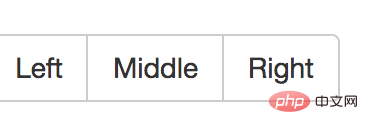
4. Run and check the effect. These buttons have become Bootstrap button group.
The above is the detailed content of How to introduce bootstrap into vue. For more information, please follow other related articles on the PHP Chinese website!

Hot AI Tools

Undress AI Tool
Undress images for free

AI Clothes Remover
Online AI tool for removing clothes from photos.

Undresser.AI Undress
AI-powered app for creating realistic nude photos

ArtGPT
AI image generator for creative art from text prompts.

Stock Market GPT
AI powered investment research for smarter decisions

Hot Article
Popular tool

Notepad++7.3.1
Easy-to-use and free code editor

SublimeText3 Chinese version
Chinese version, very easy to use

Zend Studio 13.0.1
Powerful PHP integrated development environment

Dreamweaver CS6
Visual web development tools

SublimeText3 Mac version
God-level code editing software (SublimeText3)
Hot Topics
 20518
20518
 7
13631
4
7
13631
4

![What to do if Nodejs fails to call the PHP interface_Check the protocol and port configuration solution [Method]](https://img.php.cn/upload/article/202602/04/2026020410150511644.jpg) What to do if Nodejs fails to call the PHP interface_Check the protocol and port configuration solution [Method]
Feb 04, 2026 am 10:15 AM
What to do if Nodejs fails to call the PHP interface_Check the protocol and port configuration solution [Method]
Feb 04, 2026 am 10:15 AM
The main reason why Node.js fails to call the PHP interface is that the protocol or port does not match. You need to first use curl to verify whether the PHP service is running and accessible, and then check host resolution, Docker port mapping, protocol port hardcoding, BasicAuth header, and distinguish CORS applicable scenarios.
 Family Title Calculator Organ Network_Relative Title Calculator Official Entrance
Dec 19, 2025 pm 12:12 PM
Family Title Calculator Organ Network_Relative Title Calculator Official Entrance
Dec 19, 2025 pm 12:12 PM
The entrance address of the family title calculator is https://passer-by.com/relationship. It has a simple interface and intuitive operation. It supports multiple regional title differences, offline use and multiple family structure models.
 Will css inline styles affect performance_Analysis of the advantages and disadvantages of inline css
Feb 04, 2026 pm 11:39 PM
Will css inline styles affect performance_Analysis of the advantages and disadvantages of inline css
Feb 04, 2026 pm 11:39 PM
Inline style itself does not directly trigger reflow, but the alternation of reading and writing in JS (such as reading offsetHeight first and then setting style) will force synchronized layout; simply changing properties such as opacity will usually only redraw, while changing width or display will most likely cause reflow.
 Using DeepSeek to Improve Sprint Planning Efficiency in Agile Development
Dec 27, 2025 pm 08:27 PM
Using DeepSeek to Improve Sprint Planning Efficiency in Agile Development
Dec 27, 2025 pm 08:27 PM
DeepSeek can be deployed locally to improve Sprint planning efficiency in a structured way: 1. Automatically generate user stories and testable acceptance criteria that comply with the INVEST principle; 2. Intelligently decompose tasks and label roles and scales; 3. Calibrate work hours estimates based on historical data; 4. Verify the semantic consistency of user stories and Sprint goals; 5. Automatically extract meeting action items and consensus conclusions.
 How to build a markdown editor and previewer with Vue
Jan 04, 2026 am 01:24 AM
How to build a markdown editor and previewer with Vue
Jan 04, 2026 am 01:24 AM
Use Vue3 and the marked library to quickly build a Markdown editor, bind text through v-model and parse it in real time. 2. After building the Vite project, install marked, use ref to define markdown content, and computed will automatically compile it into HTML. 3. The layout uses flex to juxtapose the textarea and the preview area rendered by v-html to achieve the effect of viewing while typing. It is recommended to use DOMPurify to enhance security.
![How to quickly close tags in Sublime Text_Essential skills for Sublime front-end development [high efficiency]](https://img.php.cn/upload/article/202602/05/2026020522300430087.jpg) How to quickly close tags in Sublime Text_Essential skills for Sublime front-end development [high efficiency]
Feb 05, 2026 pm 10:30 PM
How to quickly close tags in Sublime Text_Essential skills for Sublime front-end development [high efficiency]
Feb 05, 2026 pm 10:30 PM
SublimeText does not automatically close HTML tags by default. You need to enable "auto_close_tag": true through the Emmet plug-in or use the native shortcut keys Ctrl Shift . (Windows/Linux) / Cmd Shift . (macOS) to close it manually, and rely on correct grammar recognition.
![How to use AI to generate a job resume with one click? Recommended AI resume optimization and production tools [dry stuff]](https://img.php.cn/upload/article/202512/30/2025123019330680471.jpg) How to use AI to generate a job resume with one click? Recommended AI resume optimization and production tools [dry stuff]
Dec 30, 2025 pm 07:33 PM
How to use AI to generate a job resume with one click? Recommended AI resume optimization and production tools [dry stuff]
Dec 30, 2025 pm 07:33 PM
You can use five types of AI tools such as Zhilian Campus, Zhida AI, Canva, Intern Monk, and Niuke.com to generate optimized resumes with one click: respectively adapted to HR scoring, job portraits, visual design, zero experience packaging and technical expression needs, covering the entire process from content generation to format export.
 How to implement a pagination component in Vue
Dec 07, 2025 am 12:39 AM
How to implement a pagination component in Vue
Dec 07, 2025 am 12:39 AM
Answer: Use Vue3CompositionAPI to create a paging component, define items, currentPage and itemsPerPage through ref, use computed to calculate paginatedItems and totalPages, combine previous page and next page buttons with dynamic page number navigation, and optionally add a drop-down selection of the number displayed on each page to achieve a simple and efficient front-end paging function.
